MyMac Podcast 111 – Year End Show and Sharon Aker

On December 29, 2006, in Uncategorized, by MyMac PodCast

Click here to download the show

What was the biggest Mac stories of 2006? Tim, Chad, and Guy look at the Mac world in review. Also, David Cohen’s Fenestration, and Nemo interviews author Sharon Aker.
This podcast is sponsored by SmallDog.com, and Inno-Tech.com

Leave audio feedback by calling 801-938-5559
Get the show from these links:

iTunes Link


Podcast-only RSS Feed

Links from the show

Real World Mac OS X Fonts
Take Control of Fonts in Mac OS X: Tiger Edition


Macspiration 66 – Digital Imagery Tech Terms – 3

On December 28, 2006, in Uncategorized, by Donny Yankellow


Many people will be getting a new, or their first, digital camera this holiday season. With that in mind, I thought it was a good time for a list of digital photography and digital imagery tech terms. Keep in mind, these are not dictionary definitions. These are terms explained in a way that your grandmother (at least my grandmother) can understand.

Megapixel- This is one factor used to indicate the quality of a digital camera. The higher the megapixel the better quality image you will take and the larger you can print your photo. Megapixel also has an effect on how well a cropped image turns out. If you want to enlarge a small section of a photo, a higher megapixel camera will allow you to zoom in and crop that section, and it will remain clear. I am a believer that most people are fine with a 3 or 4 megapixel camera. Keep in mind megapixels are not the only indicator of photo quality. I know someone who bought a 7 megapixel camera for under $100. He thought he was getting a good deal. The camera was a generic brand, and the the pictures were awful.

Optical Zoom/Digital Zoom- These are the two types of zoom you might find on a digital camera. I want the camera with optical zoom. I disable the digital zoom on any camera I have. Optical zoom is a true zoom. The lens produces the zoom, just like the zoom would be produced on a traditional 35mm camera. A digital zoom is generated by the camera, not the camera’s lens. It is similar to the type of zoom you would use in a photo editing program. The closer you zoom in the more pixelated the image gets? What is pixelated? Read the next item on the list.

Pixelated- This refers to the blockiness of an image. Digital images are made up of pixels, or square dots. The more pixels the higher the quality. If you have an image in a photo editor and zoom in you will start to notice little blocks appearing. The more you zoom, the more blocks you’ll see, and the larger they will get.  A higher quality image will produce more pixels which allow for a better zoom.

MPEG- This is a movie format that many digital cameras will save movie files to.

DPI- This stands for "dots per inch." Like pixels and Megapixels, the more the better when it comes to printers and scanners. A higher DPI will result in a crisper print or a crisper scan. Most images on the internet have a DPI of 72, which is extremely low. If you zoom in on a 72 DPI image you will see pixelation almost immediately.

Memory Card- A memory card is the film for the digital camera. There are all types of memory cards. When buying one you want to make sure you buy the right type for your camera. The larger a memory card is the more pictures you will be able to fit on it. When I say larger, I am not referring to physical size, but storage size.

Megabytes and Gigabytes- Memory card sizes are marked in Megabytes and Gigabytes. The more megabytes the more images you can store, as I mentioned above. A gigabyte is 1000 megabytes. When buying a memory car, I suggest getting at least 512 megabytes (MB), and if you can afford it, go for the 1 gigabyte (GB). You won’t regret it. You may never fill the card, but you also won’t have to worry about having a new one on hand. It also refers to hard drives, and RAM in a computer, but let’s keep this about digital cameras today.

Image Stabilization- Many camcorders have image stabilization, and still cameras with large zooms are starting to include this feature. When you use a camera without a tripod you might tend to shake it. This is especially true if you are zooming in with a large zoom. Image stabilization attempts to remove this shake from the resulting video or still shot.

Zoom- This might seem obvious, but I have been mentioning it so much I figure I should list it. Zoom is the ability of your camera to move closer to the subject without the photographer moving from his/her spot. The lens "zooms" in on the subject making it appear closer.

Have any terms? Add them below.


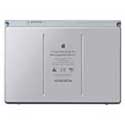
FastMac 15″ MacBook Pro Extended Life Battery

On December 28, 2006, in Uncategorized, by David Weeks


15" MacBook Pro Extended Life Battery
Model: APP-6099

Company: FastMac Performance Upgrades
Price: $99.95
www.fastmac.com

The most obvious appeal of a MacBook/MacBook Pro (aside from warming one’s lap in cold weather) is the ability to run from a battery, untethered from AC power sockets. Even though Apple P.R. touts decent run times for its laptops, you need to toggle the display brightness down as far as possible, you can’t use the hard drive much, and heaven forbid running the optical drive. Compared to PC laptops, Apple laptops have long suffered from relatively short battery life.

Alessandro Volta would be proud of the folks who actually construct the lithium-ion battery cells that make up the FastMac battery, as they’ve managed to cram more amp/hours into the same battery size than does Sony, Apple’s manufacturer. This is not your father’s battery technology! Plus, FastMac’s battery is cheaper, to boot.

I used the FastMac battery over several weeks, and here’s what I found.

First, the fit and finish are quite good. You get the same battery charge LED and pushbutton that Apple provides. Both batteries are metal on top. The only visual difference is the FastMac battery bottom case is plastic, whereas Apple’s is metal. It fits just as snugly into the battery receptacle as does the Apple unit.

Given the good construction quality, the real question is "How long does it last?" To judge that, you need to start by looking at each battery’s theoretical capacity. Amazingly, I recall that my MacBook Pro battery measured at 5350 mAH (milliamp hours) after being properly conditioned right after purchase.

Apple System Profiler tells me that, after 5 months of use, 47 complete charge cycles, the factory battery still can charge to 5300 mAH. So, it’s holding up quite well.

The FastMac battery, after the initial conditioning, showed a capacity of 5700 mAH. That’s 7.5% more capacity than the Apple battery (400 more mAH / 5300 = .075)

Real world trials showed that I consistently enjoyed run times of 15-20 minutes more with the FastMac battery. This is not a life-altering increase, but it’s clearly noticeable.

Is there any downside to using a non-Apple battery? None that I can see. Having a backup battery in your laptop case will allows you to compute on almost any U.S. domestic flight. In my secondary career as an airline pilot, I regularly used to fly Boston to San Francisco, which normally lasts 6:30 – 6:45. Two batteries will allow keep your MacBook Pro chugging for almost the whole duration of such an airline ordeal. The only annoyance is that both your batteries are drained upon arrival, thus requiring an external charger or serial in-computer recharging to get them both ready for more work.

Conclusion.
With Apple’s replacement battery retailing for $129.00, and FastMac’s price at $99.95, I’d recommend FastMac if you need a second (or replacement for an out-of-warranty) battery. You get the same build quality, and better battery life. What’s not to like?


I learned about DTP from that…

On December 27, 2006, in Uncategorized, by Larry Grinnell


How I wound up as a professional technogeek is a long and semi-interesting tale. It involves multiple computing platforms, multiple job shifts, and a whole lotta dumb luck.

After getting out of the US Air Force in 1982 after a nine year stint as a radio technician, I immediately began working for a huge Midwest-based communications equipment manufacturer, at their paging and commercial two-way radio manufacturing and R&D facility in south Florida. I worked in the manufacturing engineering organization as a bench technician, but had many of the responsibilities of a full-fledged engineer but for a whole lot less money (it was, however, double what I was making in the Air Force). I began playing with HP desktop computers and calculators writing simple programs in HPL (high-performance language) and HP Basic, controlling arrays of test equipment over their GPIB (general purpose interface bus).

At home, I was playing around with my new toy–a Timex/Sinclair 1000 computer. I spent hours trying to get the cassette interface working, and cried the blues (and repeated many of the bad words I learned from 9 years in the Air Force) when the external 16K RAM module would flex slightly, sending six hours of work into the ether. Soon after, I bought a Commodore 64. I especially loved the C-64’s I/O functions that controlled external devices like the floppy disk drive and printer. It seems that Commodore, in an effort to save some money, used the I/O chip from the lower-powered (and priced) VIC-20 home computer. This chip was limited to a maximum throughput of 300 baud…yup, that’s right…300 baud. I had a video collection database that literally took several hours to generate a report because the data moving in and out of the floppy drive did so at the speed of a modem of the day (this was, oh, late 1982-early 1983). It was a computer, though, and with a 300 baud modem, I began accessing local bulletin board systems and an early teletext system operated by the Knight-Ridder publishing house. Wish I could remember the name of it.

Digressing a bit, back in my Air Force days, I was very involved in my amateur radio hobby, particularly during my final three-year assignment in Wiesbaden, Germany. I volunteered to be the newsletter editor. I used my trusty early 1940s Royal portable typewriter to cut stencils (remember those???) for the mimeograph machine. I learned all about the properties of various papers to achieve the best print possible quality (the cheaper and more porous, the better), how to store very fragrant (and flammable!) spirit ink in my dorm locker room so the fire inspectors wouldn’t confiscate it, and I learned a lot about using our club’s very clunky mimeograph machine that I also had to store in my dorm room. Fortunately the distribution list was relatively short, as I probably threw away more sheets of paper than I distributed! Later, one of our members made his office’s Xerox copier available, and the quality (of print—not the writing) improved dramatically.

Back to 1984 or thereabouts, I volunteered (apparently, the nine years in the Air Force taught me nothing about volunteering…) to do the newsletter for my company-sponsored amateur radio club. The first few editions were done on my trusty Royal, but then a good friend of mine bought one of the very first 128k Macintosh computers, and made the mistake of showing it to me. I was hooked. I had been exposed to the possibilities of desktop publishing when our engineering specs organization had a Xerox Star Office System and an original HP LaserJet laser printer for evaluation. It was the first time I had seen a paper white display and fonts rendered just like what you saw in a book or magazine. Around this same time, my sister’s husband had bought an Apple Lisa 7/7 office system with 5 MB hard drive and 2 MB RAM for some $12,000. Both were absolutely amazing (the Star Office System was another sad example of Xerox not being able to market any technology that wasn’t a copier…). I saw the promise of “wysiwyg” (what you see is what you get). As my friend traveled extensively, I got to “hold” his Mac in his absence for “safekeeping”, and did my next few newsletters with his 128k Mac, MacWrite, and the ImageWriter dot matrix printer. I think he paid over $5,000 for the complete setup including an external 400k floppy drive. For you old timers, do you remember that if you printed in “high quality”, it wasn’t WYSIWYG? Line breaks were very different. Because of the way high-quality printing on an ImageWriter worked, the MacOS (this was probably System 1.0—all on 400k floppies!) substituted the font in use with one that was double the size (for example, Times Roman 24 point was substituted for Time Roman 12 point), which was then scaled down 50% before going to the printer. The metrics between the two fonts were so different that nothing matched up. These were the days before scalable PostScript or TrueType fonts. HQ printing also made the ImageWriter move like molasses.

By early 1985, my office purchased a MacPlus and one of the first LaserWriters to run Lotus Jazz (remember that one?). It predated products like the Microsoft Office Suite, and AppleWorks. It had very tightly-integrated modules (wordprocessing, spreadsheet, graphing, database). I used it to generate weekly factory production yield reports. I also convinced them to purchase a copy of ReadySetGo for producing department newsletters and other presentations. I did a number of ham radio club newsletters and department presentations with this setup over the next few years.

In 1987, I was asked to apply for a technical writer position in a newly formed technical publications department. Not only was this a new opportunity to do more of the things I liked, but it was a move into the “salaried” pay grades. My newsletter work, both writing and layout “skills” (a term I use very loosely), had been noticed by the manager of this new department, who was also in the ham radio club. The only thing was, my new boss felt it was his personal mission to prove you didn’t need to use Macs to produce quality technical documentation. So, I got to learn all about pre-Windows PCs in a facility that was almost 100% Mac—and here we were using PCs for publishing! My boss was an Extra-class Amateur Radio licensee, who loved to tinker and disliked Apple’s closed-box concept. I still remember the arguments when he would spout: “Macintoshes…bah! There are no DIP switches! There are no jumpers! There are no batch files! How can you call a Macintosh a computer???” My usual response was that Macs didn’t need those things and that a Mac user simply sat down and was immediately productive. His usual response had something to do with me being a Mac bigot or words to that effect. At least it was (mostly) good-natured.

So, my first office DTP workstation was a PC-XT clone. It had something like 4 megahertz of power-packed speed, and a whole 1 megabyte of RAM. Of course in those days, unless you had an expensive memory management program, the OS only saw the first 640 K of RAM. We had 20-megabyte hard drives (Seagate ST225s), but no networking. Our monitors were 15-inch no-name amber monitors with Hercules-compatible graphics cards (720 x 350 pixels). This permitted a relatively high-resolution view of about 1/8 of the page. The publishing package was Xerox Ventura Publisher 1.0. As clunky as the computer was, the software was surprisingly pretty good. At that time, there was nothing on the Macintosh to touch it. Ventura revolved around the use of stylesheets and paragraph tagging to ensure a consistent and structured look. It generated indexes and tables of contents, and especially for the times, was really sophisticated. The downside was that all files used by Ventura were external files, so all the tagging was done directly in the wordprocessing file (we used either WordPerfect 5.1 or MultiMate), so once you started tagging, you really couldn’t easily share these files, as each writer had their own ideas about their own styles and tags. To print, we copied our working files over to a 1 megabyte 5-1/4 inch floppy which we carried to our “typesetting station”: a 6 MHz 80286 PC-AT clone with two megabytes of RAM, hooked up to a 19 inch monochrome Viking Moniterm monitor, and to a QMS PostScript laser printer. The idea was to only adjust layouts and print at the typesetting station. It got harder and harder to get printing time when fellow staffers needed to use it, too.

Kind of a sidenote, Xerox did release a Macintosh version of Ventura Publisher in the early 90s, but it was so completely buggy and not completely compatible with the PC version, that it died a rather quick death in the marketplace. FrameMaker eventually took over this market niche on the Mac and many other platforms.

By 1989, we got networking! Our consultant was able to work out a system using the Sun TOPS networking software and LocalTalk wiring (230 kBPS) to a “GatorBox”, which converted the LocalTalk networking protocols to Ethernet (10 megabit 10Base2—coax, in a daisy-chain, hubbed configuration—when we left that building in 2002, it was still wired with hubbed 10Base2 coax cable wiring, except for the IT area, which had modern Cat5 wiring, 100 megabit switches, etc.), and in turn connected our workstations to a chunk of disk space on our Sun Unix network. It was really all pretty seamless when it worked, which was most of the time. Please keep in mind that at this time, Macintoshes were actually the standard computing workstation at my employer’s site—PCs were the unusual and “foreign” devices. My boss liked that—it meant it would be almost impossible for outsiders to “get at our stuff”.

As our graphics needs expanded, my boss realized that GenericCADD would not do the trick anymore, so I got to learn and use CorelDraw 1.0 with Microsoft Windows 2.0. What a bloody horrible trainwreck that was! Windows 2.0 didn’t even have overlapping windows, and Corel’s EPS files caused our print vendors no end of grief. The performance hit justified upgrading all of our PCs to 25 MHz 386SX via a motherboard swap—my boss’s boss was too cheap to buy new PCs, so the entire department lost almost a week of productivity while my boss and I swapped out motherboards and got the fellow staffers PCs back on-line.

In the midst of all this, I had bought my first Macintosh, a 512KE, thanks to a very generous bonus. I also picked up a used Apple Serial HD20 hard drive ($600.00!), which was glacially slow. I later bought a MacSnap RAM upgrade. The MacSnap board literally snapped on top of the RAM chips mounted to the memory board (and if the temperature shifted too much, would intermittently and randomly disconnect itself, causing the dreaded bomb screen). It also provided a SCSI port, so I was able to use my new Crate 60 SCSI hard drive (also $600.00). I purchased a copy of ReadySetGo 4.0 and continued with the ham radio club newsletters, as well as a new project, editing and laying out the Grinnell Family Association newsletter. This was a fun project, which also taught me a lot about Mac publishing. I didn’t have a scanner at home or work, so when I had to publish photographs, I determined the reduction or magnification needed for each photo and delivered them to a local graphic arts store, which had a device called a “stat” or “process” camera. This camera took a picture of the photos, and added a line screen (converted the picture into dots) for offset printing. I had to mount the main laser printed pages of the newsletter on art board with glue sticks and had to glue down the photos (called halftones) to the pre-scaled openings on the artboard. I sent the whole thing in a big flat yellow Kodak litho film box to one of our members in California who had a deal with a local printer. This was a very expensive process, which was later streamlined (stay tuned).

Back in the office, I wound up being the troubleshooting guy – keeping the PCs running, and when engineering provided graphics in one of many Macintosh formats, I found the tools to convert them into something we could use in the PC world.

My boss hated Macs so much that when we got an older Mac Plus to use the new corporate email system, using QuickMail from CE Software (in those days, all connected with LocalTalk wiring), he gave me his account information and had me check and answer his mail, because he actually refused to even touch that accursed Macintosh! And he called me a computer bigot! I just did a quick internet check and discovered QuickMail is still out there, marketed by Outspring.

By 1990, to go with our nice TOPS network, we upgraded everyone to the same 19 inch monochrome Moniterm monitors we used on our typesetting station, and bought a NewGen Turbo/PS 800 dpi PostScript clone laser printer. This gave us much higher quality masters to hand off to our printers—at least when the blankety-blank printer didn’t crash, drop off the network, or other fun things it loved to do. We also inherited a MacII ci for font development, using Altsys Fontographer. My boss really hated the fact that we had that Mac in the office, but I was able to prove the improvement in throughput and efficiency. We developed custom fonts that replicated the icons and text as displayed on our pagers, which made it much easier for the writers to place in-line graphics. At the time, the best tool was Fontographer, and it was only available for a Mac. I also had to figure out how to make these fonts work in Ventura Publisher and CorelDraw. Quite the challenge!

This all came about because of our first mass-market alphanumeric pager, which had a very rich icon library that needed to be represented in our user guides. My boss valiantly tried to create the graphics with GenericCADD, but the end result for a 48 page user guide was a 9 megabyte PostScript file (luckily, it “zip’ed” down to about 1 MB so it fit on a floppy) that literally took 12 hours to output on our printer’s Compugraphic 9400 imagesetter. Heck, it took about 90 minutes to print on our local laser printer! I made the case that we would have to do a lot more of these in the future, and those huge inefficient files would be nothing but trouble with our print suppliers. I got approval for Fontographer and the Mac, and developed the font to replace those individual EPS graphics in a few days. I substituted the font characters for the graphics and regenerated the PostScript file. File size went from 9 megabytes to about 1.5. Output time on our printer’s imagesetter went from 12 hours to 45 minutes. We still create custom fonts for our product user guides to this day, though it does create problems when we have to repurpose our content for HTML delivery.

By the time my boss retired in 1992 and handed the supervisor’s job over to me (sadly, my boss was unable to enjoy much of his retirement—he was diagnosed with pancreatic cancer about six months after he retired, and passed away four months after that), our PCs (upgraded with 25 MHz 386SX motherboards a few years prior) were on their last legs. Windows 3.1 was coming on the scene, Ventura Publisher 3.0 needed Windows, and Moniterm (makers of our monitors) had gone out of business—so no new device drivers. Fortunately, my department was taken over by one of the R&D groups which had plenty of budget, so we got all shiny new beige no-name 486/50 PCs, Windows 3.1, Ventura 3.0, Corel 3.0, updated our networking solution to AppleShare 3.0 and AppleShare for Windows, and QEMM (a Windows memory manager—you needed those back in those days), and nice new Sony 17 inch color displays. We got our first department server, a Mac Quadra 650 with two 1.0 GB SCSI hard disks, and all the staffers got their own email accounts for the first time—Microsoft Mail client for PCs (QuickMail was abandoned when it became very clear that it didn’t scale well in the enterprise—and there was no PC client available). I knew I would eventually go back to ask for Macs—I just didn’t have time to deal with the training and other issues at the time we got approval to get new machines. We did get a few new Mac IIci computers, one with a Radius Rocket accelerator card, for our graphics designers to run early versions of Illustrator and Photoshop.

Windows users got backed up using Norton Desktop for Windows (an enhancement to Windows 3.1 to make for a more Mac-like desktop experience), but I don’t think I was ever completely successful in restoring anything. Some time later, I got Dantz (now EMC) Retrospect and had a nearly 100% record of restoring anything that had been backed up. We transitioned from Ventura Publisher to FrameMaker 3.0 around this time. This was the final piece of the puzzle of standardizing on applications that would work well in either a Windows or Macintosh environment, and which made for a very smooth transition to Mac workstations a few years later.

Oh, speaking of Microsoft Mail, I got a look inside one of the computer rooms at work during the period my employer used the Macintosh version of Microsoft Mail. What a nightmare scene for the IT folks! Even though you could theoretically connect 255 users to a server, the reality was that you could only connect maybe 25-50 users per server—especially over an overloaded 10 megabit 10Base2 coaxial cable network. To deal with the 3000 people who worked in my facility, there were banks upon banks of Mac SE/30s acting as mail servers, as far as the eye could see. To tell you the truth, this is probably one place where moving to Microsoft Exchange was a good idea!

Within a few months, I realized that I wasn’t cut out for management. Fortune smiled upon me with a job offer from another division within the company, which I used to leverage myself into a newly-created position in the technical publications organization where I was, basically as a “technogeek”. In my new role, I did everything I was doing (desktop support, server/backup administrator, technical architect, and a year or so later, webmaster), but had no managerial responsibilities. Frankly, there just weren’t enough hours in the day to do both.

In 1994, I attended a publishing conference and got my first exposure to Adobe Acrobat. This was another major defining moment in publishing. I showed management some of the capabilities and everyone was very excited about the possibilities of putting our manuals on-line. We hired a temporary contractor and began testing serving about 100 manuals in PDF format on the internal corporate web. This was pretty radical for the time—especially when management considered the web to be nothing more than a time sink (maybe they were not entirely wrong). I learned a little bit of HTML, and built a web server from a Mac IIcx using freeware AppleScripts and webserver software that talked to FileMaker Pro to extract information from a simple query screen. We later experimented with more sophisticated database middleware products like Tango, and in the end, switched to BlueWorld Lasso, which we used for many years. By late 1995, once we proved the concept and got management buy-in, we upgraded out department server environment with several PowerMac 9500s that ran FileMaker Pro Server, WebSTAR, Lasso, and Retrospect. We finally got the staffers PowerMac 8500s that ran FrameMaker and Adobe Illustrator, hooked to gorgeous 20 inch Apple color monitors. Files were compressed with StuffIt Deluxe, which had Windows-based unstuffers, which turned out to be useful later on when we were forced to move back to Windows.

We also began exploring on-demand publishing. Our service manuals, whose press runs seldom exceeded 1000 pieces, were redesigned to use the new Xerox DocuTech Copier/Printer. This was an amazing piece of technology. Essentially, it was a PostScript laser printer capable of printing 150 or more pages per minute, double-sided, and could print on 11 x 17 sheets (that we needed for our schematic diagram pages). While we didn’t use the feature, the DocuTech could also automatically handle a lot of the bindery work (folding, collating, glue-edge binding for large documents, etc.). We later expanded upon this idea, printing our user guides on a high-speed toner-based print-on-demand solution using devices from Oce and IBM. In high volumes, that turned out to be uneconomical, and we reverted to using conventional offset printing for our user guides, which often had press runs in excess of 500,000 pieces.

I also got involved around this time with a very interesting user group, the Electronic Design Association (EDA). This organization was formed by graphic arts professionals to help their fellow professionals make the transition from the manual prepress processes to a fully digital environment. Believe me, the handwriting was on the wall for a lot of these people. Traditional “stripping” departments (the people who assembled the graphic art film and put it together to create the printing plates) suffered massive cutbacks as digital prepress techniques replaced the older traditional methods. One printer I did business with went from three shifts with over 100 strippers down to a single shift and 3 strippers, whose main job was to work with existing jobs that were still on film and would not be converted to digital. Anyway, I was very active with this group, eventually serving on their board of directors, for almost ten years. When we closed it down a few years ago, we did so with the satisfaction that we achieved our goal, and helped a lot of people make that difficult transition. We also got to see some neat demos in the process. Maybe someday I’ll tell you all about David Biedny’s presentation of the first version of the Penthouse Interactive CD (just before the internet blew all those multimedia CD products away) that he developed. The EDA organized vendor shows, art exhibitions, helped the career of a number of budding digital graphic artists, printed the first 4-color newsletter on a prototype of the Heidelberg GTO-DI digital press with the Presstek spark gap plate burning system (that was quickly scrapped and redesigned using lasers to image the plate—in part due to the way in which our test newsletter came out—suffice it to say, there were some definite print quality issues that had not been observed prior to our test), and gave away some amazing door prizes due to huge support by software and hardware vendors. I personally won a full copy of Photoshop 5.5, among other items.

With a slew of software conversion tools like Kandu CADMover, Adobe Streamline, Transverter Pro, EPSConverter, and other such tools, we were stopped creating large pieces of artwork (schematic diagrams and pc board artwork) and created completely electronic manuals, sent to our printers in PDF format. This meant no more large paper file storage, no more PPD (PostScript Printer Description) files to match each of our print vendor’s imagesetters (no two had the same devices). Prepress costs plummeted as we could provide a single PDF file with everything our printer needed. It also meant we could serve everything from our internal website. Eventually the external web teams figured this out too, and began copying our content to the external company servers.

I was sent on two trips to Singapore to set up a publications organization there, and a similar organization was established in China with my department’s assistance. I made two trips to Dublin, Ireland to look at global translation suppliers, but discovered that my boss and I were just too far ahead of our time (each marketing department in each country handled translation of manuals and felt they didn’t need a centralized translation function).

Then, in 1998, the bottom fell out of the paging business. Cellphone service got much cheaper, so folks stopped buying pagers—at least in the quantities that my employer deemed necessary to sustain a profitable business. At the same time massive layoffs began hitting our facility, my employer’s IT organization embarked on a huge program to switch everyone and everything to Windows NT. Our lovely PowerMac 8500s were replaced with ugly Dell desktop machines. At least we kept the monitors… My department had to spend thousands of dollars to replace Macintosh versions of software with PC equivalents (fortunately, I had anticipated some of this, as all of our primary applications were available on either platform, so the transition wasn’t nearly as painful as that of other departments). The good news was that we were able to take over the responsibility for publishing user and service manuals for cellular phone products, as there had not been a centralized group to handle that task for some time, and the company had gotten into trouble on multiple occasions for missing or incorrect legal, safety, and warranty information, thus saving all our jobs for another day.

Because IT didn’t have an appropriate plan to migrate our servers to Windows, we got what turned out to be a six-year reprieve, finally forcing us to migrate to Windows servers when the crack IT organization (or was that the IT organization on crack?) threatened to literally pull our network connections unless we complied with their demands, without regard to the mission we supported. Oh, to have that much power! We finished that project just before the area suffered through a major hurricane (Wilma) shut things down for several days at a time. That outage got my boss’s boss so mad I was nearly fired (because we didn’t have a disaster plan, and in his view, that meant the servers should have always been near the headquarters in the Midwest—and where my department staff should be located), and we were forced to move our primary department server to one of our Midwest facilities, and in case that facility gets hit with an F5 tornado, we were told to set up, at great cost and complexity, a redundant server down here with the hope that a killer tornado doesn’t hit our facility in the Midwest at the exact same time a killer hurricane is destroying our facility here in south Florida!

In 2001, my boss paid for me to take Microsoft Certified Systems Engineering certification training. I received my certification in early 2002, after seven grueling exams. As it turns out, I never really was able to use the training as I have been able to remain in this department, though some of the training did help me when I had to configure a Windows 2003 Server and IIS 6.0 (Internet Information Server). The IT folks certainly won’t give me access to the main Active Directory user account area, so my expensive training has been mostly for naught.

We survived the transition from PCs to Windows PCs to Macs, and back to Windows PCs because I always kept my eye on cross-platform compatibility—that it is indeed possible for Macs and Windows boxes to coexist. You just need to do a little extra planning. With the appropriate planning, a platform switch isn’t nearly as traumatic as you might think. Look at the apps we were using at the time: FrameMaker (unfortunately, Adobe has killed the Mac version), Illustrator, Photoshop, GoLive, Retrospect, StuffIt (StuffIt Deluxe .SEA files can be opened by the free Windows StuffIt Expander product), FileMaker Pro, PageMaker, Fontographer, Microsoft Office, Dreamweaver… Even Windows Server 2000 and Windows Server 2003 support Apple File Protocol using their Services for Macintosh service. I had a network running at home with Windows Server 2000 for several years with the worst problem being unreliable, crappy Maxtor hard drives. Grrrrr. Wherever possible, we avoided single-platform solutions. We actively keep the lines of communication between us and our print suppliers open to ensure our files work correctly, that the task of transferring huge PDF files optimized for high-quality printing is reliable and efficient, and that the printers can offer suggestions to improve quality, cost, and delivery. Of course with the corporate IT folks running our lives now, single-platform solutions are now the rule of the day, allowing them to use that as an excuse to ban Mac purchases. I especially love the Internet Explorer-only web application “solutions”.

Over this same period at home, I shed my responsibilities as editor of the Grinnell Family Association newsletter, but kept my finger in, doing the prepress work. One standard we adopted was to use PageMaker for page layout. Again, because this application was available on both Mac and PC computers, the file transfers were flawless and seamless. The newsletter editors used their Windows boxes, and I remained (and remain!) on my Mac. We have actually gone through several newsletter editors, but we have remained in this software environment. I also set up a web presence for the Grinnell Family Association. Originally running on a PowerMac 6100, using Personal Web Sharing, the Grinnell site is now running open source content management system software (PHP-Fusion) on a Macintosh mini at my house, and is more stable than that 6100 ever was. In 1997, I edited a 750 page genealogy of the Grinnell family in the Mac version of Adobe FrameMaker and used print-on-demand technology to publish it. Early next year, I will be revising this book, and expect to exceed 2,000 pages. I will be doing it in FrameMaker again (I still have a copy of 7.0 for the Mac, and if I get the MacBook I’m thinking of, I can run a complete Windows environment with Parallels, or use CrossOver Mac to run the Windows version of FrameMaker 7.2 directly in the Mac environment.

In the 19 years I have been in the publishing biz, I’ve learned a whole lot, and shared a lot, too. I spent a long time as the “go to guy” for cross-platform file and delivery issues, and remain active in a local Macintosh user group. Publishing technology has changed extremely rapidly over the years, which has resulted in the demise of many of the weaker competitors, but the strong get stronger. It wasn’t all that long ago that print technology was literally in the Stone Age. After explaining the printing process to a young engineer at work, he actually tried to order me to find another way to print our manuals, as materials from a company of our stature should not be printed using such ancient methods! I don’t know how long it took me to stop laughing…


Be Back Soon!

On December 22, 2006, in Uncategorized, by MyMac Administrator

The Features side of MyMac.com will be taking a few days off due to the Christmas holiday season. In the meantime, we encourage you to check out some of our blog posts (That’s them, on the right side of the main page). We will resume publishing either Tuesday the 26th or Wednesday the 27th. Depends on how many fun toys we get, and how long until we can tear ourselves away from them.


Thankful For Being A Mac User – MyMac.com Help Desk 6

On December 20, 2006, in Uncategorized, by Tom Schmidt

Holiday time is a time for reflection. For thinking about the things you are thankful for. Some recent experiences I’ve had with my own computers have reminded me of how grateful I am to be a Mac user.

I have two computers at home: a PowerBook G4 that I bought almost a year & a half ago and a home made PC that I built a little over 3 years ago. I built it so I’d have a PC to experiment with and so I wouldn’t have to say no to my daughter if she wanted a game that was Windows only. Recently I upgraded the memory in both. The PowerBook was a piece of cake. I opened the trap door on the bottom, took out the 256 MB DIMM that I added when I bought it, and added a 1 GB DIMM – doubling my memory from 768 MB to 1.5 GB.

Things with the PC did not go nearly as smoothly. When I built it, I skimped on two things to save money – RAM (toddler games don’t tend to be demanding) and the video card (a Radeon 7000 which I just replaced with a Radeon 9800 Pro so the Happy Feet game would run). My PC has 3 RAM slots, and the instructions say the DIMMs don’t need to be installed in any particular order. I originally put a 256 MB DIMM in the first slot, leaving the other two empty.

I bought a 512 MB DIMM to triple the memory to 768 MB and installed it in the second slot. All appeared well, until the PC abruptly restarted itself once it reached the desktop. Trying the RAM in different slots I discovered that they worked fine alone, but when both were installed this repeating restart thing kept happening. I went in to the BIOS, the equivalent of a Mac’s firmware which has a lot of options that can be changed, and manually set the RAM bus speed, which had been set to default automatic. The problem has since vanished and the PC is working fine.

I’ve been doing computer support for a long time, and have worked with lots of Macs and PCs over the years. In that time I’ve discovered that upgrading a Mac tends to be pretty painless, but upgrading a PC tends to upset the apple cart. So to speak.

I’m grateful that I’m a Mac user. Whether you celebrate Christmas, Hanukkah, or any other holiday, I wish you and yours the best and a Happy New Year.

No Tone, No Mail


Hi Tom,
I just returned from the Apple Store Genius Bar very underwhelmed. I am hoping you might be more helpful. I was listening to the MyMac podcast on the way home and heard your promo.

My 15 inch PowerBook G4 running Tiger has suddenly stopped chiming on startup. The Apple guys just sort of shrugged and said, "That’s weird." They took it to the "back room" to run some kind of hardware diagnostics and everything checked out OK. They did the obvious, like checking that the sound was on and resetting PRAM, all of which I had already done. Still no chime. I thought you might have some suggestions. My computer is still covered under AppleCare so I could have the logic board replaced but that’s an inconvenience.

Second problem is that when I send email from my .Mac account using Mac Mail on my PowerBook through my AirPort wireless network at home, it doesn’t get saved to my .Mac sent folder. I have DSL. I use 3 email accounts and it only happens with .Mac. I also think it’s an intermittent problem but it happens more often that not. At the Apple Store they had me log on to .Mac through Safari and set the preferences to save mail to the sent folder and of course it worked at the store. BTW, I have always had my Mac Mail preferences set to do that. But it’s a problem I’ve only observed to happen when sending mail from home. Now that I’m home, I find that I still have the problem. If I go to the Sent mail folder right after sending the email, it appears for a few seconds but then disappears, never to reappear. Isn’t that odd? I often rely on that folder as a record of my correspondence. I suppose I could set it to copy me on all email that I send, but that’s a pain and it bugs me when things don’t work they way they should. I’d rather not use a workaround. Thought you might know of a solution.

Thanks in advance for your help!
Diane in Kalamazoo, MI, USA

Diane,
I’ve seen that start tone problem before. If zapping the PRAM and/or resetting Open Firmware didn’t fix it, a logic board replacement is what would since the sound plays through the speakers normally once it’s started.

As for the Mail issue, the geniuses were barking up the wrong tree. I’ve found that your local independent Apple Specialist tends to be more knowledgeable. The .Mac Webmail Save Sent Mail To preference only applies to the webmail and has absolutely no effect on Mail.

My expectation is it may be some corruption in your .Mac Sent mailbox. Create a new user account in the Accounts system preference, log in to it, and set up Mail. If the problem occurs in the existing account, but never in the new account (this is what I expect), then rebuilding your .Mac Sent mailbox should fix it. You can do that by selecting your .Mac Sent mailbox and choosing Rebuild from the Mailbox menu.

If the problem occurs in both the existing and new user accounts, then it’s probably some weird problem with .Mac itself. You can contact them about it via the form on the bottom of the .Mac Mail support page. In my experience, however, the speed & helpfulness of their reply is abysmal. I have an issue with them personally regarding the spam filtering eating legitimate email from my car insurance company (my rates almost went up because of it) and spamcop.net. I’ve been trying to get it resolved for over three months and nothing’s changed. All they’d have to do is add the ability for people to set their own spam filter settings and white list email addresses in their .Mac account settings & I could fix it myself. Hotmail, free from Microsoft, and other free webmail systems allow this. Thanks for writing.

Apple Doesn’t Works

Hello,
I have most of my word processing documents stored in AppleWorks, although I used SimpleText for a while since it seemed to be more universal.

AppleWorks came with OS X 10.3 and I thought things were going fine. However, I recently erased and initialized before installing 10.4 which did not include AppleWorks, so I installed it afterward from the Tiger discs that came with my Mac mini.

The problem is now these old files open at my mouse click into TextEdit and they don’t render all. Yes, I know how to ‘file, open’ in AppleWorks. I have looked but can’t find a preference or option to set to avoid the automatic opening in TextEdit.

I bought into the Apple to run Photoshop in ’96. Word processing before that was a Commadore 64.

Thanks,
Craig in Faribault, MN, USA

Hi Craig,
The solution is very easy. Find one of your AppleWorks word processing documents (you may also need to repeat this with any AppleWorks spreadsheet, draw, database, paint, or presentation documents), click on it once, and choose Get Info from the File menu in the Finder.

In the Open with: section of the Info window (see below), select AppleWorks from the popup menu, then click the Change All… button. This will fix the problem for all your AppleWorks word processing documents. It will also help if you make sure that all your AppleWorks document names end with ".cwk".


Tom has been a service technician with First Tech Computer in Minneapolis, Minnesota, one of the most highly regarded Apple Specialist dealers in the US, since 1994. Previous to that, Tom was the systems manager & a graphic designer for a small marketing firm from 1990 to 1992, then worked in technical & product support with Mirror Technologies & Envisio for 2 years.

Send your questions to tom@mymac.com. He will personally reply to each message when received and select letters will be included in the MyMac.com Help Desk column.


MagStay Pro – Review

On December 20, 2006, in Uncategorized, by David Weeks


MagStay Pro
Thought out

Price: $11.99
http://www.magstay.com

Apple trumpets their MagSafe power plug attachment for the MacBooks and MacBook Pros. MagSafe is the answer to the ongoing problem of laptop users tripping over the power cord, thus yanking their computer off their desk, with it plunging to a landing both hard and expensive.

But, as a MacBook Pro owner, I can testify that the MagSafe magnetized plug can unknowingly be popped free from its socket with less force than you’d imagine, even when your laptop sits securely on your lap or desk. Then, you’re running on battery power, and you don’t even know it.

The MagStay Pro is tiny plastic fitting plug that increases the force required to unplug the MagSafe plug.

Half of the MagStay slides over the MagSafe plug, and the other half is a small prong that fits into the USB port adjacent to the power socket. The friction from the prong in the USB port is what increases the force to dislodge the plug from the socket.

Naturally, the question is "How much more force is required to pop the power plug out of the socket?"

The answer is more, but not so much that the computer will fly off the desk if you trip over the cord. The fit of the MagStay is just firm enough to prevent little tugs from unplugging your MacBook/MacBook Pro. If you really snag the cord, the MagStay will still permit the plug to pop off.

A nice touch is the small hole in the fitting that lets you view the charging LED on the MagSafe plug itself.

The only drawback is that the MagStay is small, and can wiggle free to be lost in your laptop bag when the power cord is not plugged in. During testing on a recent road trip, the MagStay came off the end of the cord, and lodged itself out of sight in my laptop bag. It was AWOL for five days.

Conclusion
The MagStay does exactly what its designed for, and does it well. The only drawback it that it can be easily lost when not in use, even if you keep it on the power cord.

MyMac rating 5 out of 5


Macspiration 62 – Google’s Online Office Options 

On December 19, 2006, in Uncategorized, by Donny Yankellow


For years the standard in word processing and spreadsheet programs has been a program housed on your computer’s hard drive. You run the program off the computer, and save everything on your computer or an external device. Recently, online applications have started popping up and they are starting to become a nice, viable, and free option.

At my school we have started to use Google’s line of applications (the word processor was formerly Writely), and the MyMac.com staff uses the spreadsheet application. The greatest feature is the ability for multiple people to edit the same document or calendar at the same time (or a different time) from anywhere with internet access. The documents are then stored on Google’s servers. Another fantastic feature in Google Docs is the ability to revert back to an older version of the document. If someone totally messes up the document beyond repair, you can choose a version from the past to revert too. This is very similar to what Apple’s Time Machine should be like in Leopard.

As I have been using Google’s online word processor more and more, I have found several speed bumps to troubleshoot. This Macspiration will talk about those speed bumps, and how I solved them, to help those that might encounter the same problem in the future. Of course, you don’t have to be on a Mac to use these applications. They are cross-platform. However, some of these tips will be Mac specific.

1. If you are on a Mac, Safari is not supported. You will need Firefox, Camino, or another browser. Speaking of Firefox, Firefox 2.0 will cause a constant error window to drop. The error doesn’t seem to cause a problem. I say "OK" and continue working.

2. You cannot cut and paste an image into a document. Actually, you can, but it will cause major formatting issues when printing and exporting. You must upload an image using the "Insert-Image" feature. If you export a document and the images are not appearing, it is possibly due to the image not being uploaded.

3. Printing can be tricky. If you use the "Print" command from the browser’s file menu you will only get one page of your document. Each document has its own "Print" link on the top right of a page for printing. That is what you want to use for printing. However, we found that this can cause some pages to be chopped at the right margin. To correct this, exporting the document into PDF or Word format works fine.

4. This is more of a caution then a tip. When you share a document with others make sure you fill in the correct "Collaborate" field. You can have other edit a document or they can only view a document. Be aware that if they are only viewing a document, they can make changes to their own version by exporting the document into Word format.

5. Page Breaks are tricky. If you need page breaks, your best bet is to export the document into Word and insert page breaks there. You can insert them through the application, but there is no ruler feature to let you know when you are at the end of an 11" long page. I also ran into difficulty deleting page breaks. To delete a page break, I had to select the page break from the line before or after the break, and continue selecting until I got to the line before or after the page break (depending on the original starting point).

6. One strange issue we found was that printing tables can produce different results on different computers and/or printers. One computer and printer combination would not print the table borders, while another would. Once we exported the document into PDF or Word, the tables printed fine on that same computer and printer.

I’m sure there will be other speed bumps in the future, and you will probably hit others as well.

Google Docs is not the only online word processing option out there. There is also ThinkFree (thinkfree.com), Zoho Writer (zohowriter.com), gOffice (goffice.com) and others. I use Google Docs because I was a Writely user before Google bought the company.

I don’t use online word processing for everything. In fact, I use Pages for 99% of the word processing I do. However, I do use it for documents I want to start typing away from home. Instead of having to email myself a file, I login into my account and the document is right there.

Are online applications ready to overthrow their hard drive based counterparts? Not yet. However, they are viable option for certain tasks and will be getting better and better.

Try one out, you might get hooked.


Digital Photography – Expert Techniques – Review

On December 19, 2006, in Uncategorized, by Artie Alinikoff


DIGITAL PHOTOGRAPHY: EXPERT TECHNIQUES
BY KEN MILBURN

O’Reilly Media
www.oreilly.com
ISBN-10: 0-596-52690-3
ISBN-13: 978-0-596-52690-0
387 pages
US $44.99, CAN $58.99

With a plethora of digital cameras appearing in the marketplace, purchases of these cameras has exceeded even the most ambitious sales predictions. Everyone and his grandmother now has a digital camera. A lot of these models are of the point and shoot variety. They’re small, lightweight, actually take great pictures, and have many features for the cost. There are lots of publications out there: magazines, how-to books, manuals, videos, and websites which help newbie photographers along the path to good quality photographs. If you’re looking for something like that, may I pass along a suggestion from the Ken Milburn, the author of this title under review? Before reading this book try Deke McClelland’s Adobe Photoshop CS2: One on One (O’Reilly). You will then be “up to speed” and more able to handle the various terms and maneuvers in Digital Photography: Expert Techniques.

Along with all the less expensive point and shoot cameras, digital SLRs (single lens reflex) have also grown up. Most of these cameras will be purchased by serious amateurs, or “enthusiasts,” and professionals. DSLRs have interchangeable lenses, more megapixels, and larger, more noise-free sensors. In other words they’re more suited to professional and “prosumer” photography.

DSLRs also are capable of producing high quality RAW files which are, in large part, what this book is all about. It’s also about workflow rather than procedures. If you’re interested in what it takes to make true professional quality images in the most efficient and cost-effective way this book is for you.

The first thing I loved about Digital Photography: Expert Techniques is its organization, and the chapter outlines at the beginning. Here the author tells us what’s in store for each chapter from start to finish. I also appreciate the way Ken Milburn writes. It’s almost conversational, like having a good buddy who happens to know almost everything there is to know about what goes into a professional digital photograph, and being a professional photographer.

He starts us off with an overview around which the rest of the book is structured. There is a quick guide in the form of suggestions (some are common sense, others are anecdotal) like getting your camera ready, computer equipment and its configuration, image downloading, backing up originals, presentation for client approval, winnowing, preliminary editing, and the final output. He includes logical common sense tips about equipment, settings, and more. He even provides a comprehensive list of what’s available — suggesting hard drives, backups, monitors, and DVD writers. Efficiency is always the byword in workflow, and Ken Milburn leads the way.

Milburn teaches us how to connect to DNG (digital negative), a nonproprietary RAW format which anyone can use. He suggests that it may become a universal format which means that even if the RAW file format in your software becomes obsolete you will still retain your RAW files through DNG. Safety. Efficiency. Smart.

Since the author has been a professional photographer for decades he has learned through experience and study about being prepared in the field for both seen and unforeseen circumstances. He passes along sage advise and counseling in his chapter BE PREPARED.

One of the great features which has separated Adobe Photoshop CS2 from the rest of the pack is Adobe Bridge. It is a browser, but so much more. Ken Milburn gives the reader an excellent primer on how this feature works and its many advantages. He shows how simple it is, and at the same time it is scriptable, customizable, has variable thumbnail sizing, and has multiple browser windows which can be opened at the same time.

Want to create and use panel layouts to sort as you wish? How about creating a meta data template including all your camera info like settings, history, status, and even IPTC (International Press Telecommunications Council) info? He shows you how to do all this, and more.

Once we get into Camera Raw, Ken Milburn shows us how to streamline the process. Once it’s set up you’re ready to rip. For you Photoshop Elements 4 users he shows the differences between Camera Raw in Elements 4 and CS2. He also tells us the why and how of it all so we understand why all this is a good thing. Take for instance the aforementioned DNG files. The author implores the reader to strongly consider filing using DNG and lots of backup. It’s possible that either through technical improvements, marketing considerations, mergers, or even dissolution of a manufacturer that a proprietary RAW format could become obsolete. It is certainly something to consider.

There are some clients out there who need their photos quickly. Wedding and sports photographers can attest to this. The author shows us that Camera RAW defaults to “smart” Auto adjustments for Exposure, Shadows, Brightness, and Contrast. So there’s a good chance of getting a publishable image right out of the camera. Sweet! Milburn demonstrates how to open and adjust multiple RAW files quickly when the files have the same exposure, brightness, range, contrast, and color balance. He introduces us to HDR (High Dynamic Range), and High Key images.

Layers have been around for quite some time, and here we are shown a system for non destructive editing. There’s a great chart listing in three columns Layer Name, Purpose, and Advice. It’s like a quick check on WWKD (What Would Ken Do) for using Adjustment Layers. Even for those of us who might be new to Layers he gives us a quick rundown of Layers and Features in Adobe Photoshop CS2.

Ken Milburn’s friend, Doug Sahlin, came up with an interesting idea which the author includes in Digital Photography: Expert Techniques. It’s called the Magic Workflow Layers Action. It allows us to include the layers in the workflow for almost every image automatically, ensuring the photographer will follow a properly layered workflow for most basic steps. You can either get this in the book or download it from the sites provided. This alone could shorten the learning curve in learning layers workflow.

All of the general repair tools are reviewed but the author goes way beyond the characteristics of the tools and into the world of commercial photography and how these tools can work for the professional photographer. This includes Glamor Tips, Architectural Tips, Still Life, lighting from behind, and more.

Are you into montages or collages? Ken Milburn can help, and does he ever. We’ve all tried to string together various shots in an effort to create a panorama of a scene too vast for one shot, but with varying degrees of success. The author talks about exposure, tripods, and framing. There are several example photos showing what a professional panorama looks like. I’ve made all the mistakes he mentions, and then some. Thanks, Ken, for straightening me out.

In his chapter “Creating the Wow Factor” we get into the details of the various tools and how, using layers, the photographer can enhance just about any aspect of lighting, colors (or black & white), and even using what he terms a “fictitious imaging tool,” liquefaction, which can remove unwanted pounds from a model, or add bulk to anyone or anything. He has many suggestions and techniques using Lighting Effects which are especially dramatic when used inside of layers. We learn how to make homemade backgrounds as well as Knockouts. If you like the look of hand coloring or tinting Ken shows us how to do it effectively and easily.

Milburn’s experience as a pro for many years becomes a windfall for us readers as, in the last chapter, “Presenting Your Work to the World,” he talks about some of the many ways to become recognized, and even paid, as a photographer. He starts by showing us how to get the prints we need by calibrating the printers and even LCD monitors. There are tips to show your images on the web, making portfolios, binders, contact sheets, and much more. And let’s not forget the all-important Copyright protection using watermarks.

While our author is certainly a huge fan and user of Adobe Photoshop CS2, he is by no means married exclusively to that software. He lists alternatives and even talks about the differences and some advantages of software like Capture One Pro, Raw Shooter, Aperture (which can be used with Photoshop CS2), iView Media Pro, and Adobe Lightroom. All of these programs have their high points and are not to be dismissed as second only to Adobe Photoshop CS2.

If you’ve ever wondered what it takes to be a pro in the photo biz, Digital Photography: Expert Techniques will give you a good idea of the dedication, knowledge, and work it takes to do it right. One has only to look at Ken Milburns pictures to see why this book makes so much sense. His photos are pristine. He seems to be able to connect with the very vibrations of the colors, shadows, and details which are all part of an image, but are often times skirted over by photographers, if only for the lack of knowledge it takes to recognize these things and bring them “up” in the image. His techniques, to be sure, are always pointed toward one thing, and one thing only. Making the best image possible with the least amount of effort and expense. And here it all is, in this wonderful and smartly instructive book.

MyMac.com Rating: 5 out of 5


MyMac Podcast 110 – Mikkel Aaland

On December 18, 2006, in Uncategorized, by MyMac PodCast


Click to listen, right click to download the show here

This week, Nemo interviews Photoshop CS2 RAW book author Mikkel Aaland. Also, what to do with an old Mac? The latest from David Cohen in the Fenestration series. And just in time, the Speedy Gift Guild for all you procrastinating holiday shoppers.

This podcast is sponsored by SmallDog.com, and Inno-Tech.com

Leave audio feedback by calling 801-938-5559
Get the show from these links:

iTunes Link


Podcast-only RSS Feed

Links from the show
Photoshop CS2 RAW
Mikkel Aaland
Twistball
NuLOOQ Navigator
iMainGo


Buying Used Macs

On December 17, 2006, in Uncategorized, by Neale Monks


Why write a book about buying used Macs?

People buy used Macs for all sorts of reasons. Often the prime motive to passing over the latest model out of Cupertino is the need to save money. After all, a G3 or G4 iMac might not be the fastest thing on the block, but it will certainly prove to be a rock-solid word processing and web-surfing machine. Students in particular are always like to find bargains, and a used iBook or one of the older G4 PowerBooks may only cost a few hundred dollars but will still provide all the horsepower you need to write a dissertation, carry out research on the Internet, and keep up your coursework.

Other people don’t really need another Mac, they just like collecting them. I’ve got a Mac Plus, a Mac SE, a couple of pizza-box LCs, and a PowerBook 3400 that fall into this category. None of them do any serious work, though I do use the PowerBook for transferring files from other computers onto floppy disks. No, I keep these machines around because I like them and none of them cost very much. It’s fun to upgrade and improve them, and the Internet is a great place to track down obsolete computer programs and expansion cards for these machines. For the Mac geek, there’s really nothing more satisfying than figuring out how to connect a 17 year old Mac SE to the Internet, or better yet, turning it into a web server!

Used Macs can be very useful presents for children. An old Mac running ClarisWorks and KidPix is an ideal way to introduce young people to the basics of computing like how to edit text or draw with a mouse. Sure, more modern computers add extra things like access to the Internet and multimedia capabilities, but all to often higher-end machines get hijacked by any teens in the house and wind up being used more or less exclusively for stealing music, instant messaging, and surfing the Web. But give the little people in your household something that doesn’t do anything more that draw, word process, and print, and you’ll find the older kids will practically ignore it.

But finding a place that sells used Macs is only half the story. There are pros and cons to buying machines on eBay, for example. Many sellers on eBay are not completely helpful when it comes to describing their wares, and it is all too easy to wind up with an overpriced paperweight. There are definitely things to look out for when checking out the advertisements on eBay, and unless you’re happy to take a bit of a gamble, it’s often better to go to a reputable used Mac reseller (such as Small Dog Electronics). While retailers charge a little more, they do offer some sort of warranty, and that gives you some degree of security, and with used Macs, which are inherently more likely to fail than brand new ones, that security is well worth paying for.

Then there is the question of choosing between the models. Which ones were turkeys right out of the door? Which ones remain solid machines with plenty of upgrade potential and decent performance? Some models are definitely better than others, but even the best ones may have specific issues you’ll want to question the seller about before you drop down your hard earned cash. Once you’ve bought a machine, which upgrades are worth the money, and which ones don’t make any economic sense at all?

Getting a used Mac working for you may mean more than simply switching it on. How are you going to move files from one Mac to another? If you have a modern PowerBook or iMac for example, getting software you downloaded from the Internet across to a Mac SE or a Duo is going to be much more complicated than you might imagine. New Macs don’t have floppy drives, for example, and older Macs don’t have Ethernet ports. USB floppy drives read and write to 1.4 MB disks, but not to the 800 K disks that older Macs use. CDs and Zip disks are convenient, but not every Mac can use them, and if you have USB and FireWire devices are only supported by the more recent Mac models.

These are all issues that experienced Mac users will be familiar with, and there’s certainly plenty of information on the Internet (not least of all at Apple’s own web site) but to date no-one seems to have put everything down in one place, which is where my eBook, Buying Used Macs, comes in. It covers all the issues mentioned here, as well as plenty more. To begin with there’s over a hundred pages covering practically every Macintosh ever made: what each machine is good for nowadays, any particular hardware issues the buyer needs to be aware of, and information on useful upgrades that can extend the useful life of an older Mac. Then there’s stuff on basic repairs and fixes that any used Mac owner will have to deal with sooner or later, such as dead PRAM batteries, loose hinges on PowerBooks, and wear and tear to cables and adapters. Realistic prices (in US dollars) are supplied to help you figure out whether or not that used Mac on eBay really is a bargain.

One of the bits of the book that I think is most useful parts are the detailed tables help you figure out the differences between models of Mac that were turned out in a confusing array of variants. Need to know how to tell a DVI PowerBook G4 from a Gigabit one? Not sure how to pick a Revision D iMac from an Autumn 1999 one? Is a Sawtooth G4 really that much better than a Yikes G4? Not sure if you can use a FireWire-equipped iPod with a Wall Street G3 PowerBook? Will that Power Mac run OS X? Don’t worry, it’s all covered here.

Other chapters in the book cover the standards used for networking and peripherals for all the Macs, right back to the original compact Mac 128. This is key information if you need to share files and programs between new and older Macs. Then there’s stuff on where to find old software (and whether or not its legal to use it!) as well as links to places that sell used Macs and Mac-compatible peripherals, upgrades, and accessories. Basically, if you’re planning on buying a used Mac, or have one on storage that you’d like to revitalise, then Buying Used Macs should be just the thing to get you going.


iMovie On the Cheap

On December 17, 2006, in Uncategorized, by MyMac Administrator

iMovie is a great application that has a lot of Mac users intimidated, thinking that I can’t do that. Well, Chris Seibold’s “Movie – On the Cheap will walk you through the process of becoming a movie mogul; quickly, painlessly and cheaply. Chris has taken the time to put it all together in an easy to read format that will get you up and running with your video camera equipment and iMovie in no time at all. Questions on lighting, recording, editing and even location shoots will quickly be answered. So for all of you budding movie producers, download Chris Seibold’s iMovie – On the Cheap today!


Kibbles and Bytes – 495

On December 16, 2006, in Uncategorized, by SmallDog


I was driving up to our Burlington store with the windows open yesterday as temperatures were in the 50s.   If it wasn’t for the fact that it gets dark about 4 PM around here, I’d think it was May. I was working in the store when a customer came in with a helmet in hand and knew that I just had to set a new record for the latest I have ridden my motorcycle in Vermont.  My previous best was December 5th, so December 14th will smash that old record since I am planning on taking a ride this afternoon since we remain in the 50s with no snow in sight!   I love working up at the Burlington store from time to time, to meet the customers and see which products are in demand, but Hammerhead seems to like it even more.   Hammerhead is the store’s official greeter.  He’ll go up to any customer with his whole rear end wagging since he has such a stubby tail.    It is a great way to greet customers because I watch as they scratch his butt (which he LIVES FOR) and smile.  Nothing like a smiling happy customer!   I told Hapy that Hammerhead needed a raise.

What’s selling this year?  iPods are selling for sure and we are trying to keep up with the demand.  I’d say that the refurbished iPod values were the first to go, followed closely by the new iPod shuffle and then iPod nanos.   What is interesting this year over last year is that there is a more sophisticated customer looking at iPod accessories.  That is one reason that we built our sound room at the Burlington store and it is almost always full of customers looking and listening to the speaker selections.  The iHome continues to sell well, however the two other hot sellers this year are the AudioEngine speakers and Apple’s iPod HiFi.

+———————————————————+

Mac Treat # 8: Automatically Open Applications at Login

This is a tip for people who frequently power off their Macs, but always launch the same applications when turning their Mac back on. People like me – I mainly use a MacBook Pro, which I almost always shut off when I’m traveling. There are a couple of applications I always launch at login – Mail, NewsFire, and at work, our accounting software called K9.

OS 10.4 gives you a couple methods for automatically launching applications when you log into your Macs user account,saving several seconds of clicking and waiting.

Method one: Launch System Preferences (Click on the blue Apple at the upper left hand of your monitor, then select System Preferences), and then click on the “Accounts” icon. Select the tab reading "Login Items.” Next, click the “+” icon in the lower corner of the window. Now you’ll see the contents of your Applications folder. Simply select the application you want to load on start, and click “Add.”

Method two (even easier): Launch the application you want to launch at login. Right-click (or control-click) on it’s icon in your Mac’s dock, then select “Open at Login."

To stop an application from launching at login, simply launch the application, right-click (or control-click) on it’s icon in the dock, and then deselect “Open at Login."

+———————————————————+

Best iTunes Format Feedback By Ed @ Smalldog.com

This is a follow-up to an article I wrote last week, detailing how I determined the best audio format and bitrate for importing music into iTunes. I determined that this was a 256 kbps AAC file. This sounded great to me, virtually indistinguishable from Apple Losseless, while also keeping an acceptably small file size. I am going to erase the music I imported as an MP3, and reimport the CDs as 256 kbps AAC files.

In that article, I asked for feedback. I am publishing some of that feedback, and answering some questions in this article. Also, I must apologize for writing "ACC" instead of "AAC." AAC stands for Advanced Audio Coding, and is the correct term. I don’t know what ACC stands for! I apologize for the error.

Joseph R. asked:

"Did you notice a difference between a 320 kbps MP3 and a 320 kbps AAC file?"

The answer is technically yes, though in practical experience I would never notice the difference. A 320 kbps AAC file was indistinguishable from the Apple Lossless format, and is almost the same size as an Apple Lossless file."

A reader named Paul wrote in asking if I was saying "that AAC at 192kps is better sounding than the mp3 or apple lossless encoder? What are you basing your listening experience to? Headphones, living room music or ipod?"

My response: I think AAC encoded by iTunes at 192 kbps definitely sounds better to me than an MP3 encoded by iTunes at 192 kbps – though both sound good." Paul streams his music wirelessly; in most cases, I doubt he’d hear the difference between the two files. I based my comparison on music playing from my MacBook Pro, volume set at 2/3 in iTunes and 2/3 on the computer. I used a pair of professional Sony MDR-7509HD Studio Headphones. I listened to the music over and over again in a quiet room, taking notes the entire time.

Clyde B. wrote in saying,

"I imported all my songs from cd’s and used AAC.  Because I need the disc space, I have exported my iTunes library to DVD’s and CD’s as data discs, and play back from them whenever I want to listen to particular albums.  If I reimport the library from data discs, is there any loss?  Since I gave my original CD’s to the library or swapped them for other CD’s, I do not have any originals for comparison…"

The answer is, simply copy the AAC files into iTunes. Just drag the AAC files off the DVDs and CDs directly into iTunes. You can even use iTunes 7 to create a new, fresh iTunes library as needed. Don’t re- compress your AAC files; you might lose sound quality.

Several readers wrote in asking if I ever used programs such as jHymn or the iMovie hack to strip the DRM from iTunes Store-purchased music. I have, but this is a legally grey area. Also, I find burning and reimporting the song to work best for me, as I then have the music backed up on CD.

Paul W. asked:

"In iTunes preferences where you set the import settings on my G5 it says, "optimized for Velocity Engine". However on my MacBook Pro it says, Optimized for MMX/SSE2. They are both set for the same bit rate so why the difference? Is it because one is Intel & one PowerPC? Will it effect sound quality depending on what one I imported on?"

Your MacBook Pro is telling you that iTunes will take advantage of Intel’s MMX/SSE2 multimedia processor extensions. This makes processing certain kinds of data, especially multimedia, more efficient. Power PC based Macs used the Velocity Engine for this. This effects the speed of the encoding, but not the quality of the encoded audio file.

Steve A. wrote:

"Being an audiophile myself, my goal is for as nearly perfect, true- to-life reproduction as possible. So, I’m willing to sacrifice disk space for higher bitrates and sampling sizes.

When capturing vinyl recordings, I use an uncompressed 24-bit, 96KHz format. After cleaning up all the pops, clicks, and wear, I apply dither and downsample to 16-bit, 44.1KHz uncompressed AIF. This allows me to make audio CD copies of my vinyl recordings. For importation into iTunes, I transcode the 16/44.1 files into Apple Lossless format. I also use the Apple Lossless format when importing commercially available audio CDs.

As for compressed material I find online or on sampler or compilation CDs, I don’t do any further transcoding. I can hear ultrasonic dog whistles, so I can hear the compression artifacts found in the usual bitrates used for MP3 or AAC files; 128, 160, and 192. While it’s true that the higher bitrate MP3s and AACs, such as 256 and 356, are nearly audibly indistinguishable from lossless formats, they take up almost the same amount of disk space as well. So, I just use the lossless, knowing that I still have the option of transcoding into a compressed format if necessary."

Nat K., an audio professional from San Francisco wrote in saying, "The bottom line about sound quality is: if it SOUNDS good, it IS good.  Whatever works for your own personal pair of ears.  If you don’t hear a loss of sound quality using your method of re-ripped (as opposed to re-imported) music, then it works well for you.  Others with more stringent guidelines for sound quality might, or might not, disagree.  There is no absolute.

Using the highest resolution/bit rate feasible is the best way to go, and by "feasible" I mean the size of your storage device.  Audio compression algorithms trade audio quality for convenience, the most extreme example being low-bit-rate cell phone voice compression, which can sound like you’re talking from inside Pluto (the dog, or the former planet, your choice).  The various music compression schemes have been devised with just this trade-off in mind, and the higher the sound quality, the greater the storage space required.

We sacrifice one thing for another, and there are no free rides in the world of audio, not even a free lunch, unless the band brings its own catering."

Nat also wrote "I fully trust that you are doing this for your own personal enjoyment…" I do, but that’s an interesting subject to discuss. We’ll take the subject of sharing music and DRM up in a future issue Kibbles & Bytes!

+———————————————————+

Computer Resolutions 2006 By Ed @ Smalldog.com

It’s almost the time of year to make New Years Resolutions again! We’re going to list our New Years computer resolutions in the 12/29/06 issue of Kibbles and Bytes. I can already tell you that one of my computer resolutions is to back up my computer once a week, instead of once a month. What are your resolutions? Email them to ed@smalldog.com, and I will publish them here, in Kibbles & Bytes!

+———————————————————+

Predictions, 2006 By Don @ Smalldog.com

It’s that time of year again where we review how I did last year in predictions for 2006.  We’ll have 2007 predictions in the 12/29 issue of Kibbles & Bytes.

Let’s see how I did:

Sports

Baseball: Cubbies. They’ll meet the Yankees and win in six.

—-> Just wait until next year!

NBA:  The Celtics squeak into the playoffs because they play in a weak division and surprise Indiana with a first-round victory, then fall to the Heat in the second round. San Antonio repeats as NBA champs, beating the Pistons for the second year in a row. This year LeBron James is the league MVP

—–>

Celts – Just wait for a couple years. Miami crushed Dallas Steve Nash won the MVP award for the second year in a row.

Football: It’s da Bears! The Bears’ defense stifles all comers and they end up playing the Patriots (who crush the Colts) in the Super Bowl. In a repeat of Super Bowl XX, the Bears beat the Pats 27-3.

—–>Just wait until THIS year!!

NHL: Who cares?

—–>I still don’t care.

Scottish Games: Hapy rises in the rankings and is ranked above #70.

—–>Hapy rose in the ranks and is currently ranked #86 out of 992 competitors

       http://www.nasgaweb.com/dbase/rank_overall.asp

Winter Olympics: The Torino Games will be a huge success, with the USA winning gold in skiing and skating but failing to win in hockey.

—–>The USA did win gold in skiing and skating and failed to place in hockey — score one for Don!

Weather:

January will see a straight week of below 0′F temperatures followed by the "January Thaw" in Vermont.

—–>Global warming saw moderate temperatures that never fell below 0°F and rose as high as 55°F

There will be a snowfall in Vermont of more than 36 inches in 48 hours.

—–>Nope.  It was a miserable year for snow.

Temperatures in Vermont in March will hit a record high of 75 deg F, causing widespread flooding.

—–>It did hit 74° F but the lack of snow pack mitigated any serious flooding.

There will be fewer hurricanes this year, but they will continue to be stronger than normal.

—–>Definitely fewer.

Another early spring in Vermont. I’ll be motorcycling by April 7th.

—–>I was out in March.

A late autumn will be followed by an unusually snowy November in Vermont.

—–>Autumn was a bit late but November was one of the warmest on record.

Politics:

The midterm elections will herald a shift in power as at least one house of Congress passes to Democratic control.

—–>Both houses passed to Democratic control — #2 Don got right.

Bernie Sanders will be elected as the first avowed Independent Socialist senator from Vermont.

—–>Bernie won in a landslide – #3

Scudder Parker will win the Vermont governor’s race after a hotly contested recount.

—–>Scudder lost after a strong campaign.

There will be a major shakeup in the Bush administration.

—–>Can you say Rummy?  - #4

Karl Rove will be indicted in the Valerie Plame case.

—–>How did he get out of that one?

Contentious hearings on the nomination of Judge Alito will result in a filibuster, the "nuclear" option, confirmation, and a Constitutional crisis.

—–>nope

Hearings on domestic spying will result in new bipartisan legislation limiting the power of the President to spy on U.S. citizens.

—–>well, not yet!

World:

In a tragic repeat of last year, Iraq will continue to drain resources and kill young soldiers and innocent civilians, and the Iraqi people will continue to suffer.

—–>I SO MUCH hate to be right about this one!

There will be confirmed contact with alien life

—–>no – but water on Mars!!!

Bird flu will cause illness throughout the world, however, it will be a less virulent strain than anticipated.

—–>no

North Korea will agree to abandon its nuclear weapons in exchange for a peace treaty with the U.S. and South Korea

—–>wishful thinking

Iran will continue to isolate itself from the world, resulting in ineffective sanctions from the UN.

—–>yes, and holding that sad holocaust denial conference

Osama bin Laden will be captured by U.S. commandos in Pakistan but will commit suicide.

—–>Osama is stall on the loose

There will be a U.S. military intervention in Latin America.

—–>Thank God, no!

USA:

After a particularly severe winter, oil prices will rise, causing gasoline to reach $4/gallon by the summer.

—–>Gas went up into the $3 range but plummeted in time for the election – coincidence?

Terrorist threats will close U.S. airports.

—–>no

New Orleans will rebuild and residents will be rushing back after Mardi Gras.

—–>New Orleans is recovering but has a long way to go

There will be a major earthquake.

—–>no

Continued labor unrest will force Congress to consider health care reform.

—–>Maybe the new congress will begin that process

A major U.S. auto manufacturer will seek bankruptcy protection.

—–>No, but damn close!

Apple:

Apple’s move to Intel processors results in an unprecedented increase in market share.

—–>That IS happening, big time!

Apple or third-party software solutions allow Intel-based Macs to run any Windows software.

—–>That IS happening

Apple will move further into the consumer electronics markets with new products for music and video.

—–>Wait until next year!

Apple will introduce their own cell phone.

—–>Wait until next year!

Apple will finally settle with the Beatles and their songs will be on the iTunes Music Store.

—–>Wait until next year!

Apple will introduce their first Intel-based Mac at the Macworld Expo in January.

—–> Nailed that one!

Steve Jobs will be Time Magazine’s man of the year.

—–> nope

Apple will introduce a palm-top full-featured computer.

—–> nope

Apple stock will split 2 to 1 and reach $100/share (pre-split).

—–>nope but close on the $100/share

Apple will make a startling acquisition.

—–>I have not been startled

There will be consolidation in the ranks of Apple resellers.

—–>Some but nothing dramatic

Technology:

High Definition TV will result in record sales for flat-panel TVs and create an increasing eWaste problem.

—–> yes on both counts

Voice over Internet will be commercialized to a greater extent, threatening traditional phone companies.

—–> yes

Free wireless internet access points will replace fee-based systems in public locations.

—–> yes in some locations

TiVo as we know it will become obsolete

—–> TiVo Lives!

Small Dog Electronics:

Small Dog Electronics will post record sales.

—–> Yes, thanks to our new S. Burlington store!

Podjungle.com will account for 10% of Small Dog revenue.

—–> No, Podjungle.com was a flop

Small Dog will have popular blogs and podcasts for its customers

—–> Yes we have them, are they popular?

Small Dog will have technology to allow voice communication from its website to our customer service people.

—–> Not yet

Small Dog will diversify into one additional product category and have a new website online by the end of the year.

—–>Nope – we decided to open a fantastic flagship store instead!

+———————————————————+

Windows Vista on a PC vs. an Apple By Jimmy @ Smalldog.com

I’ve been playing with the RTM of Windows Vista for a couple weeks now (available to businesses and MSDN users) and I’ve actually enjoyed it quite a lot. The install process is quick and most of my drivers were installed. I think I had to install the latest NVIDIA drivers on my PC but other then that it caught everything else. It even worked when I plugged the computer into my HDTV.

There was one major issue I came across though. It was my sound. I have on-board nForce4 audio and it works really nice for the first 20 minutes or so. When I am in the middle of watching a movie or listening to music it will start to sound really funky and crackles. I’ve looked all over the internet for a fix and asked all my friends who might know something about the issue. Apparently it was a known issue and that NVIDIA would release some Vista compatible drivers. Mind you Vista hasn’t been released to consumers yet. I am not really sure what drivers were auto-installed when I initially installed Vista but they weren’t very good.

I then tried to use my Sound Blaster Live! 5.1 PCI card and that was a complete failure. I read multiple threads on the Creative message boards that talked about installing some other driver called kX and supposedly that would fix the issue but I couldn’t get it to work whatsoever.

I then read on another website about how the Realtek drivers might work, and without actually checking to see if my board was using the Realtek chip I downloaded and installed the Realtek software and installed it. It didn’t work at all so I was about to give up.

My last attempt was downloading the Vista RC1 drivers from NVIDIAs website. I un-installed my current drivers and re-installed with the RC1 drivers. I’ve been watching a movie in Media Center for 30 minutes or so now and I haven’t had any major issues. I did notice that the sound got distorted when I was moving the volume up or down.

That was all on a PC. AMD Athlon64 3500+, 2GBs RAM, DFI LanParty UT nF4, SATA Drives. I would have thought that it would have worked with no hitches. Guess not. I had to go through ALL of that just to get my sound working. I don’t think it would be proper to blame this on Microsoft/Windows though. I think it’s the fact that NVIDIA hasn’t provided me or other NVIDIA audio users with the appropriate drivers for my sound card. Windows Vista is final, it’s ready to go out to customers and NVIDIA isn’t keeping up with their drivers.

So where does Apple come in here…

I have Vista installed on 2 machines, the one in the previous paragraph and this one; an Apple MacBook 2.0GHz Core Duo, 2GBs RAM, 80GB HDD.

My first attempt to install Windows Vista on a Macintosh was through Parallels. It work perfectly fine minus the fact that I didn’t get the Aero (glassy windows) effects. Other then that it worked great and I had no issues with it.

I really wanted the pretty eye-candy so I installed Boot Camp (v1.1.2) and popped in the Vista installation DVD. Rebooted and installed Vista, no issues at all. I had made a drivers CD from the Boot Camp application, so after the Vista install I stuck that in and went through the drivers installation. No problem there either. Those drivers are also meant for Windows XP not Vista, yet they worked great for the most of it.

There’s only a couple things I know that aren’t working. These things I didn’t even expect to work and seem more like “extras”. The iSight, Bluetooth, double finger scrolling, screen brightness and volume control via the F keys. It’s not like major things aren’t working. Sound, airport, some Apple keyboard functions, Aero glass, Ethernet, and battery functions are all working.

How is it that my Apple computer works 100x better with Windows Vista then my PC?! I do hope that Apple releases some Windows Vista compatible drivers for their computers. I see no reason why they won’t although it may not be until January 30th, 2007 or later since that’s when Microsoft will release Vista to consumers.

I am sure NVIDIA will be releasing an update for Vista soon enough. Something I did read was that Creative dropped support of the Live! 5.1 card and have no intentions of updating them for Vista. Oh well, guess I’ll just wait for NVIDIA.

Overall I am impressed with Windows Vista on both my Macintosh MacBook and on my PC, but saying anything more is another blog post for another time!

+———————————————————+

Specials!

Here are the specials for this week, valid through December 22th or while on-hand supplies last. Be sure to use the wag URL to get this special pricing!

+—————-+

Holiday Gift Guide, Bundles, and Specials:

http://www.smalldog.com/wag17026/mymac

+—————-+

iBook 14in G4/1.33 256/60/Superdrive, FREE 512 RAM Chip – $929.00

http://www.smalldog.com/wag17108/mymac

+—————-+

PowerBook 15in G4/1.5GHz 512/80/combo/AP/BT – $1099.00

http://www.smalldog.com/product/36465mymac

+—————-+

Save on Titan Gear iPod Nano 2G Kit with iPod Nano Bundles!

iPod nano 4gb Silver (2006), GizMac Titan Gear iPod Nano 2G Attachment pack (web only) – $209.00

http://www.smalldog.com/wag17102/mymac

iPod nano 4gb Pink (2006), GizMac Titan Gear iPod Nano 2G Attachment pack (web only) – $209.00

http://www.smalldog.com/wag17101/mymac

iPod nano 4gb Green (2006), GizMac Titan Gear iPod Nano 2G Attachment kit (Web Only) – $209.00!

http://www.smalldog.com/wag17100/mymac

iPod nano 4gb Blue (2006), GizMac Titan Gear iPod Nano 2G Attachment kit: (Web Only) – $209!

http://www.smalldog.com/wag17099/mymac

+—————-+

Apple 23" LCD Cinema Display, Applecare Protection Plan – $1059!

http://www.smalldog.com/wag17105/mymac

+—————-+

All Applecare on sale – save up to $60!

http://www.smalldog.com/wag17059/mymac

+—————-+

$200 instant rebate and FREE express shipping on Final Cut Studio 5.1! Rebate code: saveonstudio

http://www.smalldog.com/wag17071/mymac

+—————-+

MacBook Pro 17in 2.33GHz 2GB/160, FREE MacCase 17in Sleeve (black) – $2799!

http://www.smalldog.com/wag17041/mymac

+—————-+

Brenthaven Edge I Black for 13.3in MacBook, FREE Kingston 256mb USB Flash Drive- $49.00!

http://www.smalldog.com/wag17023/mymac

+—————-+

Brenthaven Edge I Black for 13.3in MacBook, FREE Kingston 256mb USB Flash Drive- $49.00!

http://www.smalldog.com/wag17023/mymac

+—————-+

Nike + iPod Sport Kit for iPod Nano, with Marware Sportsuit (use Nike + iPod w/ any shoes) – $34.99

http://www.smalldog.com/wag17028/mymac

+—————-+

iMac 24in Intel 2.16GHz 1gb/250/Superdrive, Final Cut Express HD 3.5, 500GB D2 Drive – $2549!

http://www.smalldog.com/wag17042/mymac

+—————-+

M-Audio E-Keys 37 USB Direct-Connect 37-Keyboard – $39!

http://www.smalldog.com/wag17075/mymac

+—————-+

Miglia DLG-01 Dialog Phone for Skype and iChat AV – $65.00

http://www.smalldog.com/wag17076/mymac

+—————-+

Kensington SX2000 Speaker System for iPod – $49.00!

http://www.smalldog.com/wag17077/mymac

+—————-+

Palm Tungsten Z22 Handheld color organizer – $89.00

http://www.smalldog.com/wag17079/mymac

+—————-+

MacBook 13in 2.0GHz 1gb/120/Superdrive/black, Final Cut Express HD 3.5, LaCie 250gb D2 drive – $1949

http://www.smalldog.com/wag17040/mymac

+—————-+

Olympus Stylus 750 Digital Camera 7.1 Megapixel (Black) + FREE 512 MB xD memory card – $379!

http://www.smalldog.com/wag16966/mymac

+—————-+

Apple iPod Hi-Fi Speaker System, FREE $25.00 iTunes Gift Card, FREE 3- day express shipping! – $349!

http://www.smalldog.com/wag17029/mymac

+—————-+

Apple iPod Hi-Fi Speaker System, FREE $25.00 iTunes Gift Card, FREE 3- day express shipping! – $349!

http://www.smalldog.com/wag17029/mymac

+—————-+

Apple .Mac 4.0 1yr Internet Service, New or Renewal, w/ FREE Kingston 512mb USB Flash drive – $99!

http://www.smalldog.com/wag16986/mymac

+—————-+

Two FB-DIMM 667MHz DDR2 1GB RAM chips with FREE Kingston 256 flash drive – $389.00!

http://www.smalldog.com/wag16998/mymac

+———————————————————+

I’ll be helping out up in Burlington again this weekend.  I’ll bring Hammerhead along for some greeting work.   Remember when I told you about Hammer’s hot spots and allergies.  We finally decided to get him a food allergy test and it turns out that he is allergic to beef (which is the main ingredient of the dog food we have been making for him), duck, chicken, venison, soybeans and peanuts!   The vet that has been helping Hammer got us a report of all the dog foods and treats that he can safely eat so now we don’t have to make his food any longer and I am confident that his hot spots will be a thing of the past.

Have a great December weekend!   Thank you for reading Kibbles & Bytes and for all of the support of Small Dog Electronics.  We know it is you, our loyal customers, that has made our company a success!

Your Kibbles & Bytes team,


When America Online (AOL) became a free-subscription service recently, members no longer need to pay for its features, except tech support. Tens of millions of people worldwide continue to use AOL. Among them are clever Macintoshers who join only for an AOL Instant Message (AIM) identity that is compatible with Apple’s excellent iChat, and that provides a second-rate webmail service that is finally straightforward and stable.

You can learn more at AOL’s cluttered home page by clicking on the "Get Free AOL Mail" link near the top. If you can’t locate it, let me know.

Last month a new AOL Radio service was launched for all members, paying or not. Primary URLink is http://radio.aol.com that will redirect you to http://music.aol.com/radioguide/bb with a prominent link to "AOL Radio for Mac Users" (it works differently on Windows).

Clicking on the link instantly downloads an application installer called "AOL_Radio.dmg" that can be double-clicked to install "AOL Radio.app" software to your computer. Why would any sane person want to do such a thing, after all the garbage America Online has dumped into the physical and digital universe during the last dozen years?

By some bizarre twist of events, both AIM and AOL Radio are first-rate. Let’s concentrate on music, not chat. First time you launch AOL Radio, type in your new or existing America Online or AIM identity and password, wait a moment, and observe a new screen that looks like this:

Because you are an intelligent music lover, you’ll quickly make sense of the clear, clean design of AOL Radio’s interface, and you’ll appreciate its diverse selection of over 200 stations, all having very good sound quality. Apple’s free iTunes Radio feature is similar, but inferior. I’ve tried many different Internet radio services, and AOL Radio is the best one, no matter how much you want to hate America Online.

XM Radio is a monthly-fee subscription digital radio service that broadcasts via satellite to homes, cars, and portable players. Here’s a look at the XM home page:

AOL Radio includes 76 of XM’s most popular music stations. Nemo’s favorites include focused programming on early rocknroll hits from the 1950s and 1960s, a couple each for classical and jazz selections, and "The Village," with American folk music plus a great show hosted by Bob Dylan that plays four times weekly. Twice the quantity of XM stations are AOL’s own programs, of equal quality to XM. Favorites: ’50s Black Music, 20th Century Avant Garde Classical, Acoustic Blues, African Rhythms, Baroque, Bop, Celtic — more than I could listen to in a year of 100-hour days with no time for sleep or work. Wowzer!

Whatever your taste is music, weird or conventional, AOL+XM free Internet radio has more than enough variety and quality, without any crashes or bumps in the road, to satisfy. You’ll need a reasonably current Macintosh with a broadband connection. My G5 tower, G4 PowerBook, and G4 iBook all run AOL Radio.app flawlessly.

If you’ve read this far, you are possibly either interested in trying AOL+XM or seething with anger at my nerve suggesting you consider using anything from A-Oh-Hell. In the latter case, remember how bugged you’ve been with Microsoft over the years, yet how you used Internet Explorer with OS 9, and how you rely on Office Mac 2004? I’m not going to cram AOL Radio down your online throat, pal. You don’t have to try it, like it, or acknowledge its existence if you don’t want to. But if you enjoy terrific tunes and trax from old and new wax, Jack, AOL+XM Radio has what the others lack.


iFrogz Tadpole – Review

On December 15, 2006, in Uncategorized, by Donny Yankellow


iFrogz Tadpole
Company: iFrogz

Price: $24.99
www.iFrogz.com

Children in the kindergarten through third grade can be rough on toys. If one of these toys for your child in that age group is an iPod, you want to make sure it is protected. The Tadpole iPod case for the 30GB, 60GB, and 80GB iPod with video by iFrogz is a case you might want to consider.

I have reviewed a couple of the iFrogz cases recently, and the basic Tadpole case is just as good as those. The case is one of the thickest silicone cases I have seen for the iPod, providing protection from bumps and (hopefully) light falls. The iPod easily slips in and out of the case. The case is designed to fit around the larger iPod models. If you are using a 30gb iPod, there is a silicone insert to fill in the gap. My 30gb iPod fits perfectly with this insert installed.

What sets the Tadpole apart from the other iFrogz cases, and from any other case I have seen before, is that it has handles. The handles are designed for hands of youngsters. I could fit three of my adult sized fingers through the handle openings. To help with getting a good grip on the case, the handles also have bumpy grip down the sides. Not only do the handles help in holding the iPod, they help in protecting the iPod. The handles are about a half an inch of solid silicone. If the iPod falls and lands on one of these handles first, it definitely has a better chance of survival.


The top of the case has an opening for headphones and the hold button. Third party headphones easily fit through the headphone hole. The bottom of the case does not have a dock opening. This is a good idea, since kids can get into anything and the case is designed for use by kids. Not having the opening protects the dock connector of the iPod from spills, sand, glitter, and whatever else you can think of. It might be annoying for a parent to remove the iPod for syncing, but the alternative of a protective cap or flap will eventually be explored, lost, or torn off by any child. I think it is better to just leave it sealed.

The Tadpole is available in six colors: purple, orange, red, royal blue, lymon green, and pink panther. Just like the other iFrogz cases, the Tadpole comes with the protective clear screenz overlay to protect the face of your iPod. Plus, your child can choose the click-wheel decal of his/her choice to customize the case to his/her liking.

In every other iPod case I have reviewed I look for a belt clip. This is the one time I think a belt clip is not needed, because of the target audience. An iPod clipped to the pants of a first grader is asking for trouble. That is assuming the clip does not get lost. However, I think an adjustable lanyard for this case would be a great idea to prevent the likely scenario of the iPod being set down someplace and forgotten about.

When I first got the Tadpole I showed it to some of my first, second, and third graders. They really liked it. Not only did they like the look, but they liked the smooth, slippery feel of the case (which is a dust and lint repellant coating). Some of the students’ gut reaction was to take the case and start pulling and stretching it in all directions. I’m happy to report there was no damage to the case.

I even showed it to some of my older students, and they also liked it. I even like it. Even thought my hands don’t totally fit through the handles, I like being able to hold the handles while watching something on the iPod, as opposed to wrapping my hands around the iPod.

Personally, I would leave the full sized iPods to the older kids. However, if your youngster has a full sized iPod, you want to protect it with a case. The tadpole is definitely worth considering and very affordable at $24.99. You might even want it for the older kid in your household (even those over 18).


MyMac.com rating: 4.5 out of 5


Wither the pen, I think the keyboard is far mightier

On December 14, 2006, in Uncategorized, by David K Every


A friend (John Welch) and I were talking about pen centric computing, and we were in fierce agreement that it is not the revolution that some people pretend. Coincidentally, or because of the renewed interest, I saw an excellent speech on the state of the art in pen computing; what Microsoft and other researchers around the country are doing with the technology and where they expect it to go.

What amazed me most was not the progress we’ve made, but the lack thereof. It was good stuff, showing how we break down pen computing into areas like:

  • 1) digital ink (pure unrecognized blobs)
  • 2) drawing / illustration
  • 3) recognized text (cursive and printing, trained and untrained)
  • 4) gestures (macros)
  • 5) contextual recognition
  • But I saw a similar demo by ATG (Apple’s Advanced Technology Group) in the early 90’s. I’ve seen elements of this done with mice or other input devices for another decade or more, some demos go back to the 60’s.

    1) Digital ink has worked forever. You just record mouse movements and can redraw them. If you want to get fancy, you remember pressure to change darkness or width as well. Basically this is data-entry at its simplest. So simple that it has little value. What do you do with it? You captured information, but in a form that has little value. You can print it. But if you want to do anything you need to recognize it; that means either having the computer translate it, or giving it to a human to do the data entry for you.

    This isn’t completely useless. Sometimes it is easier to use a tablet (pen) for entry. Basically, if you are standing/walking, and need to jot something down, it is very fast/easy to write. Blat. Done. Information captured in the least useful of ways. However, if you have a modicum of training, and the ability to sit, and some physical space on the device, then a keyboard is about 10 times more efficient at entering that data (speed, accuracy, etc.). So if you’re the UPS man, or a stockboy, standing around in a keyboard hostile environment, then pen computing is great. If you’re running in the hall, and happen to be lugging your computer with you, and someone gives you a nugget of info, and you can jot something down, then heck, that’s great too. If you have a small device with you where the keyboard would increase the size or be annoyingly hard to use in microscopic scale (say an iPod, Palm Pilot, phone, etc.), and you’re entering very small amounts of data (a name and phone number), then pen computing is kinda cool. Other than that, I’m looking for the big gain – and not finding it.

    So what’s the big payoff? You make it a lot more useful if you give me the function on a device like an iPod where the alternative interface (due to size constraints) is far worse – like I want to click-wheel through the alphabet to enter something. For quick browsing or pointing at objects while standing around, it isn’t bad. For data entry, digital ink, isn’t really very useful for the computer. Digital ink isn’t going to replace a keyboard for email, writing, or most of the input of real data, day to day. So you can make a computer 3% more useful to me for those times when I want to quickly scribble a mini-note or sketch and don’t have space to do it right. Other than that, I’m using more traditional means to enter my data.

    2) Drawing is fun. There are certainly cases where drawing on a color tablet/display is great, and seeing the actual effects in real time. It feels like painting, sketching or other mediums. The metaphor is easy. But is it really better? Not as much as you might think.

    Use a paintbrush or pencil in real life, and the brush often obstructs your detail. You can learn to get around this by experience (or by lifting), but it isn’t a great concept to have the object doing the marking obstructing what you’re marking. (Annoying physics problems). On the other hand, with a modicum of training, you can use a mouse/tablet on the desk, while the effect is being displayed on the screen, and there is no brush or arm obstructing what you are doing. Computer artists can have more control (and undo) than other mediums for reasons. The limits of physical objects may not apply.

    In the west, we write right to left and top to bottom just so that our arm/hand doesn’t obstruct what we just wrote, assuming you’re right handed. Most lefties often do this weird curl thing when they write for the same reason. But when you allow some space between the drawing surface/object, and the display (as in mouse-screen, keyboard-screen, tablet-screen, etc.) it helps defeat the laws of physics and the obstruction, and allow your eyes and hands to work on the same problem at the same time, without getting in each others way. Yes, it takes a little more training because we’re used to the other, but once over that curve your efficiency goes up.

    Also, ergonomics this disassociation is better as well. If you’ve ever tried to operate a touch-screen, or designed interfaces for them, you know their limitations. Besides getting the screen dirty while using, if the screen is the right position for viewing, then it sucks for usage. Your arm gets fatigued holding it up to press menus or write on your display. Or, you can put a display+touch screen integrated and use it like a clipboard. Have you ever used a clipboard a lot? It is great for writing and arm fatigue, but sucks in that you’re always looking down at it, and strains your neck. Whether you work with an easel layout and let your arm get tired, or lay it on a desk/drawing surface and let your neck get tired, both are less efficient (for fatigue) than having a low surface for your arms like keyboard, mouse, drawing tablet – and a high surface for your eyes like a display.

    Once you start thinking of good interface and pen computing (a bit of an oxymoron), you have to start making modifications to the interface. Like we westerners think top-left, bottom right. With a mouse, this works fine; menus at the top, and they drop down with nothing but a small cursor to obstruct us. If you’re designing a touch interface you want to work the other way. Menu’s on the bottom (easier to reach), and they pop up, so that your finger/arm that activated them isn’t obstructing the choices. By changing the input, the current WIMP interface/metaphor breaks. Or for once, Microsoft putting the start menu at the bottom-left actually makes some sense. (Actually, bottom right would be better, but I wouldn’t want to confuse Microsofties by blowing their minds with well-reasoned HCI / Human-Computer Interface discussions).

    So pen style computing has a certain reward for some types of work. If you’re lazy (not in a bad way, we’re all lazy), or not used to computers for input, or only working for very short periods of time (small sections of entry), then pen/touch computing has some value. If you’re doing the opposite, well then it just isn’t as efficient as the metaphors and solutions we’ve already created, which is one of the reasons it hasn’t had much adoption.

    3) Recognizing text and shapes. There are multiple forms of writing, handwriting, printing, multiple systems, shorthand, abbreviations, and so on. Human brains are amazing in the way they can recognize and adapt context and partial information. Computers not so much. If I write (714) 853-1212 you think “the phone number for getting time in the O.C.”. Pen recognition has to figure was that 714 with part of a circle around it, and should I complete the circle to help him? That 1 looks like an L, and the 8 looks like a B, and are those 2’s or Z’s? Then it has to try to put it altogether and recognize the pattern as a phone number sequence, and so on. It is ugly, and requires a lot of computing power, and doesn’t work well. Throw in difference between my writing and my Doctors, and it is even a harder problem. Computers need a context, because there’s just too much to known (too many variables, and they aren’t good at making the leaps).

    This has resulted in the dilemmas we have with pen computing. Draw something; is that the number 0, the letter O, or just a circle? If you tell the computer first, by entering in a number area, or giving it a hint, the computer’s like “Ohhhh, I know what he wants”. If you don’t, it scratches it’s anthropomorphic head, and grinds it’s microscopic gears to figure it out. And guesses wrong quite often.

    We’ve come a long way in pen computing. If we tell a computer what we’re doing, they are getting mediocre at recognizing printing or cursive. If we use a special shorthand, or spend a while training the computer on how we write (as an individual), it leaps from mediocre to acceptable or even good. And if we throw in context that we’ll write certain things in certain places, and give the computer tips on what we’re asking, the accuracy leaps from good to very good. (It can do work analysis, and so on). That applies whether using pens or not.

    The other side is the pen hasn’t done anything but give me more states (modes) and make it more confusing for the computer. If I type with the keyboard and draw with the mouse, the computer knows when it sees the mouse that it is a drawing. (Discrete devices to do different things, is a free hint as to context). The more I overload a single device (the pen) and use it for entry of numbers, letters, and drawing and gestures, etc., the harder the problem becomes, and the more errors the computer makes.

    So for pen computing the idea of having a stylus to draw can be nice; easier to manipulate than a mouse. If you’re abstracted (the mouse/stylus and display are disassociated), it makes it easier for you do to things like scale – I draw at twice the size it shows up on the screen, or half, and so on. There’s power in that disassociation, once trained. The idea of drawing on the display means a 1:1 association that is easier in some ways, and far more limiting in others. In the end, there are a lot of tradeoffs with overloading the stylus to do too many things. Eventually computing will be able to handle all this at once, but we aren’t there yet.

    4) Gestures and Macros are cool. We use them a lot already. Double-clicking versus single clicking has a different effect, that’s a gesture. Click and drag to pull down a menu is a gesture. Pen computing has adopted many more gestures. Part of this is the bias of their interface; you’re probably on a smaller device so menu’s to pull down a “delete” function isn’t as easy as just scribbling over the object to make it go away, and you don’t have a keyboard to give a command like cut/copy or paste, so you make gestures that mean the same thing. But is this an improvement? It requires more training, and that usually increases mistakes.

    Apple did some research at gestures in the 80’s and early 90’s, just using a mouse, and some things popped out at them. You want easy gestures to do frequent things. So selecting an object and throwing it (flicking your wrist and letting go) would launch the object towards the target. So you could move a file to a drive from across the desktop with a flick of the wrist. But then again, if your aim was off, you could hit the other drive and issue a copy, or worse, hit the trashcan instead. Hmmm… destructive behaviors shouldn’t be too easy. Mouse movements are sometimes shaky, and gestures can be easy to misinterpret, or mean many things. And the training is very contextual to the culture and individual. (A circle made with your thumb and index finger may mean OK in America, but in some countries it is the symbol for asshole).

    Beyond a few dozen gestures and they start becoming hard to remember and too similar to differentiate. So they are good for frequently used shortcuts. But they need to vary by context/application, and are quickly overwhelmed. Apple gave up (mostly). Pen computing needs to rely on that for too much. I see the solution as more a hybrid that can use a pen for some things, but that it is unlikely to be the only interface that most people use. (An augmentation to computer interfaces, not a replacement).

    5) Contextual recognition. Well, I already went over most of this. Context is hard. An ‘e’ in handwriting is almost the same loop you make to say delete in document editing. A circle can be a circle, a number, a letter, or a part of something else (like an 8, b, etc.).

    The idea of the Mac was making a computer that was less mode-centric (modal), and making it more modeless. You could copy things between modes (applications) by drag and drop, the same menu’s were common across applications (at least the first few were). A window in one app looked a lot like all the others, and so on. Breaking down the barriers from each application being it’s own universe (mode).

    Pen computing is almost the opposite. They are so stressed with overloading the same gesture to mean many things depending on context, that they have to force us back into modes to help the computer decide what we’re trying to do. Pull up an equation editor and all the gestures are used for that. Pull up a 3D drawing too, and the same gestures become different behaviors for that, and so on. Normal interfaces do this too, but if the pen is the only for of input it increases this and/or increases the error rates. In a few more generations (or more) of computers, we might have the computing power to throw at the problem. But so far, this is a very complex problem to crack. We’re getting better, but the error rates are still incredibly high, as is the training costs.

    Conclusion

    Pen computing types often talk about things like speech helping to augment pen interfaces. I agree. But then again, they augment other computer interfaces like mouse as well. Pen interfaces NEED to augment themselves more than other interfaces because of their limitations. So sure, I’d love to have continuous speech recognition and a pen interface… almost as much as I’d like continuous speech recognition and a traditional WIMP interface. The speech helps the pen, but it helps other things too. And speech is too limited to work without something to augment it (like mouse or stylus), so isn’t a panacea on it’s own.

    So I do hope pen-computing keeps progressing. I’d love to be able to take notes on my iPod, and do speech recognition with it to dictate notes. I would very infrequently use those behaviors on my laptop or desktop, but it would add some value. So pen computing is what it is, a nice enhancement or improvement for man-machine interface, especially with discrete devices like an iPod, Palm, or UPS / Inventory tracking tablet – but for now (and quite a while), I don’t see it as a huge revolution that will change the way we interact with computers. Pen computing is more a driver of combining multiple interface elements to make up for its limitations. That’s good, not just for pen computing, but all man-machine interfaces.

    http://graphics.cs.brown.edu/research/pcc/research.html


    Thumbn@ils 34

    On December 13, 2006, in Uncategorized, by Donny Yankellow


    Book Bytes Special Seasonal Sampler

    On December 13, 2006, in Uncategorized, by John Nemerovski

    The iPod & iTunes Pocket Guide, 2nd Edition
    by Christopher Breen

    Peachpit Press
    ISBN 0-321-48614-5, 224 pages small format
    $9.99 US, $11.99 CN, £6.99 UK

    With the most essential information for the least amount of money, The iPod & iTunes Pocket Guide, 2nd Edition is a contender. Breen is the godfather of iPod experts and authors, but is this his best project to date? Font size and inking are small and less than dark, and screen shots are not numerous. Everything essentially iPoddish is covered, if more briefly than others in our evaluation. When text is more important than images, and minimum size/price are criteria, beginners and some intermediates will accept our 3.5 out of 5 score.

    iPod: The Missing Manual, 5th Edition
    by J. D. Biersdorfer

    Pogue Press / O’Reilly Media
    ISBN 0-596-52978-3, 239 pages
    $19.99 US, $25.99 CN

    For gorgeous production values and distilled introduction to the iPod, iPod: The Missing Manual, 5th Edition is splendid. At the same price and with similar content to The iPod Book, 3rd Edition, below, your purchasing choice comes down to style and presentation. Most suitable for new owners, 3.5 out of 5 is a fair rating in this Book Bytes capsule commentary.

    iPod Fully Loaded: If You’ve Got it, You Can iPod It
    by Andy Ihnatko

    Wiley Publishers
    ISBN 0-470-04950-2, 276 pages
    $19.99 US, $23.99 CN, £13.99 UK

    Picking up where Missing Manual leaves off, iPod Fully Loaded goes under the hood and behind the scenes to deliver more functionality for your iPod than you ever thought your little musical blob can accomplish. I spent an entire afternoon studying this book in preparation for a Book Bytes Live! podcast interview with the author, scheduled for MyMac.com Podcast #109, and I am impressed. Andy did his homework, and the results are masterful. A wealth of Tips and Tidbits sidebars and an abundance of screenshots make this book a keeper for past and future generations of iPods, not just the current batch. Ihnatko has a distinctive writing style that makes you feel like he’s a geeky friend who’s tutoring just you. When you want much more than the basics, you’ll agree with our 4.5 out of 5 Book Bytes rating.

    The iPod Book, 3rd Edition
    by Scott Kelby

    Peachpit Press
    ISBN 0-321-48617-X, 305 pages
    $19.99 US, $24.99 CN, £13.99 UK

    Every page has the same physical look and feel in The iPod Book, 3rd Edition. With one comprehensive lesson per page, you always know where you are within its format. Kelby’s strongest range of material is on using iPod for music acquisition and playback. This book is aimed toward beginners who want to learn it once and get it right. For large, hiqh-quality screen shots and a chatty writing style (does he dictate, or use a keyboard?), our Book Bytes capsule coverage rating is a solid 4 out of 5 for less experienced iPodders.

    40 iPod Techniques
    by Troy Silver and Rand Miranda

    Youngjin Singapore / Wiley Publishers
    ISBN 981-053721-2, 164 pages square format
    $16.99 US, $21.99 CN, £9.99 UK

    The Accessories section is the strongest part of this square-but-well-rounded iPod volume. It’s cuter and more colorful than the Dummies book listed below, but with less content than Kelby’s title above. If price, size, and style are your main criteria for choosing an iPod book, 40 iPod Techniques will suffice. But for a little more money, you get a lot more quantity elsewhere. Squeaks in at barely 3 out of 5, exclusively for beginners.

    iPod & iTunes for Dummies, 4th Edition
    by Tony Bove and Cheryl Rhodes

    Wiley / Dummies Press
    ISBN 0-470-04894-8, 418 pages
    $21.99 US, $25.99 CN, £14.99 UK

    For size and price iPod & iTunes for Dummies, 4th Edition is the largest physical book on our sextet, and the one with the most content. No glossy pages or color photos here, just beginner through intermediate descriptions and numbered steps for everything newbies-and-more need to know. When you have memorized all within these pages, you’ll be able to work the iPod Genius shift at any Apple Store. Dummies books are the ones power users sneer at, but barely one in a dozer iPod/iTunes geekers could pass a pop quiz based on the tons of practical techniques here. Not a glamor book, but solid info throughout. Rating: 4.5 out of 5 for all but the most advanced readers.


    Delicious Library – Review

    On December 12, 2006, in Uncategorized, by Claus Wolf

    Delicious Library 1.6.4
    Company: Delicious Monster

    Price: US$ 40
    http://www.delicious-monster.com

    Do you have a library full of books, a collection of DVDs, CDs and/or games? Do your friends drop by to borrow any of these items and can it be hard to remember who got what item at what time? Or is it even hard to remember what precisely you have?

    If you’ve outgrown a standard sized bookshelf this might just be time to think about bringing order to your collection. You could of course start a neat list, possibly even in Excel, but how about creating your own library catalog?

    Delicious Library does just that, it replicates a complete library catalog for your collection, complete with catalog enrichment (courtesy of an amazon-API) and loan management. Rediscover your collection, manage your loans to friends and family and learn about additional items that might interest you…

    Getting Started
    Delicious Library is a 11 MB download and universal binary. Once installed and opened this tool will greet you with a very neatly designed workspace, that should remind you of a bookshelf in the middle, to the left some categories (Books, Movies, Music, Games) and a list of “borrowers”. To the right is a section, which serves as data entry point, information screen and bookshop.

    At first getting a large collection into Delicious Library might seem scary, but the makers of the tool have had an ingenious idea. After all few of us are librarians and enjoy the particular details of cataloging. Thus Delicious Library will only require a bit of information and collect most of the “catalog data” from amazon. You can pick the amazon location (Canada, France, Germany, Japan, United Kingdom, or United States) from preferences.

    So it is time to turn around the first book and look for the bar code, the bar code contains the UPC (Universal Product Code) and usually the ISBN (International Standard Book Number). If you don’t have a bar code on the back of the book, or you have long thrown out the book jacket, open the book and take a look at the first few pages. Unless your book is really old, it will have it somewhere.

    ISBN: 0-7515-3682-2: Albom, Mitch: The Five People You Meet in Heaven; Time Warner Books
    Enter the ISBN in the data entry field and the program will recognize, whether you are entering an ISBN or an UPC and offer you Find by…, click the button, let the internet work its magic and pronto – you should have the most important bibliographic details (like title and author) filled in. It couldn’t be easier and it truly couldn’t be faster and for a treat you are given a cover scan. The makers of this tool assured me that I need not worry about copyright.

    Hang on a second, if you have an iSight Camera – you can spare yourself the typing and simple have the software recognize the bar code for you. I wasn’t able to test this, but I would assume it works. Your collection is gigantic and spread over several floors and taking each book to the computer isn’t an option? You can buy a bluetooth bar code scanner, that will help. If you are out of bluetooth range, so the web site, it will store up to 500 bar codes, for later transmission. Now that is for the semi-professional librarians out there.

    Of course, there are options to search by title and author – but most of the time you won’t need those. Want a bit of fun? Enter some foreign titles and switch on your speakers. I had a jolly good time just listening to my computer try to pronounce some German book titles. Want to find an Easter Egg? Enter UPC 7321921586095 and have the speakers on, listen carefully as the DVD title is read out and just a second later “Voldemort”. Delightful – simple minds, like mine, are easily amused.

    So getting data in there is really easy and there are manual options and everything can be edited… Is there anything wrong with this tool so far?


    Well some truly, truly minor stuff:

    I have a fairly international book collection and I’d sometimes wished that I could just right click an item and pick “Reload Details from…” and then select the amazon-store I’d like to get my data from. By default my amazon store is the one for Germany, which is cool. I can change that to anything I like, but what I’d really like to be able to do is take an item that might be lacking a synopsis or a cover scan and try my luck. Especially for books purchased in the UK or US this might help me get better data, quicker, though there is little wrong with the data I find.

    The ISBN is displayed as amazon# – now this isn’t incorrect, amazon uses the ISBN as their ASIN (Amazon Standard Identification Number). This number will frequently be the same (actually in most cases) but I’d prefer the ISBN to be shown – I don’t so much care for the ASIN, as one is an international standard and one is a proprietary, and thus not so very much a, standard. But that is just me – and hopefully won’t bother any of you. The reason I got the desire is, because amazon is really good at showing the ISBN in their records.

    Generally I have to say I am really surprised at how little time it took to enter a good part of my collection here (and no the screenshots don’t even show part), enter the UPC or ISBN and you are virtually done. Need to change or add something, it is done in seconds, it it is truly intuitive. The rich data really makes all the difference to me.

    Cataloging is not a task I would consider “enjoyable” and major academic libraries pay thousand and thousands of Dollars to enrich their catalog. In the past I have caught myself borrowing data from the Library of Congress’ and/or British Library’s z39.50 services, but this does it all for me without copy and paste – it is truly a outstanding solution!


    Searching, Loaning, Rediscovering your collection

    At the bottom of the screen is a search box, throw in an author name or a title and the display will change to only offer those books you have. It really doesn’t matter whether you are in list view or shelf view. Very nicely done. While this isn’t the advanced searching some library catalogs would give you, it is fully adequate for most of average Joe Users’ needs.

    Searching in a hurry – Delicious Library will integrate into a Spotlight search. You’d rather use a widget? No problem, Delicious Library comes with one, that lets you search your collection easily.

    In the main window I entered brown de and it brought back Dan Brown – Angels & Demons. Thus it is reasonable to assume that an automatic Boolean AND operator is set and a common automatic right hand truncation is used. Fine by my standards, and more than just adequate.

    Unfortunately the synopsis is not part of this search, which is a shame. My collection holds several items, which deal with a particular person and the synopsis would have allowed me to find those. So maybe you want to spend the time and add notes. Even if you only use the Notes field to add keywords, this will help you find more data efficiently.

    With the enriched catalog data from Amazon you will also find categories – though with some titles categories are more or less meaningless. For example for Mark Haddon’s “The Curious Incident of the Dog in the Night-Time” the amazon.de entries that have been imported into “genre” are Kategorien / Subjects / Bestseller Bargains. But this is by no means the fault of the program, but a shortcoming of the data supplied and you are free to change what’s in there. Since I didn’t pay for the data or service, I we can’t complaint. So maybe once more a reason, to do some manually editing.

    The benefit of these categories, when they are there properly, is that it allows you some slicing and dicing of your collection. Looking for contemporary literature – type in contemporary and see the selection of your bookshelf change.

    And talking about bookshelf, I just couldn’t help but be impressed by the eye to detail the programmers have had. Take a close look at the bookshelf to find a little label that tells you what you are looking at:

    If you have friends, you might be letting them borrow a book or dvd or game or cd from you and obviously all your friends are good at brining the item back just when they promised to – not. The bigger the collection, the more you might be tempted to record who borrowed what.

    This tool makes your life real simple. When you start the program for the first time it will pre-populate the borrower’s section with people from your address book that share your last name. A basic logic to find your relatives, but it seems good enough to me, although I had to delete many entries, as Wolf is a fairly common last name in my neck of the woods.

    Add more borrowers from your address book, or add a complete new entry. When you want to check out a book, simply drag the book onto one of your borrowers and the item is being checked out. Clicking on the borrower from now on brings up a list of items this person holds. There is a little calendar that records when the item is due back and all of this can sync with iCalendar. Managing your loans is simplicity itself and I very much like that the item still shows as part of your collection, but the cover scan and item description have a little yellow band saying “out”. Once a book is overdue, this changes to a red band saying “late”.

    This section heading said something about rediscovering your collection – well you can search it and you get a better understanding of what you have. You can even setup different shelves to sort your books, maybe the books you use for your research paper on “Libraries in the 21st Century”, or just a kids collections, or work related, or come up with your own…

    The amazon API lets Delicious Library do something else that is quite nice – have amazon recommend items to you that are similar to the item you are looking at. You know this feature from amazon.com as “Customers who bought this item also bought”.

    Let’s consider the book by Mark Haddon once more, if you like “The Curious Incident of the Dog in the Night-Time” you get a whole lot of recommendations, one of which is Marina Lewycka’s “A Short History of Tractors in Ukrainian” and from my very own experience I can tell you they are good recommendations and make for entertaining reading.

    Now obviously this feature could simply be meant to sell you more book, and it does that – but whenever the system recognizes that you’ve got a book already, it will not show a little shopping basked symbol, but a return arrow and dim the item ever so slightly and ultimately allow you to jump to that item in your collection. Rediscover your own collection, find connections that weren’t that obvious. But also, build your collection systematically. This doesn’t just work for one media type, but it might suggest a dvd that matches a book, and vice versa.

    I have however found that the matching your library seems to work based on the ASIN (or at least it isn’t the title), because for one DVD I am being recommended another that I already have. The title is the same, but the edition (I bought it in the UK) is different. So my advise is, don’t hit that shopping basket right away, but have a look at your collection again.

    A great set of functionalities and I probably haven’t even scratched more than just the surface.


    Conclusion

    Delicious Library won’t make you into a librarian, but you probably would have gone to Library School, if you wanted to be one. However it gives you a wonderfully sleek (and award winning) program, that allows you to quickly build up a virtual copy of your library, which you can search and manage, that you can use to mange your loans and borrowers, and which will allow you to take a whole new look at your collection.

    The amazon-connection might at first look overpowering, everything comes from amazon and there are lots and lots of links back to them. Yes, it is true, this tool needs amazon to do its magic, but you are not forced to buy there. Amazon has data, they do not only know books in the same category, but they know that Joe bought book X and then Y and then Z and they are able to draw connections. Data Mining, the transparent customer, all is true – but for you it means they are able to find connections between books that pure category and title data couldn’t and this tool harvests it in a much nicer way than what amazon.com does itself.

    When you buy from within the program, Delicious Monster will get a share (5-7%) of the revenue. On their website they state that this revenue is donated – let’s believe them, the price to you is no different.

    All in all a truly wonderful application, that fulfills its purpose and shows a care to detail, which I cannot help to admire. I can highly recommend this to any aspiring hobby librarian, or to anyone with a decent sized book collection, and am happy to give it an excellent:

    MyMac.com Rating: 4.5 out of 5

    System Requirement:
    Mac OS X 10.3 "Panther" or higher
    Universal Binary

    Notes:
    Having mentioned some books in this review, I think it is just fair that I give full details, so you might be able to buy them. They are all rather short books, but they are truly good reads, in my humble opinion, and would make great stocking stuffers.

    Mitch Albom
    The Five People You Meet in Heaven
    Time Warner Paperbacks, 231 pages
    ISBN 0751536822
    GBP 6.99

    Mark Haddon
    The Curious Incident of the Dog in the Night-Time
    Vintage Vontemporaries, 226 pages
    ISBN 1400077834
    USD 7.99

    Marina Lewycka
    A Short History of Tractors in Ukrainian
    Penguin, 325 pages
    ISBN 014102576X
    GBP 5.99


    Macspiration 63 – Default Applications

    On December 12, 2006, in Uncategorized, by Donny Yankellow


    Do you have files that you want to open in one program, but they always open in another when you double click them? If so, there is an easy fix for this which I will discuss in this Macspiration.

    For this article I am going to use a JPEG file, but this procedure will work with any file type.

    To start, click the icon of the file in question. Choose “Get Info” from the file menu. An information window will open for that file.

    Towards the bottom of this window will be a part called “Open with.” If you don’t see anything under the title, click the arrow next to the word “Open” so that it points down. This section of the window will tell you what program the file will open in when double-clicked. This samples file will open in ImageReady.

    To change this application click the program name to see a list of programs to open the file with. Click the program you want to use.

    Now, when you open this file it will open in the program you just chose. To change all files of this format to open in this chosen program click “Change All…

    Close the window, and you are done.

    There you go. An easy method for changing the programs your files open in.

    Finally, if you only want to open the file in a different program than the default program one time, you can control-click the file’s icon. Choose “Open with.” You will be presented with a list of programs like I mentioned above. However, this time choosing the program will only effect the file once, and not be a permanent change.

    Leave your comment below.


    Looking for something?

    Use the form below to search the site:

    Still not finding what you're looking for? Drop a comment on a post or contact us so we can take care of it!