Our heartfelt condolences go out to the family and friends of Jef Raskin, who most consider the father of the Macintosh computer.

Mr. Raskin was born March 9, 1943, and died on February 26, 2005. He joined Apple as employee #31 in January 1978. It was Mr. Raskin who started the Macintosh project at Apple Computer, with the idea of creating a cheap and easy to use computer marketed to the masses.

MyMac.com conducted an interview with Mr. Raskin back in September 1999. We asked him if, at the time, not receiving credit for his role in creating the Macintosh was upsetting. He wrote “I am upset when the creation of the Mac is attributed to Jobs. It’s sloppy reporting. On the other hand, Jobs’ role in bringing the Mac out was also crucial, as were the contributions of hundreds, indeed, thousands of others at Apple and elsewhere.”

You can read the entire review at this link.


Weekend Archive – Why Do I Hate Word Processors

On February 26, 2005, in Uncategorized, by MyMac Administrator

This weekend, we go WAY back to… 2004?!? Okay, so that is not too long ago, but this article by David Casseres is well worth reading again. Why Do I Hate Word Processors was originally published January 2004. Why not contribute to the article discussion and ask if Apple’s new Pages has changed his mind any?


PodCast 2/24/05!

On February 24, 2005, in Uncategorized, by MyMac PodCast

Show notes for the February 24th, 2005 PodCast

The MP3 is HERE.

The Big Announcements this week!

#1 We have a Sponsor! More Information on who and how next week!

#2 The MyMac.com PodCast Contest Information! Should we do a music quiz or Apple quiz for our contest next week? Help us decide! Send us feedback or leave a note below. What are we giving away? Check ‘em out below!

RSL Speakers! The Digital Fidelity One speaker system! Check out next weeks PodCast for your chance to win!

#3 MacMOD Video is returning! We officially announce the new MacMOD video on this weeks show. Sponsored once again by Tekserve.com! Did you miss the first MacMOD video series? Check it out here.

New iPods discussed

Red-Eye correction in iPhoto. Changes and problems.

Apple to by TiVO? Hu? We talk about the merits and the downsides.

South Huntington Public Library loans out iPodShuffles preloaded with Audio Books. Tim called them and got more information!

For next week (or the week after) an interview with GameOver.org.

We end the show with a tune from Guy Serle!

Be sure to send us some feedback via email at either tim@mymac.com or chadperry@mymac.com. Better yet, send us your MP3 feedback to mymac.com@gmail.com.


MacAlly PodPro noise-reducing headphones – Review

On February 23, 2005, in Uncategorized, by David Weeks

PodPro noise-reducing headphones
Company: MacAlly

Price: $69.00
http://macally.com/spec/ipod/

When doing my first daily booth cruise at the recent MacWorld Expo, I noticed MacAlly’s new PodPro noise reduction headphones. Being the not-very satisfied owner of Sony MDR-NC5 Headphones, I wanted to evaluate the new MacAlly offering.

MacAlly had a review unit UPS’d to the Weeks division of MyMac.com labs the day after I returned from the Expo.

The PodPros are full over-the-ear headphones, not ear buds, and are colored to match the iPod’s ivory color. The ‘Pros are easy to adjust, and comfortable for long listening sessions. The connector cord is about three feet long, which is long enough to keep the iPod on a belt clip, or in a pocket. A volume rheostat in the middle of the cord is handy for volume adjustments when the iPod is in a case or a pocket. MacAlly ships the ProdPros with a zippered travel bag. One unexpected nice touch is an airline seat audio jack adapter, allowing you to use the PodPros to listen to in-flight entertainment.

The ear cups are lined with a soft leather-like material, which I found very comfortable. When using the PodPros in the gym, the liner did tend to get sweaty, but they were easy to wipe dry with a cloth.

Noise reduction technology needs power, and the PodPro is no exception. The unit needs two AAA batteries, which MacAlly says will last 100 hours. So far, I’ve logged more than 30 hours of usage, and the original batteries are still going strong. Just make sure you switch off the noise reduction “on-off” switch located on the left headphone when your listening session is complete, or your 100 hours will be used up in, well, 100 hours. You can still use the PodPro as a standard headphone without batteries, or with the noise reduction turned off.

Like most people, I use my iPod in a variety of locations, and some are noisier than others: the gym is loud, while jogging the local side streets is quiet. Airline jets are in between, as most of the sound is wind noise and mechanical hum. Noise reduction technology allows you to save your hearing by reducing the background noise, so you don’t need to crank up the iPod volume to hearing-unfriendly levels to enjoy your tunes.

Most noise reduction headphones are simply “on or off.” The PodPros have a rotating thumbwheel on the left headphone that permits you to adjust the amount of noise reduction. As applying noise reduction does affect sound quality, having the ability to adjust the amount of noise reduction is good. I keep the noise reduction set to Max, and still find the audio quality to be very good. When you spend $69.00 for a noise-reducing headphone, you want to reduce the noise, right?

With the PodPros taking a healthy whack off the background noise level, I found my iPod sounded better than ever. Sound quality using the PodPro is far superior to the Apple-supplied ear buds. PodPro noise reduction capability and sound quality are both better than my soon-to-be surplus Sony MDR-NC5 headphones.

“But”, as Steve Jobs usually says at the end of his Keynote addresses, “there’s one more thing.” Unfortunately, the “one more thing” with the PodPros is not good news. The only drawback to the PodPros is a known problem that surfaces when the headphones are used in a car. When using the PodPros in a car (as a passenger) I found the ‘phones produced a short blast of static each time my car went over a bump. The noise was clearly related to the degree of noise reduction I’d dialed in. With no noise reduction, there was no bump-induced static. With the noise reduction turned up high, a rough road produced so many pops and blasts of static that I couldn’t use the PodPros at all. The same problem occurred while on my next airline flight as a passenger. The expansion joints in the taxiways produced the same pops as did road bumps. Once airborne, the PodPros produced distortion-free sound. Interestingly enough, jogging was trouble-free; my footfalls did not cause problems.

It’s generally not recommended to use headphones while driving a car, as you’ll be less able to hear sirens and other important sounds, so this problem may not be a big deal. But if you want to use them while a passenger, it’s serious problem. MacAlly says they’re aware of the issue, and are working on a fix, but have no timetable yet.

Conclusion: I love the PodPros. They’re well-made, comfortable, effective noise reducers, and produce good sound for their price. While I don’t use the headphones while the driver, I do want to use them when I’m a passenger. But the bump-related noise issue has to be fixed before I can give them the great rating they deserve. Until MacAlly gets the problem fixed, I can only give the PodPro headphone a strong 3.5 rating.

MyMac.com rating 3.5 out of 5


Company Stores – Sausage and music

On February 22, 2005, in Uncategorized, by David K Every

Wouldn’t it be great if you were a rock star? We have visions of fame and riches, women throwing themselves at you, luxuries and prima donnas. While the women throwing themselves at you part might be a perk, the music industry is a business, and it is not always a pretty one.

Fred Allen said about Hollywood, "You can take all the sincerity in Hollywood, place it in the navel of a fruit fly and still have room enough for three caraway seeds and a producer’s heart." While he was referring to the movie side of Hollywood, it seems to apply to the music side as well, nation wide. Many people really, really don’t like the record labels, and if you want to know why then read on. But I warn you making music is like making sausage; it’s much better if you don’t know what goes into it.

Imagine you’re an artist in a band, and you cut a great album, and you get signed to a record label, and your first album goes platinum (1,000,000 records sold at $13.99-17.99), what do you think you would get out of it? Now you know you’re not going to get the full $18 Million, as there’s distribution, wholesale costs, promotion, and so on, but how much would you say goes to the artists? Think lower. If you guessed $0.00 you’d be about right. Everyone makes money off the album (CD) but the artists themselves.

Now that isn’t to say that the artists don’t get money. Artists make money off air rights (when the song is played), royalties for writing the song if they are original works, for signing the record deal, and most of all from touring. But the music pressing scam, er, business, is not where the artists make most of their money. Those discs are just promotional materials so that the band can get exposure and make money playing, showing up, or selling promotional materials.

Here’s how the ponzi-scam works.

The record companies sign a deal with artists, under the auspices that they will promote the band, and own the distribution rights to the discs and the music itself. They cut a deal that looks like big money to a band (say $250,000 signing). To a few starving artists that $60,000 apiece, assuming 4 members, looks like big money, but that’s not a lot of money to live on with all the expenses and time it takes to write and produce the music and other issues. I know I wouldn’t want to work that hard for $60K every other year; and most don’t get deals at all, let alone very often.

Then let’s assume the band sells a million copies and cuts a deal to get 13 points (13%) of sales. This amount changes a little, but that’s roughly the norm. The band only created, produced and have to play the music while the record labels have to sell it, so of course the record label gets the hogs share. Even so, at roughly $20/disc and a million copies sold, 13 points sounds like the band is getting roughly $2.5 Million. But you’re still not thinking like a record label.

First, bands do not get credit for every copy sold; they get credit for like 85% of copies sold. Remember when record labels sold records, not CD’s but things that were made of vinyl and had a tendency to break? Most of the music listeners don’t remember that far back, or weren’t even alive back then. But the record labels claim they need to write a fixed 15% off to breakage (because Vinyl is fragile). Of course now days CD’s never really just break, but that’s the breaks for the band. The band gets their cut of only 85% of the discs sold, and their first taste of the business.

To keep things on a roll, often there’s a "distribution" counting; again for every 12 discs sold, the band gets credit for 10. This is so the distributors can get their cut of about 17%. Now the distributor is often the record label in disguise; either a division of the label, or partly owned by the label, and the band gets another piece of the shell game and the label gets a bigger piece of the pie.

For the million copies sold, the band gets credit for about 700,000 copies at best. Again, it changes by contract, and all this information is disclosed in the 80 page contract, full of fine print that the band had to sign, right there in section 4, paragraph 6, between the Latin and legal jargon. And during the process the band is under the pressure that if they don’t like it, they can go somewhere else that will probably give them a worse deal or they might get labeled as "difficult" and get no deal at all. So most bands sign, and there really isn’t much of a choice.

Now don’t forget that while discs sell for like $17.99, that’s retail. Bands don’t get a cut of gross, they get a cut of net sales. Distribution takes their cut already, but there may be distribution at more than one level. Stores get their cut; wholesale can easily be $8.00 – $10.00 a disc. Which is a great markup for something that costs a few cents to press, and well under a $1.00 to press, print and package. So the label is getting about $8.00 per disc in profit, and the band, is getting less than a buck off of only 70% of the discs they sell; but that’s best case, not yet near real world.

The record label isn’t near done with the creative counting; they usually get to take out their "packaging" fees for having the discs pressed. They usually bill the band at a rate of about $2.50 (or 25% of wholesale), being that it costs them well under half that. Sometimes this comes out before calculations, sometimes this fee is taken out of what the band owes to the record label; but either way the band is paying for it. So the record label isn’t even providing the service of producing the discs because they’re back-billing the band for it, or taking that off the top instead of out of their cut.

Either way, the band starts calculating their 13 points on $7.00 to $8.00 per disc; meaning if they are getting a dollar a disc, on 70% of discs sold, then they’re doing good. That would mean take home of about $700,000 for a platinum album. While that is a surprisingly small amount when you divide it up amongst four people, you’re still being hasty and overly fair to the band.

Think about this little gem. If they band sells their own discs, at their own concerts or online, they have to buy the discs at full wholesale price from the record label (at about $8.00 each). The label is doing nothing to promote, distribute or sell, yet they’re still making their full cut of the discs and getting their money. Even if the band presses their own live disc, that the label will do nothing to promote or produce, the band has to pay the record label for the intellectual property that the band had to give up rights to in order to get signed. Ouch, that’s gotta sting.

Remember that $250,000 advance the band got for signing? You don’t think that was a "signing bonus" do you? The signing bonus is usually for the movies; most signing bonuses are loans against royalties that the band has to pay back. So the $700,000 the band got, less their signing "bonus" leaves them with less than $450,000. And we’re just getting started.

The bands percentage does not include all the other things that they have to pay for. Studio time, the producer (who can eat a couple percent by himself), marketing, promos, those almost all come out of the bands cut. An album today won’t sell unless it has a video, right? Expect to blow $100,000 to $300,000 off the top (easy), and that can easily go over a million for some special effects. The record label will arrange everything for you in the company store – but the band pays for it all.

The record labels are also very generous with money; wining and dining, galas, parties and events. They house themselves and the bands in the nicest hotels, and invite lots of people to come to everything. Do you know why they’re so generous? If you guessed that they’re expensing all that back to the band (out of the bands cut), then you’d be right.

Remember the discs sold many copies, but what about all the discs not sold? A lot of the record stores have arrangements with the labels to sell on consignment. That means that if they don’t sell something, they just throw it back and get full credit. Guess who pays for the extras? If you guessed the band, then you’re getting the idea. And since record labels and record stores have little or no penalties for over-pressing, they love to order many more copies than they need. Who cares, it is the band that eats the waste.

Promotion

Now we get to the fun stuff. You don’t think that radio stations play music out of the goodness of their heart do you? Hah! What do you think this is, the 50′s? Radio stations play what they are paid to play through a form of graft. Now technically, that’s illegal or the labels would have to disclose the spiffs; so the record companies setup satellite "promotion" companies called "indies" (independent radio promoters). The labels give the indies money to give to the radio stations to play the music. The more successful you want the song, i.e. the more you want it played, the more you pay. Expect a few hundred thousand dollars to make a song successful enough to sell a million copies. Once again, the labels aren’t spending their own money on that graft, they take it out of the bands cut. But wait, there’s more. Much more.

Now the record labels are paid for promotion, right? That’s what they do, they promote bands? Unless they don’t.

Bands get all excited to get signed, but they may be signed not to promote them, but just to eliminate them as competition, or to prevent other labels from getting them. Labels can, and do, sit on the contracts (and artists) figuring that they’re making more money by protecting their other assets from the competition, than they would by promoting the new act. Congratulations "new band" you were good enough to be paid dirt to get silenced for a few years, or more, while your label turns out to be the enemy that is just trying to stifle you. And they’ll have the full force of the law behind them.

It isn’t really in a labels best interest for there to be too much diversity. Diversity is competition, and they’d have to promote them all, and differentiate them all, and people would have more choices. They’d much rather fewer choices because it costs less to promote when there’s less noise, and they don’t have to think as hard.

Now this dark little secret is far darker than you think; it isn’t just the record labels in on it, it is the entire industry.

Let’s talk about Clear Channel for a minute. They own over 1,200 radio stations, which they are turning into clones of one another and a giant money making promotion machine. They pick a format; say classic rock, and they all play the same song at the same time, and may even go so far as to synchronize commercials (so that you can’t channel surf). If a band fits the format, then they might get played, if they don’t then they are out of luck.

That sounds like reasonable business; that a company should be able to pick who they play and what their audience likes. But think about that more. The problem is that a lot of good music doesn’t fit the format of a narrow-minded corporate goon type person who has little knowledge or interest in what the public really wants.

Think of a group like Cheap Trick. They made great music, and they still make music today. Why don’t you hear it on the radio? Well Cheap Tricks new songs aren’t the same as other new songs; they are a classic rock group, so you can’t play them on an alternative or new music format station, because they aren’t that genre. On the classic rock station, they don’t want new songs by a group, they want all the classic songs; so they won’t play them there either. The results are that you get to hear the top few old songs from old groups, and that’s it. They are chewed up like yesterday’s news, not because they aren’t doing good stuff that people would want to hear, it is because some program director gets to decide (nation wide) what qualifies as being music worthy. Consumers don’t even know that the band is making new music.

I caught Blessid Union of Souls in concert the other evening. They had some really fun stuff. They did a remake of their "I believe" single that was all punked out and hard rock, and they covered a Led Zeppelin and Queen songs that were a bit retro and classic rock but also a bit modernized and alternative, and they had some new material. Really fun stuff, but what format does that fit in? Who would play it? They’re falling outside the niche that music distribution monopoly wants them to fit into.

Good bands fall off the charts because the record companies and promoters have no interest in them because they just don’t fit the format. On top of that, the older groups are more established and wiser to the games of the industry; thus they would demand too much or be too smart. The labels and promoters figure, "screw that, bring in the fresh meat that will line up to get molested". There’s a very select few bands that are big enough to get "fair deals", or that can become their own label, and thus buyback and keep their own intellectual property. But while those few can get around the record labels’ molestation, they’re still going to be victims of clear channel.

And this game is just getting started. Clear Channel doesn’t think they have near enough market share yet. And not just in Radio. They’ve bought up near a million billboards and signage nation wide. They’ve also bought or own the rights to hundreds of venues that bands would play at. And they’re looking at becoming their own record label. Imagine the monopoly this represents; a band that you could only get played on clear channel stations and on clear channel billboards and play in clear channel venues if you signed on clear channel label. But don’t worry, they’ll treat you fair and look out for your best interest just like the other labels do; right?

Conclusion

The record labels and radio stations are really just a distribution monopoly with accounting practices that would make the scummiest of lawyers blush. They are the gatekeeper, suffocating the industry, but leaking out enough material to stay rich. Consumers don’t really get the choices that they want, they get what the labels are willing to give them. All the labels are whining about piracy, but most bands aren’t, because except for a very elite few, most aren’t making much money off that anyways. If you want to see real piracy, look at the rape and pillage the labels are suffering on the bands.

Most bands or albums don’t hit platinum; they sell about 8,000 copies. The reason for the low success rate of bands is because labels don’t do a good job in the first place; they either aren’t picking the right bands, or more often, they aren’t promoting them enough to reach critical mass. The labels use the low success rate as an excuse for why things work the way they do, and rationalize forcing the big bands to subsidize all the failures with outragous fees and terms. The truth should be obvious, at least some of the failure rate is testimony to the incompetence of the labels at doing the one job that they are hired for in the first place; but there’s no incentive for them to change. The 5 top labels own 85% of the market, and are suffocating the industry with their incompetence. All the independents combined make up the remaining 15%. So no matter how bad the labels are, there really aren’t enough alternatives.

Remember that successful platinum album? The record label probably makes about $10 – $15 Million on it. The artists? They probably owe money. The gracious label will just ignore the debt, or credit the debt to the next album. Until the band finally gives up and goes somewhere else. If you think about why there’s such a high turn-over in the industry, it may not be just because the publics tastes are fickle, but also because artists can take only so much before they decide to do something else. So when you hear stories of bands going bankrupt, or spending all their money, and you think, "wow, what bad businessmen they are", you might want to think a little about the industry they are in, and the company they keep.

To end on a good note; not everything is doom and gloom. The times are a changin’. The Internet has taken the middleman out of retail – and it won’t be long before it does the same to the record labels and their distribution monopoly. Already MP3′s are making a difference. So it isn’t a matter of "if" the bands will start being able to go direct to consumers, just a matter of when or how much.

Bibliography
* HIT MEN by Fredric Dannen
* LIFE AND DEF by Russell Simmons with Nelson George
* OFF THE CHARTS by Bruce Haring
* BLACK VINYL WHITE POWDER by Simon Napier-Bell
* LAST NIGHT A DJ SAVED MY LIFE by Bill Brewster and Frank Broughton
* LOSING MY VIRGINITY by Richard Branson
* THE RISE AND RISE OF DAVID GEFFEN by Stephen Singular
* BAD BOY by Ronin Ro
* http://www.austinchronicle.com/issues/vol17/issue41/music.labels.html
* http://bombhiphop.com/newbomb/bombpages/linernotes.html


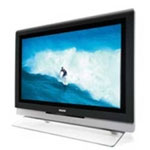
The Seibold Review: Phillips AmbiLight 42″ Plasma TV

On February 21, 2005, in Uncategorized, by Chris Seibold


The Seibold Review: Phillips AmbiLight 42" Plasma TV

Plasma TV, LCD TV, CRT (aka direct view), HDTV, Digital TV etc. There are so many acronyms and so much chatter about TV these days it can get very confusing. The average Joe doesn’t care about all the standards, the competing technologies (Plasma -vs- LCD) all they want to know is: How does any particular model stack up? Today let us run the 42" Phillips Ambilight through its paces.

It is generally a good idea to start at the beginning and, in this case, the beginning is the packaging. The Ambilight comes surrounded in heavy foam and seems more than adequately protected. Upon opening the box you’ll find another (obviously) smaller box containing the stand, mounting brackets, the remote and an assortment of cables. Remove that from the box along with a few pieces of foam and you’re in flat screen nirvana. Well you would be if you could figure a way to get the thing out of the box. If you’ve looked at the warnings you know two things: Thou shalt not touch the screen and Thou shalt not lay the TV flat. So just how do you get the thing out of the box without destroying the original packaging? First get a buddy (I recruited my neighbor) and use the wall mounting brackets to lift the television straight out of the box. At this point I should note that the TV only weighs 92 pounds but, for some reason, it feels like a lot more.

Inspection reveals a plethora of inputs. You’ve got two fully complemented component inputs on the bottom, and HDMI input (High Definition Multimedia Input), the typical cable jack, on the side of the television you’ll find the more typical three plug AV input. Further inspection will reveal S video inputs and audio out. In short the Ambilight has plenty of connectivity.

After you’ve inspected the TV and marveled at the thinness of the screen (less than four inches thick) you’ll probably turn your attention to where you’re going to put the thing. This something best considered before delivery as moving the TV without touching the screen is tricky to say the least. Phillips provides three choices in the box. You can opt to use the included glass and aluminum stand. The stand looks very nice and is remarkably stable. Your second option is direct wall mounting. For this Phillips provides brackets with mounting holes spaced the predictable sixteen inches (use a stud finder on the wall). If neither of those options are appealing you can use the included kit to mount the TV to a VESA arm. You’ll need your own VESA arm but Phillips thoughtfully provides all the other hardware.

Once the TV is in place we can move on to what everyone really cares about: using the thing. The first thing you’ll note when you turn the TV on is the remote, it matches the Ambilight and has a high quality feel. The first thing you’ll notice about the picture once the TV is turned on is that it is uniformly awful. Before you become too dismayed you need to step back from the TV to a distance of eight feet or so. The picture will still look worse than TV it is replacing (in my case a 27" nothing special Magnavox) but the images will at least be passable. The reason the Ambilight looked so bad in comparison to the TV was replacing is due to two factors: The old television was smaller and hence had a sharper image and because the factory presets were a little off. Once you adjust the Ambilight the picture looks much better. Not as good as a direct view television but certainly acceptable.

Of course the Ambilight is a high definition screen so to really get an idea of how good it can be you need to give it a HD signal. Let me turn momentarily to pure geekery: The AmbiLight is a 1080i television. It features a 1920x1080i resolution and is thus capable of displaying (I think, things get fuzzy here) the highest agreed upon quality of HDTV. (HDTV varies from a high of 1080i to a low of 780p, there are some sets capable of 1080p but since this is not part of the standard the utility is questionable). Vagaries of HDTV aside once you get an HDTV signal into the AmbiLight the results are stunning. The picture looks fantastic. The quality of the picture is difficult to adequately convey but, without exception, everyone who has seen the AmbiLight displaying an HD signal has become mesmerized. Colors are bright and vivid while blacks are truly black.A recent trip to the local Best Buy revealed that the AmbiLight had a noticeably sharper picture than most of the Plasma and LCD TV’s surrounding it. Keep in mind objective ratings of the picture have just left the building and any pronouncements made by a quick stroll through the TV section of an electronics store are very subjective.

There is more to a TV than simply picture quality. Audio must also be considered and here the Ambilight’s performance is not as amazing. That is not to say that the audio isn’t adequate because it certainly is. The Ambilight features four speakers and employs Dolby Virtual surround Sound. Still you’ll be happier if you wire a set of decent speakers to the television and that no problem owing to the left right and center speaker outputs. The other things that make the TV more than a simple monitor are well done. There are a set of minimal controls on the side of the television allowing access to volume, power and the menu. The menu provides loads of control over the picture quality, resolution with plenty of gimmicks thrown in (pixel plus, color enhancement) and plenty of really useful controls. You’ll find no less than seven picture formats but "automatic" works fairly flawlessly. You’ll also find an equalizer for sound and a very good picture in picture option (default is a split screen) and an entire control panel devoted to the AmbiLight. Customization of picture and sound are just about unlimited but even with all the options the menu remains intuitive and easy to use.

Let us close the review with a discussion of the Ambilight feature. Ambilight is the name given by Phillips to the two color changing lights found on either side of the television. The lights change hue with the picture or you can choose to control the tones manually. Phillips opted to put lights on the TV owing to scientific studies that indicate a little extra lighting relaxes the eye and makes watching TV easier. I’ll concur with the scientists, the Ambilights actually do make for better viewing but not by much. In my case I am fortunate enough to have to can lights sunk in the ceiling. These provide more light than the Ambilight and make watching the TV much more comfortable. In short the Ambilight is a nice idea but there should be more of it.

Overall I’ll be sad to see the Ambilight head back from whence it came. It is a great piece of technology and truly a pleasure to use. I think Phillips would be well served to add a HDTV receiver to the set along with the dual tuners the Ambilight sports straight out of the box. Other than that there are no real misses on the Ambilight but not any home runs either. While the picture did look simply amazing when a HD signal was being displayed that has as much to do with HD as with the quality of the Ambilight. I don’t think anyone would be disappointed by the performance of the Ambilight but I also doubt anyone would be completely blown away by the performance when comparing the set to equally able plasma TVs.

MyMac rating: 3.5 out of 5
Pros: Nice styling, great picture when using HD
Cons: Expensive
Spec Sheet (PDF)


A Decade of MyMac.com – 1995 – 2005 Part 2

On February 21, 2005, in Uncategorized, by Tim Robertson

A Decade of MyMac.com – 1995 – 2005 Part 2
1996-1997

The start of our thirteenth issue was huge for me: we had a cover artist! It was May 1996, and Mike Gorman had agreed to create covers for our digital magazine. The first was perfect, showing a fit, tan guy that said “end of summer 1995” Next to the same guy, now pale-white, bloated, and sickly looking, with the caption “Beginning of Summer 1996 – Too much AOL!” It was great!

One of the problems people had with our magazine was the time it took to download. Tiny by today’s standards, our 13th issue was 1MB in size. For some AOL users, that could mean a half-hour download! Way too long, especially if they were a subscriber and I emailed the issue to them. So in June 1996, we started a text-only edition, and it had moderate success for a year or so before we cancelled that version. It was the same magazine, only no pretty pictures and about a tenth or less the size.

During 1996, all the rumor and speculation was about IBM buying Apple. Reader Casey Levegue actually made up an IBMAC logo just in case it actually happened, which we printed in our May 1996 issue. Of course, as we all know, if there were any talks between Apple and IBM, they went nowhere fast. Funny how, nine years later, it is IBM who has sold off their consumer computer division, and it is Apple rolling out new award winning products, has a diverse product line, and is super-profitable. Remember, back in 1996-1997, things looked bleak indeed for Apple.

It was also during this time period that Apple Computer’s board of directors hired fellow board member Gil Amileo as CEO. Gil would last a little over a year, but be remembered forever as the man who brought back Steve Jobs to Apple when he led Apple in the purchase of NeXT Computer. It would also be seven years later when I would actually talk to Mr. Gil Amileo on the phone, more than once, about his writing for this very website. While he agreed at the time, it sadly never happened. Often his reign at Apple has been misunderstood by the Mac faithful, and I really wanted to give him his due. Perhaps someday when the time is right and his schedule opens up more.

Four new writers joined the MyMac ranks in June 1996 for our fourteenth issue. They were Eric Manchester, John Clark, Dustin Roberts, and Pawel Pokutycki from Poland. To this day, only Dustin Roberts is still in contact with me. I have no idea where the others have disappeared.

Our June 1996 issue was also the first issue not created on my lowly Performa 410, as I moved into a Performa 6300CD. The speed difference was amazing, and I honestly thought that the power and speed of this computer would last me years and years. It had a 100MHz PowerPC 603e processor, 16MB of RAM, 1.2GB hard drive, and a built-in CD-ROM drive! What more could I ever want, right?

Our fair magazine could also be found on The MACsonian CD-ROM, a bimonthly CD-ROM publication. While the CD-ROM publication folded soon thereafter, I am fairly certain the presence of My Mac on it was purely coincidental. Hey, we are still here after all!

Also hard to imagine today, but the IBM processors that the Macintosh was using back in 1996 was actually faster in MHz than what the Pentiums were capable of doing. Our July 1996 issue sported a running Power PC chip easily outpacing the Pentium.

It was August of 1996, our sixteenth issue, when reviewer and My Mac Magazine icon creator Adam Karneboge took over as web master for the site. It would still be a while before we were able to rescue our mymac.com domain name after our leaving web master took so long to transfer it over, but at least we were back on the Internet! To this day, Adam is still working on the site; only now as part of a web design team.

Today, many Mac faithful think of Safari as Apple’s first and only web browser. Many do not remember, or were not around at the time, CyberDog. CyberDog was actually Apple’s first foray into creating a web browser, which Adam reviewed in our August 1996 issue. At the time CyberDog was more than a browser. It would also FTP, email, and used an easy to use finder interface. It was created using another abandoned Apple technology, the much-ballyhooed OpenDoc.

In September 1996, we were talking about the rampant rumors of Apple and Be getting together to create Mac OS 8, Apple’s next generation OS (which would not materialize until years later as Mac OS X). The talks, as we all know now, never went anywhere for a variety of reasons. First, it was rumored that Be Inc.’s President and CEO, Jean-Louis Gassee, was asking way too much for the company. It was also rumored that the BeOS was not as far along technology-wise as Apple was led to believe. Apple would later go on to purchase Steve Jobs’ NeXT Computer company.

Our cover for the November 1996 issue paid homage to Power Computing, a Macintosh clone maker who was at the time simply beating Apple in the speed wars. One of the problems at the time was that the clones, with a license from Apple allowing them to clone the Macintosh, were supposed to help grow the Macintosh market share by growing their business in areas where Apple was not doing well. For instance, UMAX was selling cheap Mac clones that would appeal to the low-end computer market. Power Computing, on the other hand, went after Apple’s cash cow, the high-end market. Rather than growing the Macintosh market share, all Power Computing really did was cannibalize Apple’s own share of the existing Mac market. Their computers were hands-down faster than the high-end Apple machines at the time, as well as being cheaper. They would challenge Apple until Steve Jobs returned to the CEO roll and cancelled all licensing agreements, thus effectively putting Power Computing, Inc. out of business.

In December 1996, we welcomed new writer Barbara Bell Velazquez to the staff and her new “The Starting Line” column in which she would give advice for new Mac users. It was a great monthly column that was brilliantly written for the new user, and we received quite a lot of positive email on it.

At this point in time, the end of 1996 and the start of 1997, our issues were getting larger and larger every month. As such, editor Russ Walkowich needed help editing each issue, so a new copy-editor was brought into the fold, Jim Moravec. Jim also did some writing, but his efforts on the editing side were mostly unknown to our readers and staff. His involvement was monumental is bringing up the quality of the magazine. Jim would work in relative obscurity for years with My Mac Magazine, leaving around the same time our downloadable issues gave way to the website only edition.

Producing each monthly issue was a huge task. At the time, the process went something like this: the writers wrote their articles and emailed them to me, usually by the 10th of every month. I would then do a preliminary edit on their articles or reviews. Then, using DOCMaker, I would assemble the articles with all the legal pages, as well as ad pages, and add in the graphics. By the 15th of the month, I would send the issue to Russ, who would go through each article and review. If Russ made any changes, he would highlight his changes in colored text. Russ would then send the issue over to Jim, who would do the same as Russ had done, only using a different color for his edits. Russ would once again go over the entire issue, either keeping or nixing Jim’s edits, as well as making any last minute edits. Russ would then send the issue on to me, and I would comb the issue, finding both Russ’s and Jim’s edits, and either keep them or change them myself. I would then change all their colored text to black so the readers would not see strange red or blue text in the middle of a sentence for no reason. (A few actually got through, but those were rare.) I would then finish all the graphics, adding in Mike Gorman’s cover, and send the issue on to Adam. Adam would in turn create all the HTML and web pages for the website, posting the new issue online.

We did that every month for years.

In January 1997, our magazine sported a new icon, created by Jason Rainbows. Russ also interviewed the talented artist in that same issue. Today, you will find an occasional article from Jason here at MyMac.com, making him one of our longest running contributors.

Apple purchasing NeXT was the big news that January as well. Steve Jobs was back, but no one knew how much influence we would have in the company he had co-founded years before. Was it good or bad that Steve Jobs had returned to Apple was a question everyone was asking at the time. With hindsight, we should have known better. It was the beginning of the “NEW” Apple, a year away from the introduction of the iMac, and much, much more.

Much has been written about the fate of Apple once they purchased NeXT. A year later, and Apple fans would note that it was not so much as Apple acquiring NeXT, but NeXT acquiring Apple. All the top NeXT people moved into the top positions at Apple, reorganizing not only the entire company, but in time, its entire product line. The effects of the NeXT purchase are still being felt to this day.

One of my all-time favorite articles ever to appear on My Mac Magazine was in our March 1997 issue, titled “The Gorilla Benchmark Test” by Pete Miner. It is in our archive, and can found here.

Just released from Apple in 1997 was Mac OS 7.6, and Adam did a review of it in our March 1997 issue. This OS was actually shipped on either CD-ROM or floppy disk!

April 1997 saw a very cool cover of an Apple Starship Enterprise shooting at a Borg Microsoft cube. Also in that issue, more rumors were flying, this time thanks to an article in the San Jose Mercury News. Larry Ellison, the billionaire CEO of Oracle Inc. had openly said he was thinking about acquiring Apple in a hostile takeover.

Adam and I scooped most of the Mac press in that April issue, our 24th, with a preview of Mac OS 8.0 based on alpha software. His preview showcased many screen shots, the official “Copland” look of the OS, the multi-threaded finder, and much more. It was a huge coup!

As our second year in publishing wound down, Apple was in a lot of trouble. Things looked bleak, as they usually do before the sun rises. (In this case, Steve Jobs and the iMac.) My Mac Magazine was a huge success in terms of popularity and readership, but financial matters were a different story.

To be continued.


MyMac Podcast for Friday, Feb 17, 2005

On February 18, 2005, in Uncategorized, by MyMac PodCast


Download the latest MP3 PodCast HERE

Special Guest David K. Every joins Tim Robertson for this weeks PodCast

David K. Every, on a half hour notice, joined Tim today for this weeks PodCast. Co-Host Chad Perry was unable to broadcast today, so David was kind enough to join Tim via iChat AV.

Show links:
iChat AV
The CELL processor report can be downloaded here
Read more of David Every’s work at
mackido.com & iGeek.com


NewerTech iBook G3 14.8V 4800mAh Clamshell original iBook replacement battery
Company: Other World Computing / NewerTech

Price: $140 US
http://www.macsales.com & http://www.newertech.com

Apple’s original clamshell (or "toilet seat") G3 iBooks are great portable computers. They scream in OS 9 and they work in OS X without any serious difficulties. But their replacement batteries were expensive and not easy to locate. Until now.

Other World Computing (OWC) purchased NewerTechnology (NewerT), and maintains its well-respected brand name for domestic and international sales, says CEO Larry O’Connor. Replacement batteries are big business, as OS X becomes more efficient on older iBooks and PowerBooks.

I use a bondi-colored USB-only iBook for training purposes, and my personal travel laptop is a blueberry iBook with USB + FireWire. The bondi machine had a dead battery, so OWC’s NewerT replacement comes in very handy.

Comparing my original Apple battery to the Newer replacement, they both charge up quickly and discharge slowly, giving 4 – 6 hours of usage away from the power supply. Following the detailed cycle and discharge calibration procedure on OWC’s instruction sheet was not difficult, but required a bit of planning.

Performing an empirical comparison is not practical, but my everyday usage of the NewerT battery confirms that it charges more quickly and discharges more slowly than the Apple original. OWC’s claims for 50 percent greater battery capacity may be a bit exaggerated, but we won’t argue over precise numbers. NewerT fits precisely into its designated slot, and receives high marks for quality of construction.

Larry told David and me, during our private conference at the Macworld Expo, that the 99 percent top charge on my NewerT battery is acceptable so long as the battery works perfectly, which it does. My only suggestion is to give customers the option of ordering a fully-conditioned battery from OWC for a few additional $$$, to avoid the hassle of calibration.

Can I find anything wrong with this battery? No, and I applaud OWC/NewerT for their commitment to legacy laptops. At $140 the Lithium-Ion battery is worth nearly as much as the computer minus battery, but with a working battery an older iBook has value greater than its auction or resale price tag.


MyMac.com rating: very strong 4 out of 5


Review – iLife 05

On February 14, 2005, in Uncategorized, by Guy Serle


iLife 05
Company: Apple Computers

Price: $79
http://www.apple.com/ilife

I am not a rich man. This means several things. It means I can’t just hop on a private jet and go to a MacWorld Expo when they happen. It means I can’t just drop everything and sip pina coladas on a tropical beach with a warm beach breeze shooting up my bathing suit watching scantily clad girls with very little on frolic and…, well never mind all that. What it mostly means is that I have responsibilities and bills to pay. With two kids and a mortgage, I don’t have lots of spare cash, so when a bargain comes along; I try to take advantage of it. iLife 05 at $79 is such a bargain.

Yes, I hear the cries of multitudes wailing that iLife 04 was $49. Before that, the various pieces were free downloads (well except for iDVD). To all of you I say, tough noogies. Look around, smell the coffee. Try and find any other integrated multi-media software suite as fully featured as iLife at this price. Go ahead, I’ll wait. Hmmm hmmmm hmmmm. Oh you’re back? What did you find? My guess is nothing for the Mac or any other platform that does everything to what iLife 05 does. At even twice the price if anything near exists. Yes there are suites that offer many of iLife’s functions, but they are unusually clumsy, not as fully featured, and not all the pieces work with each other. So lets push it out of the equation. This qualifies as a deal.

I’ve heard some complaints about installing iLife 05. Corruption of photo or music libraries has made the rounds in some Mac forums, but I didn’t experience any problems myself. As with any installation of this type, back up your data in case of catastrophic failure.

No review would be complete without talking about some of the new features of the packages that make up iLife 05. I’ll take each in order and tell you what I like about it.

iPhoto 5

As a photo archiver, iPhoto was pretty good. Each download from your digital camera was in its own folder, easily found but year/month/day. It gave you a thumbnail view of each picture which made finding the exact one you wanted easy. It’s editing functions were sub par at best however. Brightness, contrast, retouch, red-eye removal, crop, yawn. If you were at all serious about photography, you had a copy of Adobe’s Photoshop or Photoshop Elements or some other full-featured image editor. The new editing features of iPhoto 05 probably won’t make you sell your copy on eBay anytime soon, but it’s a vast improvement over what was offered before. Besides the typical brightness and contrast, iPhoto now includes easy to use slide bars for exposure, saturation, sharpness, temperature, and tint. Is your photo slight off kilter? The straighten feature will put it right. Of course all your old favorites are still here as well. My only complaint about the new editing features is that to get to it isn’t very intuitive. To get access to the editing features, first select a photo and hit the “Edit” button on the bottom palate. Once the edit window comes up, find the double right arrow next to the “Done” button. Single clicking it brings up a drop menu with two choices, Sepia and Adjust. Choosing “Sepia” gives your photo that “Wow! What an old photo!” look. Choosing “Adjust”, brings up the advanced editing window.

Still prefer Adobe? No problem. Specify that program in iPhoto’s preferences and double-clicking an image starts it right up. In the past this was a mixed blessing if all you wanted to do was something simple. It was an all or nothing thing. Now, if all you need is iPhoto’s tools instead, simply click the edit button. Double-click for your outside program, edit button for iPhoto. A nice touch.

Apple has made some improvements to the user interface as well. If you’re in edit mode, a scroll bar on the top allows access to your entire library. Edit one photo and go on to the next without having to leave edit mode. The program now allows for direct importation of RAW files as well.

iMovie 05

Last year according the Steve Jobs, was the “Year of the Laptop”. This year is the “Year of High-Definition.” OK, whatever Steve. Let me know when inexpensive HD DV camcorders are available. Of course inexpensive means different things to different people. To me it means I can buy one and not totally hack off my wife for spending a lot of cash. Which means I won’t be buying a HDV camcorder anytime soon. However, when I do, iMovie will be waiting. iMovie 05 now supports High Definition Video. The formats supported are; HDV (720p and 1080i), MPEG-4 and iSight (more later), DV, and DV widescreen.

What does this mean to most people? Probably not a lot. There are other changes in iMovie that will mean something. Like direct MPEG support. No more using QuickTime Pro to convert to DV. That alone will save me a lot of time. You can also now use your iSight camera to import live video and audio. Of course new transitions, titles, effects, and Skywalker sounds are included as well. Apple promises greater stability as well. I must say in varied light and heavy use, I did not experience a crash similar to what happened on occasion with iMovie 3 and 4.

One thing I noticed was that iMovie no longer performs renders on multiple clips at the same time. In previous versions, as you made changes to titles, effects, or transitions, each clip would show a black bar that would steadily turn red as the clip was rendered. As you changed more clips, the progress of each would slow and gradually speed up as each clip finished. I can’t be sure, but this may have led to some of the instability of the previous versions. The new version of iMovie now only renders one clip at a time. As each finishes, the next one takes over and so on. I can’t say whether this makes rendering faster, but if it doesn’t crash, I won’t complain.

Another nice feature is added support for stills. Whether imported from iPhoto or another source, you can extend the length of time for the still using a slide bar right underneath the zoom slide bar instead of having to double-click it and manually change the time in a separate window. The “Ken Burns” feature still works great like it always has.

The editing screen is slightly wider to accommodate HDV, but other than that, the interface hasn’t really changed all that much. There is better support of drag and drop between iMovie and it’s siblings. Drag and drop a video to a pane in iDVD instead of having to go to that program and searching for it. Drag and drop also extends to iWork’s “Keynote” program for interactive presentations. All the integration between iMovie and the other iLife aps work the same as it ever was.

Another new aspect of iMovie 05 is something Apple calls “Magic iMovie”. In a nutshell, you hook up your camcorder, click “Magic iMovie” and the program takes over from there. It sucks up the video, adds titles, transitions, chapter marks, and will even send it over to iDVD without you being there. I haven’t tried it yet, so I won’t say how well this works. I can’t imagine it would be all that great (How the heck does it know what titles to put in?), but I’ll reserve judgment until I try it.

The last word for now from me on iMovie 05 is not a positive. If you have purchased iMovie add-on programs from companies like Gee Three, be prepared for some of those features to no longer work. There are some compatibility issues with volumes 3,5,6, and 8. Gee Three has some work arounds (Click HERE for the page describing the problems and solutions in some cases), but if you rely on some of these add-ins for your day to day stuff, you may want to wait before buying iLife 05. According to their website, Gee Three now has a download that will correct some of the problems with their add-ins.

iDVD 05

What can you say about this program that makes it better? As you might expect, Apple has included more themes and tighter integration with the other iApps. That’s to be expected. But before you move on, lets see what’s under the hood. There are really some exciting changes that Apple made that will affect not only your decision to buy this software, but possibly what your future hardware requirements might be as well. A bold statement for sure, but bear with me.

Many of the themes now have what Apple calls “Drop Zones”. These are areas where you can drop photos or movies from anywhere and iDVD will incorporate it into your theme. There are also improved editable maps (a screen that shows you the path of your videos). HDV is supported in iDVD as well and multiple formats (DVD-R, DVD-RW, DVD+R, and DVD+RW) can be used.

Kind of like iMovie’s “Magic iMovie”, iDVD has “OneStep DVD”. Hook up your Camcorder and click a button. iDVD will suck up the video and put it on DVD. Great if all you want to do is archive some video. I wouldn’t use it as a finished product, but it’s a nice feature.

What’s the REALLY big news? How about being able to burn DVDs from DVD burners OTHER than an Apple approved internal SuperDrive? Save your project as a disk image and burn it in any DVD burner with Apple drivers. Now you don’t need a SuperDrive to use iDVD.

GarageBand 2

GarageBand has been a huge success for Apple. It has been such a success that I would be hard pressed to come up with any new features that it didn’t already have. Good thing I don’t work for Apple.

Most of the improvements will benefit real musicians as compared to loop meisters like me. How about multi-track recording (up to eight tracks at once if your hardware has the wherewithal), a built-in guitar/bass tuner, and on the fly music notation. Now you change the tempo and key of the loops you record. If your singer or guitarist was just a wee bit off on their playing, GarageBand 2 has timing and pitch adjustments that will work with any loop.

GarageBand 2 also now has instant music notation of any selected software instrument loop that you create. The music or loops you create are editable (in either notes or notation form) as well in case you make a mistake. They are not however printable.

GarageBand really is a separate application from the other members of the iLife family. There is no direct link to any of the iLife programs other than iTunes. Might have been nice if Apple could have allowed drag and drop .band files directly into iMovie or iDVD. In order to use a GarageBand composition within, say, iMovie, you must export it to iTunes and then it is available to all the other iApps. I wouldn’t exactly call that integration.

iTunes

iTunes is the last free download in the iLife stable. It hasn’t really changes that much from the 04 version except to add iPod shuffle/USB connectivity and to break Real.com’s Harmony program that allowed Real AAC files to play on an iPod.

If you downloaded the most recent update to iTunes, you already have this.

Hardware Requirements

Are you ready for this? Stock Beige G3s are officially out in the cold with this release. Teardrop iMacs will be hard pressed to make the grade as well.

A Mac computer with at least a 400Mhz G3 processor (600 Mhz or faster required for GarageBand)

Mac OS X 10.3.4

G4 or G5 required for GarageBand software instruments and the advanced editing features of iPhoto.

733 MHz G4 required for iDVD

1 GHz required for the High Definition features of iMovie HD. I wouldn’t worry too much about this one. If you have one of those expensive HD camcorders, you aren’t using iMovie

256 Mb minimum RAM required (Apple recommends 512. File this under No excrement Sherlock)

A display capable of 1024 X 768 resolution

DVD drive required to install iDVD and GarageBand

A SuperDrive is required to install iDVD (Technically this is not true. You can install iDVD without a SuperDrive present by using installation options instead of default)

4.3 Gb of Hard Drive space.

Breaking it down, it comes out like this

733 Ghz or better G4/G5 processor
OS X 10.3.4
512 Mb of RAM or better
DVD drive (SuperDrive recommended)
4.5 Gb of Hard Drive space
A display capable of 1024 X 768 resolution

That leaves out a lot of pretty current hardware. If you have the hardware to use it, iLife 05 is incredible. Even having said all this, I still think iLife 05 is a bargain. If your hardware is up to the task, I would get it. I’m dinging 1 and 1/2 stars for high hardware requirements, some weird interface features of iPhoto, and iMovie breaking some third party add-ons. I’m adding 1/2 star for allowing DVD burners to use iDVD.

MyMac.com Ranting: 4 out of 5


MyMac Podcast for Friday, Feb 11, 2005

On February 11, 2005, in Uncategorized, by MyMac PodCast

MyMac Podcast for Friday, Feb 11, 2005.

Hey, a new PodCast! Also, we have the BaldRat picture online now!

Download the MP3 file here!


iPod Armor – Review

On February 9, 2005, in Uncategorized, by David Weeks


iPod Armor
Company: Matias Corporation

Price: $30 – $50, depending on model

http://www.ipodarmor.com

Want to protect your Pod from everything and everyone, especially yourself? Or provide solid coverage while Podding out and about? iPod Armor is your solution.

The iPod Armor has an attractive brushed aluminum finish. I especially liked the raised embossed outlines of the click-wheel and the screen. As expected, my 4G iPod fits perfectly, and there is a removable soft plastic plug covering a slot that allows access to the iPod’s docking port.

The front and back sections of iPod Armor are hinged together with a piano hinge at the bottom, thus allowing the front cover to flip back towards you. When the case is closed, it shuts with a loud SNAP sound.

Points off: I found the edges of the hinge to be sharp. The hinge wasn’t sharp enough to cut, but it was unpleasantly sharp. The manufacturer should round off those hinge ends. The metal interior also has a sharp feel, and could be rounded for safety.

The snap that keeps the Armor closed is too tight for my taste. While it’s great that the cover will never, ever, NEVER pop open accidentally, I needed to use more force than expected to get the case open. Nemo disagrees, and finds the tight fit “just right” for his brute strength.

iPod Armor just begs to be used with the Apple iPod remote. With a remote, the fact that you can’t access the iPod at all when the Armor is closed is less of a problem. Be advised that you can’t adjust settings or choose playlists with the remote, so you don’t have full control of the iPod when the Armor is closed.

Grumbles aside, iPod Armor is probably the next best thing to storing an iPod in either a bank vault or an Abrams battle tank. I’m getting the nerve up to try driving my car over an Armor-encased iPod. I’ll have to convince Nemo to offer up his iPod for the test drive. If he agrees, we’ll report back.

(Ha, says Nemo — our review unit is for 4G iPods only, so that leaves your wife’s Pod to test, David. Memo to company: if a 3G iPod Armor is available, I’ll put my Pod inside and whack David’s tender knuckles with it.)

All in all, the iPod Armor is great, but it’s not for me. I prefer easier access to all my iPod controls. For users who value protection over easy access, Matias Corporation’s iPod Armor is the way to go.

Nemo says:

I like it more than David does. iPod Armor fits my lifestyle and sense of design. With its optional heavy-duty clip, iPod Armor will accompany me on my next hike, but I agree about needing to obtain a remote control for the iPod.

For its purpose, iPod Armor is a keeper, so let’s compromise with an enthusiastic rating of 3.5 out of 5.

David Weeks and John Nemerovski


Introducing Scroll Down Books

On February 9, 2005, in Uncategorized, by MyMac Administrator

Introducing Scroll Down Books

MyMac.com is proud today to introduce our new ebook publishing division, Scroll Down Books.

Scroll Down Books are ebooks, written by some of the most talented writers in the Mac world. Our first two books are now for sale. The first two are:

Buying Used Macs – $5.00
Neale Monks will take you though the process of spending your money wisely when you can’t run out and buy a new Mac. He offers you the background on the different Mac models, back to the start of Apple and up to the almost brand new models coming out of Cupertino. He will take you through the good and bad points of each model and whether it’s a good idea to buy, upgrade or not even bother. So if you’re considering your options for buying used, Neale Monks’ book is a must-have!

iMovie – on The Cheap – $5.00
iMovie is a great application that has a lot of Mac users intimidated, thinking that “I can’t do that.” Well, Chris Seibold’s “iMovie – On the Cheap” will walk you through the process of becoming a movie mogul; quickly, painlessly and cheaply. Chris has taken the time to put it all together in an easy to read format that will get you up and running with your video camera equipment and iMovie in no time at all. Questions on lighting, recording, editing and even location shoots will quickly be answered. So for all of you budding movie producers, download Chris Seibold’s “iMovie – On the Cheap” today!

To learn more about these ebooks, please visit www.mymac.com/ebooks

More ebook are planned over the next few months!


MyMac.com PodCast for February 3, 2005

On February 3, 2005, in Uncategorized, by MyMac PodCast

MyMac.com PodCast for 2/3/05. Download it HERE.

Two MAJOR announcements on today’s show!

We welcome MP3 feedback emailed to THIS address! Send us your voice comments, songs, and more! We will try and play each MP3 file sent to us.


Aluminum PowerBook battery and 65 watt PowerBook battery charger
Company: Newer Technology
Price: $109 / $49.95
http://eshop.macsales.com


Newer Technology 4800mAH Aluminum PowerBook battery
Price: $109.00

Newer Technology 65 watt PowerBook battery charger
Price: $49.95

Newer Technology has been adding to its line of batteries and chargers for Apple PowerBooks. The Weeks division of MyMac.com labs has been flogging them to some time, to see if they have the juice, so to speak. I tested a 4800mAh (53.3 Watt-Hour) Aluminum PowerBook battery, along with a 65 watt-hour PowerBook battery charger.

Historically, most users stick with their original Apple batteries until the original battery has given up the ghost. But Apple does not supply replacement batteries forever, and you’ll be more than disappointed to find that your older P’Book battery may be orphaned. Even if a replacement is available, the battery may have been sitting on a warehouse shelf gathering dust. Sitting on a shelf is not good for laptop batteries; they don’t age well just sitting in a partially-charged state. An old battery may not accept, or hold, a charge well.

I’m currently using an 15″ Aluminum PowerBook, which ships with a 50 watt battery. Apple touts the 15” Aluminum as providing 4:30 hours of battery life “depending on battery saving features used and system configuration.” As any PowerBook owner knows, you’ll never get the advertised battery life without running the screen at lowest brightness, no CD or hard drive access, and no Airport, Ethernet, or modem usage. Occasional typing is permitted. Best battery life is always obtained by gazing at your computer while it’s in sleep mode.

My usage pattern while on battery is rather demanding: I run the screen at full brightness, Airport’s on, and the hard drive is accessed frequently enough to rarely permit it the opportunity to spin down. I generally get about 1:45 – 2:00 hours of battery life before reaching the 5% charge remaining level. At that point, I’ve already had several “Low battery” warnings, and have to plug in.

Visually, you’ll think you’re getting a real Apple battery. Newer’s fit and finish it excellent, and it’s has same LED’s for displaying charge level. Labels on the back display the battery rating (4800 mAH or 5300 mAH). The first Newer Tech 4800 mAH battery I received for testing had problems. It would never charge past 85-90%, and the battery life would not exceed 1+15 minutes. Newer specifies the correct technique to properly condition a Li-Ion (Lithium Ion) battery, which I followed to the letter. I actually conditioned the battery several times, and then reset the ‘Book’s Power Manager, just to make sure that I didn’t have corrupted power management settings. No dice.

Coincidentally, these problems happened just before the annual MyMac.com pilgrimage to the 2005 MacWorld Expo. At the show, fellow MyMac.com writer John Nemerovski and I had a chance to interview Other World Computing President Larry O’Connor. Since OWC owns Newer Technology, the buck stops with him. After our discussion about OWC’s upcoming products, I mentioned the problems with the review battery unit. He immediately diagnosed it as having a bad cell, and swapped out out the defective battery for a new one right then and there. There’s no better customer service than getting help from the owner of the company. While I doubt the average OWC/Newer Tech customer can talk with Larry directly, OWC’s customer service is generally quite good.

Conditioning the battery involves fully charging and fully discharging the battery at least once. Having done this, I found the new battery worked perfectly. The stock Apple charger would top off an almost-completely discharged battery in roughly 1:45, while still using the PowerBook. I did not try to determine the “time to charge” when the computer was not in use.

Given that the test unit was a 4800 milliamp hours (mAH unit), I wanted to see if the battery would provide the full 4800mAH. The easiest way to find out battery capacity is to run the following script in Terminal:

ioreg -l | grep -i IOBatteryInfo

Here’s the result from testing a just-conditioned NewerTech 4800mAH battery:

[Squiggly:~] dweeks% ioreg -l | grep -i IOBatteryInfo | | | | “IOBatteryInfo” =

({“Capacity”=4685,”Amperage”=1264,”Current”=4650,”Voltage”=11608,”Flags”=4})

This command queries the battery for it’s capacity, current charge level, and voltage.

Theoretically, the battery should show its capacity as 4800mAH. However, I ran the same script on my PowerBook when it’s battery was new, and found that Apple’s battery tested at just over 4700 mAH. So, it may not be unusual for even new batteries to not charge to full-rated capacity.

In use, I could not tell that this was not a stock Apple battery. When I flogged the Newer battery with my demanding power requirements, it produced the same battery life as Apple’s battery. Battery life when I was trying to conserve power was just as good. The unit charged just as fast with the stock Apple charger as the Apple battery. I did not perform a test that simply runs the system until it sleeps by running it under a constant load (playing iTunes non-stop) as I prefer a more real-world test.

So, why buy Newer’s 15” PowerBook batteries? I can think of two reasons: price and choice of capacity. The 4800 mAH battery sells for $109.95, while Apple’s part retails for $129.00. You’ll get the same battery life for a bit less money. Newer also sells 53 watt-hour/ 5300 mAH battery for $129.99. We did not test this unit, but it should provide roughly 10% more battery life than Apple’s battery for the same price. As someone once said…”You pays your money, you takes your choice.” Choice is a good thing.

MyMac.com rating 4

MyMac Labs also tested Newer Technology’s PowerBook battery charger.

Retailing for $49.95, the charger provides the same 65 watts of output as the $79.00 Apple charger. Not surprisingly, I found the time to charge my PowerBook with the Newer charger to be the same as the Apple charger.

Time to charge aside, what’s the difference between the two units?

Apple has some advantages:

It’s a bit smaller and lighter. Roughly the same depth, it’s one-third as long, as well as being a bit narrower. Apple does not publish the weight on it’s web pages, but it does seem somewhat lighter than Newer’s charger.

Apple’s cord length is 8 inches longer than Newer’s 12 feet. Apple also provides the ability to plug the charger itself into the wall socket, and not use the extension cord. Newer’s extension cord is permanently attached to the charger.

Apple’s unit has a light-up ring at the end of the plug that attaches to the PowerBook that glows amber while charging, and then turns to green when the battery is fully charged. This is a great little feature Newer doesn’t have. To be sure, you can view the LED’s on the battery to see the charge state, but those provide only a very rough estimate. If you want a good estimate, you must consult the battery indicator in the menu bar, which means having to have the PowerBook up and running.

In contrast, the Newer unit has an LED on the charger itself, but it merely indicates the charger is plugged into the wall, not the charge state of the PowerBook.

So why buy the Newer unit? If price is an issue, you’ll like that it’s $29.05 cheaper than Apple’s part. That’s a 36% savings. If you don’t mind a slightly bigger and heavier unit that doesn’t have the glow-ring plug, you’ll do just fine with Newer’s charger. As far as charging is concerned, it’s just as good as Apple’s charger. Again, you can choose between features and price. Choice is good.

MyMac.com rating 4 out of 5


The exhibition area of Moscone Center’s Macworld Expo in San Francisco is a madhouse. During four long days on the showroom floor taking photos, meeting with companies, and posting articles to MyMac.com, I observed important trends emerging from the chaos.

Other web sites, including Macworld Magazine, TidBITS and Small Dog’s Kibbles & Bytes publish their “best of” from the Expo. Here at MyMac.com we took a different approach, focusing on products and companies that offer more than meets the eye with regard to innovation.

So here are our six “MyMacworld.compliments — Honorary MWSF 2005 Expo awards, for companies and products that demonstrated exceptional innovation at this year’s show. Congratulations to all of them from your friends and readers at MyMac.com. Photos of these and other products are available in our picture albums from the 2005 Expo.

__________

USEFUL UTILITIES is our first major trend. Fewer people than ever are relying on Norton Disk Doctor or Tech Tool Pro on their OS X computers, for several different reasons. In Panther (OS X v10.3), system software is very reliable. Serious troubleshooting and disk maintenance are infrequent. How are the software utility developers responding?

Prosoft Engineering adds Drive Genius to its expanding family of OS X utilities. Developed by a New Zealander named Marko, Drive Genius claims to do everything that the big name disk repair and recovery applications do, and more. Its $99 US single-user price is affordable IF the results are half as good as the ambitious promotional material claims it to be. I have an unopened package, and David Weeks and I will start to work with it in February. Let’s give Prosoft our provisional “Giant Killer” award.

Micromat introduced DiskStudio during the Expo, and I predict it will be a huge success. Why didn’t somebody develop this application before now? It configures any hard drive into any number of partitions in any direction, with a few clicks. I will use this every week in my private computer tutoring business, and very often for my personal computers. Partitions have been a nightmare before now, and all of a sudden the bad dreams will become joyrides if this $50 US utility works as advertised. When I train users, being able effortlessly to manage partitions will improve my efficiency and productivity by magnitudes. Micromat receives our “Most Useful Utility” award.

SecuriKey from Griffin Technologies plans to change computer security forever with a combo SecuriKey software-hardware solution. Install their encryption software, then insert or remove a special USB key from your computer for access acceptance or denial via a password. It works on both Mac and Windows, costs $130, and additional keys are available for $50 when the dog eats your originals. Unplug your tiny USB SecuriKey and walk away from your desktop or laptop with full assurance that nobody can harass your system, period. Every member of our MyMac.com MWSF 2005 team wants to try out the product, so watch our Features column for a review. SecuriKey gets our “Best Cross-Platform Utility” award.

TRUE BELIEVERS is our second major trend. Individual innovators become successful by creating unusual products that find an immediate audience throughout the Macintosh community. Here are three:

From England comes Solio a solar-powered battery charger for iPods and cellular phones, with more product compatibility expected soon. As David Weeks posted previously at MyMac.com, using Solio you open its three-winged hand-sized solar collector, stick a pencil through its center hole, charge its battery, and use the custom cables to provide power for your iPod or cellular phone. What will be next? Perhaps laptop charging capability. Environmentalism and computer use are not usually compatible, and Solio hopes to make the breakthrough. We’re delighted to recognize Christopher Hornor from BetterEnergySystems Ltd. with our first “Solar Solutions” award.

LQGraphics brings us Photo To Movie, a dynamic slide show application that goes w-a-y beyond iPhoto’s Ken Burns Effect. Jason Snell from Macworld Magazine and Jeff Carlson from TidBITS joined me at the booth for a lengthy conversation with developer Chris Meyer. The demo was simple, and the results were stunning. Complete control over every aspect of a superior photo slide show is now possible for both Mac and Windows. You can see a couple of examples on the web site. Keep an ear to the wind, because this developer will be one to watch. For $50, users receive much more in slide show creativity than they ever could previously. Let’s call this software award “Beyond the Burns,” for Photo To Movie’s ability to go past the Ken Burns Effect for slide show video, audio, and titles.

Optical character recognition (OCR) scanning software never really performed well, until now, with the latest application from I.R.I.S. Instead of being a P.A.I.N in the N.E.C.K. (and elsewhere), OCR scans now provide an almost unlimited array of creative enhancements for document text and images. I lost track of time during the demo, and even then I wished I had another hour with each of this company’s products. In the past, optical character recognition software was mediocre and unpredictable. I.R.I.S.’s new products offer a giant improvement in accuracy and versatility, being able to include or exclude graphics with precision. This company sticks to its mission, and we need to give their products a thorough examination. How about an “Outasite OCR” award for the visionary developers at I.R.I.S.

WiebeTech makes a monster G5JamPlus add-on for your G5 tower that turns a single computer into a Soft Raid multi-SATA-drive unit. The specs are a bit geeky, and you can read all about it here. A jumbo custom baffle/cooling plate mounts inside the G5 enclosure, and up to four external drives can be affixed to it. With prices from $600 – $2900 US, heavy-demand users can obtain speedy, high-capacity storage with an in-stock box as foundation. My new G5 is scheduled to arrive soon, giving me an opportunity to take this demon around the block on two-wheels. Fasten your SATA-belts, and put on your “Ready To Wear RAID” outfit, which is the award we give to WiebeTech.

That’s the wrap on our favorite new technologies from Macworld SF 2005. Please use the Article discussion area below to offer suggestions of additional products to consider between now and MWSF 2006.


When the UPS delivery arrived during dinner on Thursday night I nearly jumped out of my skin. The Small Dog Electronics shipment was here, a full day early. But my extra RAM was missing, so I had to wait until Saturday morning to set up my new supertoys.

Here is a photo essay in thirteen pictures of the process of going from old iMac and new heavy cartons to new G5 + 20” Cinema Display. Tremendous thanks to:

• MyMac.com publisher Tim Robertson, for encouraging me to “Get a computer that’s up to your skills, finally, John!”

• Colleague David Weeks, who hassled me for years to “Get yourself something more substantial than that old G3 iMac, Nemo!”

Casio Exilim Camera for their terrific camera used to make these photos, and to

• Don and Dawn and Ed at (MyMac.com long-time sponsor) Small Dog Electronics, for their personal assistance and ongoing support of our publication. (Next time you want to order anything online, call Ed at 1-800-511-MACS, tell him Nemo sent you, and ask for his best possible price.)

Each photo has its own brief caption, and here are some additional comments:


My desk with Epson printer-scanner-copier and G3 iMac, for the last time in prime location.


G5 carton underneath, 20” Cinema Display on top, and four 512MB memory chips in the middle.


20” Cinema Display awaits unveiling. iMac in background is jealous.


DVI, USB, and FireWire cables before their first encounter with G5 tower.


“Nemo, this thing is really heavy!” says pal David Weeks.


Easy removal of fan unit allows for instant access to memory cards below. Yes, Apple ships its heavy-duty dual-processor 1.8 GB G5 tower with a mere 256MB of included memory (2 x 128MB chips). Give me a break!


After removing the puny 2 x 128 RAM chips and inserting 4 x 512 MB memory, for a total of 2 GB. That’s more like it, to match this mighty dual processor.


Closing the case lid after replacing the fan unit.


Plugging in a blue Ethernet cable, for Internet access.


Which way is up on this darn USB plug? The rear of Cinema Display has (hooray!) two each FireWire 400 and USB ports.


With all cables and plugs attached, I press the G5’s power button for the very first time. Chimes! The display displays. Life is grand.


Using a FireWire target mode connection, all 6 GB of nearly ten years of my data is transferred from old iMac onto new G5 in 16 minutes. Try to do that in Windows, ho hum.


Proudly at center stage, Cinema Display is ready to rock and roll, and G5 is happily tucked under my keyboard to the left. Old iMac is feeling discouraged, being used as a base for my SoundSticks speaker.

I spent the entire afternoon installing software, setting preferences, and configuring email accounts, before CLONING THE ENTIRE NEW G5 DRIVE onto a WiebeTech external MicroGB+ portable FireWire 800 disk drive.

Today was one of the best day’s of my computing life. I followed all instructions, used years of Weeks / Nemo experience, and can now play with the big kids.

The Cinema Display is sensational. I was concerned that its 20” size would be insufficient or inadequate. No worries. G5 tower, to my left on the floor, is powerful, quiet and surprisingly handsome. I had thought these metal boxes were ugly, but now that I own one, it’s very attractive.


Looking for something?

Use the form below to search the site:

Still not finding what you're looking for? Drop a comment on a post or contact us so we can take care of it!