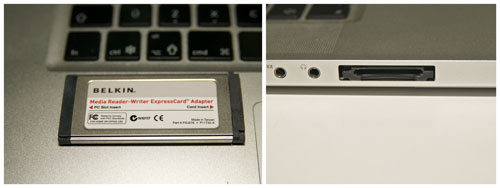
If you have one of those older MacBook Pros with an ExpressCard slot, and your camera uses an SD memory card, you may be jealous of the new MacBook Pro models that include an SD card reader. You may think you need to buy an external card reader and be overwhelmed with its annoying USB cable, to solve your issue. But there is no need for such a thing — in fact, your MacBook Pro can handle SD cards the same way the newer models can — with the Belkin Media Reader ExpressCard Adapter.
Read More

Geekiest Show Ever 33 – After Contact
Tim Robertson and Chad Perry talk about what life would be like, politically, religiously, educationally, etc. on Earth if actual, no question contact with an alien life actually happened.
Read More
MyMac Podcast 298 -“ Who the heck is Tom?
Some talk about databases (ACK!) and feedback from Reb Bliefernich which leads into a discussion about iPhoto and managing your pictures. The contest for the 300th podcast is soon going to end! You’re running out of time to enter for some grate free stuff! This week we talk about Hazel for NoodleSoft and Fotomagico Pro 3 from Boinx Software. We also apologize to Tom Schmidt for going outside the box for that weird suggestion from last week. Lastly we have a bit of a chat about Apple’s new Mac Mini! Is it the greatest thing ever or is Apple sending mixed signals about their product lines?
Read More
Review – Portraiture Plug-in Version 2.3 for Apple Aperture
Almost every picture of people you see in magazines or on the web has been retouched. If you are a portrait photographer, you may be tempted to retouch your photo so that the people look at their best. You can use software such as Photoshop or Aperture, with a brush and a few masks, to enhance the portrait. But that is a tedious and long task. A plug-in like Portraiture may come in handy to help you with the major portrait retouch. We have tested for you the Aperture version of the plug-in.
Read More
Two Display Adapters Reviewed
Display adapters are now available for every model of Macintosh and Windows computer to add an additional monitor or television to your computer video and audio signal. If you don’t know the difference between HDMI, VGA, DVI, Mini Display, Mini DVI, USB, and FAQ, there are people handy who will help you determine the best way to configure your external display.
Read More
Review – FileMaker Pro 11
FileMaker Pro continues to develop – steadily and incrementally. A year after the release of version 10 comes FileMaker Pro 11. It has a more robust feel to it than previous versions; it’s more streamlined and friendlier than ever to the user. Since earlier reviews of FileMaker Pro have appeared on MyMac, this one concentrates on what’s new and/or improved in this latest version.
Read More
iPad Bubble Sleeve and Squish Skin Review
iPad Bubble Sleeve SRP: $49.99 Squish Skin SRP: $39.99 Company: Hard Candy Cases http://www.hardcandycases.com/ Hard Candy Cases have carved a niche in the highly
Read More
OWC Radio with Tim Robertson
Today, Other World Computing has launched a new audio podcast, OWC Radio. Hosted by Tim Robertson, the first episode features an interview with TUAW.com tech writer Steve Sande.
Read More
An Introduction to FUTURE MEDIA CONCEPTS Interactive Courses
Read More
Reviewed – Three iPad Cases From Griffin
Read More
MyMac.com Podcast 297: It’s Finderlicious!
Feedback from Gazzano9 and Steve Calmy (DON’T do option 3 Steve!) starts the evening off and then it’s a bit of cleanup regarding fixing some Macs of ours and friends. We talk some more about some of the prizes from the contest. Tonight it’s AppDelete and Default Folder X. We discuss some Finder enhancements and alternatives and finish the night with a smidgeon of WWDC. Have a listen!
Read More
Review – Kensington Windshield/Vent Car Mount with Quick Release Cradle for iPhone and iPod touch
The Kensington Windshield/Vent Car Mount with Quick Release Cradle for iPhone & iPod touch is a mount kit for your iPhone or iPod touch for your car.
Read More
Review – Future Media Concepts Online Training Courses
When I purchased Adobe Photoshop Elements 6, it came with a copy of Adobe Bridge. I had absolutely no idea what Bridge was, or how I should use it. Until now.
Read More
Take Control of Mail on the iPad, iPhone, and iPod touch – Review
Take Control of Mail on the iPad, iPhone, and iPod touch Review
Read More
NTUOS4 – WIRELESS PEN TABLET – Review
Wacom, the company well known for its pen tablets, introduced recently the Intuos 4 Wireless. This is basically the same as the Intuos 4 Medium size tablet with Bluetooth connectivity. We had the pleasure of testing it for you.
Read More
When disaster strikes, stoicism and a good recovery utility can be helpful
No sooner had I clicked on the icon for that drive than I felt the horrible sensation that signaled I had just done something very stupid.
Read More
Even more AT&T fail- iPad with 3G more expensive
AT&T has announced new data plans for mobile Internet, claiming these plans will make it “more affordable to more people…â€, but this is just not so. One giant hole in this make it more affordable idea is there is no longer an unlimited data plan for iPad customers. That kind of makes this a LOT more expensive actually, not more affordable as AT&T claims.
Read More
LALA no more! Maybe Good news for iTunes?
In December 2009, Apple bought Lala. On June 1st, 2010 Apple closed down the cloud-based Lala music service and no reasons were given by Apple. (Lala music subscribers should go to the old lala site location for more info.)
Read More
MyMac Podcast 296 – iPad HIGH! Mac Mini Low
The GMen start out with some listener feedback from Australia. Gaz has ANOTHER problem with some of his Apple gear. THIS time it’s his Mac Mini. We go into a little detail about ProSoft Engineering’s Data Rescue and Drive Genius and JoeSoft’s Hear gets a mention. Guy fixes his Tae Kwon Do instructor’s Mac and doesn’t get a roundhouse kick to the face.
Read More
My First Look – Adobe Photoshop CS5
Adobe seems to come out with a new CS5 every year, including Photoshop. Every time a new version comes out you have to evaluate what is new and if it is worth the money t make the upgrade. I currently use CS3 at home and in my classroom because I did not see the need to upgrade to CS4. For me, and I think many others, it was not a “must have” update. However, CS5 and the new features they have added make this a “must have” update for any one using Photoshop.
Read More