iClock 3.05 – Review

On September 29, 2006, in Uncategorized, by David Weeks


iClock 3.05
Scriptsoftware

http://www.scriptsoftware.com

$20.00 shareware fee

Being a founding member of the Macintosh Bleeding-Edge club, I’ve recently completed the transition to Intel-powered Macs.

Since my desktop and laptop are now Intelicized, the next transition is to update my software to Universal binaries. Why have more PowerPC software than absolutely necessary running under Rosetta? It’s slower, and uses more memory.

To be sure, some of my applications will be PowerPC for some time to come. Microsoft Office is stuck in PowerPC-land until the next major update, as is Photoshop. I have to admit, Office runs at least as fast on my Mac Pro under Rosetta than it did natively on the old 2.0 GHz Dual G5. Photoshop is noticeable slower, but I’m not a P’Shop power user.

If you’re curious to see what software is PowerPC, and what is Intel-friendly, start Activity Monitor, It’s part of a regular OS X install, and it lives in the Utilities folder.

Choose the CPU tab, and click on the Kind column. The display will sort by Kind, grouping PowerPC and Intel applications into separate groups.

(don’t worry, there’s a review of iClock coming up!)

When setting up my Mac Pro, I was highly distressed to find that two of my favorite utilities, Frank Vercrusse’s ASM, and Amar Sagoo’s Prefling, were PowerPC only. While ASM ran fine under Rosetta, Prefling would not even run on my Mac Pro.

ASM provides a menu bar application switcher a la OS 9, and also provides the ability to manage application windows like OS 9.

Prefling lets you open OS X preference panes directly from the dock without having to use the blue Apple icon to open the main Preferences window to choose the desired preference pane.

Gotta get out of Rosetta!

Searching Versiontracker.com for potential replacements turned up iClock, published by ScriptSoftware.

iClock is sold as a menu bar clock, but that’s selling it short. Way too short! Way way too short!

Universal binary application iClock has turned out to be a splendid replacement, not only for ASM and Prefling, but it also because includes many other great features. Some of these are more important to me than the menu bar clock feature.

iClock does all the following:

• Application menu that allows switching to any running program.
• Open system preferences and menu extras directly.
• Show All, Hide Others, Hide All window control.

• Recent Applications menu.
• Gives you a birds eye view of different time zones.

• Customize the Time and Date display in the menubar in hundreds of ways.
• Change the colors separately of the Time and Date display in the menubar.
• Choose the font to display the Time and Date in the menubar.
• Gives you a time zone calculator that finds the best time to connect up the people in as many time zones as you want.
• Gives an easily accessible, at a glance system menu view of times/dates in as many parts of the world as you want.
• Add the people/companies you work with directly from the address book.
• Gives the dial codes for countries around the world. • 12 or 24 hour time.
• Custom alarms that are so easily accessible you will use them.
• Use the calendar to show birthdays from Apple’s Address Book and links to iCalendar.
• The calendar can float on top or below other windows and its transparency can be set.
• Run a Screen Saver on your desktop using iClock’s Screen Effects. Try Cosmos.
• CopyPaste users can conveniently add the CopyPaste menus to iClock.
• iClock can help you track your Stock Portfolio, Option-Click on iClock menu bar to set and view your stocks.
• Calculator with history and auto hide.
• To do list

This is one huge list of features for a single utility application, especially one that is touted as a menu bar clock.

How well did Scriptsoftware implement them?

Does iClock crumble under the weight of creeping featuritis?

All in all, iClock is quite well done. Once set up, each feature works as advertised. I did have some minor troubles getting the stock tracking feature to work, but a quick trip to the support forum on the Scriptsoftware website corrected my error in short order. Scriptsoftware includes a very helpful FAQ. Also garnering bonus points is the very thorough Apple Help file that is included. Given the multitude of features iClock has, a pre-emptive trip through the Help would answer many questions before they even arise.

iClock’s main drawback is getting it configured. Setting your personal preferences is a bit overwhelming. iClock does so much, and is so wonderfully configurable, that working through all its preferences can be a bit daunting. iClock is like BBEdit in this regard; it’s so fully-featured that setting your preferences can take more time than learning how to use the feature you’re configuring!

I could go on for pages discussing each feature. You’d be well-advised to try iClock for yourself. But here are a few points that are worth mentioning.

iClock allows you to send help requests via email. Since the right answer often depends on what computer and OS version you’re running, iClock will paste the appropriate information directly into the email. Here’s what my help request email automatically included:

I am using MacOS X 10.4.7 (Intel) with iClock 3.0.5.

My Local Time Zone: America/Phoenix [MST, GMT: -7.00] QuickTime Version: 7.1.3, Registered: Yes

Feedback / Bug Report: ===================================

Also, iClock allows menu bar access to a comprehensive list of Mac-related web sites, news sites, and general information links. Phone lookup information is linked to 411.com. The area code link is to the NANPA (North American Numbering Plan Administration) web site: so it will always be up to date.

ZIP code sites are the US and Canada official sites.

You can edit web URL for any site if it changes, or you prefer another site for a particular purpose.

The alarm/reminder feature is especially fine. You can set reminders to run one time, or at regular intervals. The neat feature is that the reminder can open a document, go to a web URL, launch an application, or even run an AppleScript! The ability to run AppleScripts as part of a alarm or reminder open up a world of possibilities for customizing workflow’s.

The menu bar access to Hide, Hide Other, Hide All and Show All works flawless. iClock does not provide ASM’s ability to emulate OS 9 application windowing, though. I wonder if Scriptsoftware could roll this into a future version…

One last great point is that the iClock application switching menu will list which applications (if any) are running under Rosetta. For example, my iClock menu shows Entourage (Rosetta). Here’s a constant reminder of which developers have not yet gone Universal binary!

Do I have any complaints? Sure. Lest this review sound like a total love-fest, I need to list a few things I did not like.

• Why is the default color for the menu bar clock a garish blue? I had to wade through the various preference options to figure out how to make the clock display in black.

• Try to clean up or centralize the multitude of preference windows.

• Some features might be less-than-useful. I’m not quite sure why I would want transparency control of the To-Do window. I do know that making the window 99% transparent is useless, as it becomes virtually invisible. In fact, once I had made it completely transparent, I had a hard time seeing it to turn off transparency!

• Having a Recent Applications menu is good, adding Recent Document would be even better.


Conclusion

iClock starts out as a menu bar clock, but after a while, that just becomes one attractive feature. It’s an application switcher, preference pane launcher, To-Do list, stock tracker, and powerful reminder tool. It’s worth every penny of the $20 shareware fee.

MyMac rating 5 out of 5.


Many people are afraid of the System Preferences window on the Mac. They are afraid they will change a setting that will make the computer stop working or even blow up. The system preferences are nothing to be afraid of. In fact, you can use the system preferences to customize your Mac to your liking.

I have discussed many of the preferences in the past, like “Desktop & Screen Saver”. Today I’ll talk about four other system preferences and how you can conquer those fears of changing the settings on your computer.

TURN ON/TURN OFF
A couple weeks ago I needed to leave my computer on for an extended period of time, and I was going out of town for a few days. I didn’t want the computer on for all that time. So, I found a utility that would shut the computer down at a certain time each day. What I didn’t know, at the time, was that this feature is already built in to the Mac OS. I discovered this just the other day. You can schedule your computer to turn itself on and/or off automatically.

To do this you’ll want to go to the “Energy Saver” System Preference.

Once in Energy Saver click the “Options” tab.

In the lower right of this window click “Schedule.”

A window will drop where you can set your computer to turn on at a selected time each day, and/or turn off. Just check the boxes for the option you want and then set the time. The “Shutdown” option also has the choice of putting your computer to sleep instead of turning it off.

In the middle menu, you have the option to have this action happen everyday, weekdays, weekends, or just one day of the week.

Click “OK” and you’re done!


BE THE BOSS WHEN INSERTING A CD OR DVD

Does your computer start playing a DVD in DVD Player when you insert a DVD movie? Would you like it not to? Does iTunes open every time you insert an audio CD, but you want to use a different music player?

The “CDs & DVDs” preference is where you want to go to change all of this. Here you can choose what to do when blank media is inserted into the computer, audio CDs, video DVD’s, and photo CD’s.

Each of the above choices is listed in the preference pane, with a pull down menu of options. Most are self explanatory (open iPhoto, open iMove, etc.) The one that might be a little confusing is “Open Finder” for blank media.
“Open Finder” will mount the CD or DVD onto your Desktop. Here you can drag and drop files on the media for burning.

You also have the option of having the computer “Ask What To Do” with blank media. If you don’t want the computer to always open iTunes or mount a CD in the Finder, choose this option. Every time you insert a blank CD or DVD you can choose what you want the computer to do.


TURBO CHARGE YOUR MOUSE

Is you mouse pointer moving too slow across the screen? Or does the computer react to slow to your double-clicks? Open the “Keyboard & Mouse” preference. Here you can set how fast the pointer moves on the screen (Tracking Speed), set how fast the computer reacts to double-clicks, and how fast a window scrolls (if you have a mouse with that option). If you have a two button mouse you can even set the right button for the main click, instead of the left. Just make sure you are in the “Mouse” tab of this preference.

If you have a third party mouse, there may be a separate preference or utility to control these settings.


KEEP YOUR COMPUTER ON TIME

When you first start up your new Mac you are asked to set the time and date. You can also set this information in the “Date and Time” preference. This is nothing special. However, instead of relying on your watch or clock in your house to set the time, you can automatically have your computer get the time from the internet by checking the box next to “Set date & time automatically.” After checking this box, choose your county option from the pull down menu, and you’ll never have to worry about having the wrong time on your computer again.

It might be a good idea to click the “Time Zone” tab in this window and make sure your computer is set for the right time zone.

That wasn’t so bad was it? I’ll bet your computer didn’t explode either. There are a lot more settings you can change from the System Preferences window. Don’t be afraid to explore and tweak your computer to act the way you want it to.

Leave your comments and questions below.


Better Workflow in Photoshop – Book review

On September 28, 2006, in Uncategorized, by Bakari Chavanu


Photoshop Workflow Setups
by Eddie Tapp

197 pages
O’rielly Publishers

www.orielly.com

Any pro photographer, graphic designer, or web developer knows how important establishing a workflow is to effectively and efficiently completing projects, especially when it comes to working in mammoth programs like Adobe Photoshop CS2.

As both a student and developing professional of digital photography I’m discovering that as I learn how to better use Photoshop to improve my photographs and do design work, it’s equally important to know how to work and save time in PS so that the work can be done with as less frustration as possible.

As anyone who has spent some time working in PS, you know there are literally hundreds of menu items, tool selections, palettes, and features that either enhance your work or make you feel too overwhelmed to open the program and take advantage of what it can do.
To this end, a workflow is essential. In fact, I would say that anyone who works in PS and is not using a workflow system is wasting valuable time and is probably frustrated with the program.

Author, digital photographer, and lecturer Eddie Tapp, who this month was inducted into the Photoshop Hall of Fame at the Photoshop World Expo in Las Vegas, and who also serves as the Chairman of the Committee on Digital Advanced Imaging for Professional Photographers of America, has written the first in a series of books on effectively using Photoshop in the areas of professional color management, creative enhancement techniques, and professional production techniques.

His first book, Photoshop Workflow Setups: Customizing Photoshop for Digital Photography is part manual and part sharing of tips and strategies for using the basic tools, pallets, and features of PS. Unlike many other books on PS, he also includes chapters on using Adobe Bridge (installed with the CS2 package) as a image management program in conjunction with PS.

First off, I must say I thoroughly like the writing and layout of this book. The instructions are not verbose and each page layout includes single column text on the right and left side of each facing pages. Colorful screen shot illustrations make up the middle part of each facing pages with plenty of room for jotting notes. Additional tips are placed in yellow sticky-like notes that appear on almost every other page.

As I reference this book I often feel as though I’m reading a manual break down of each of PS’s tools, palettes, preferences, and menus and shortcuts. The explications for defining how to use each of these features is similar to what you might find in Adobe Photoshop’s Help files, however the writing is much clearer and friendlier to read. If for example, you look up the definition for "adjustment layers" in the Adobe Help files, the first definition starts of saying, "Adjustment layers and fill layers have the same opacity and blending options as image layers…." But in Tapp’s book, the definition starts this way: "Adjustment layers are some of the most powerful features in the Layer’s palette, allowing you to create various adjustments for color and tone on a layer rather than permanently changing the pixel data." Here is when Tapp is at his best when he shares what he finds most useful in PS and how he as a PS expert makes the most effective use of particular tools, palettes, or features.

Much of this book is simple and straight forward, mainly because, I imagine, the varied types of readers that might use this book. Photoshop Workflow Setups will appeal most to novice and intermediate users of Photoshop who are not familiar with many of the preference and tool options often hidden away in PS. I’m not quite sure if this the first book in the series would appeal to more advance users of the program, for anyone who has completed a significant number of projects in PS no doubt is already familiar with many of the features that Tapp describes in this book.

Intermediate users of PS, like myself, though will find the book most useful. As I read through the chapters, I often open up PS and apply what I am learning from the book. Based on Tapp’s explanations, I have further customized some Preferences features, learned how to setup and save palette locations, how to attach History Logs to my image files, improve my understanding of the Actions features, and, among other things, have taken yet another look at Adobe Bridge as a way to manage my Photoshop and other Creative Suite projects.

If you’re not familiar with features like layer comps, font options, Version Cue, custom menu settings, XMP Sidecar Files, PS’s camera raw plug-in, smart guides, and vector tools then this book will also be of use to you.

However, Tapp doesn’t take much of a tutorial approach in this book, which is what I hope he will do in upcoming books in the series. Sometimes to really explain a powerful PS feature, you need to have readers open an image file and work through the steps. It’s not enough to just define what a feature does. Once users apply what they learn from a tutorial they will usually develop ownership of the process and can apply it again for similar projects.

Writing a book about Photoshop is no easy task and only an expert user like Tapp with with a conscious awareness of what students and professionals need to know when using the program can write a useful book such as this. Photoshop Workflow Setups is a very manageable book that can be referenced easily and will no doubt help novice and intermediate users make some significant inroads into this popular and powerful program.


MyMac Podcast 101 – Adam Raimer

On September 28, 2006, in Uncategorized, by MyMac Administrator


Download the show here
The latest happenings in the Mac world are covered, as well as a great interview with Adam Raimer of Madtown Aces Audio Productions. Who is Adam? He is actually heard on our podcast every week, and has been a part of the show for over 18 months. Check out the interview for more information.

Leave audio feedback by calling 801-938-5559

This podcast is sponsored by SmallDog.com, and Inno-Tech.com.

Get the show from these links:
iTunes Link
Podcast-only RSS Feed


MyMac Podcast 100 – Live from the Apple Store

On September 26, 2006, in Uncategorized, by MyMac PodCast


Download the show here

The MyMac.com Podcast celebrates our 100th podcast by recording a live show at the Apple Store in Grand Rapids, Michigan. Guy Serle flies in from Virginia to co-host the show with Tim Robertson, and they gave away over $1,750 worth of Macintosh and iPod gear. Also, what does it mean to be a Mac user? Find out what some of our past podcast guests and MyMac.com writers think it means on this show.

This podcast is sponsored by:

SmallDog Electronics


Inno-Tech.com


Microsoft


Roxio


PodsPlus


Miglia Technology

Special thanks to:
Lori Boss and Paxton Bates from Apple Computer

Rick Stringer

Dan Rodriguez

Leave audio feedback by calling 801-938-5559

Get the show from these links:

iTunes Link


Podcast-only RSS Feed



I was listening to the September 11th episode of the This Week in Tech podcast last week, TWiT 68, and not quite half way through I heard Cory Doctorow say some things that kind of surprised me. I expect to hear inaccurate statements from mainstream media, but not from the TWiT übergeeks. They were discussing bit torrent vs. easier solutions like iTunes for downloading media:

Cory Doctorow: “When you do get these things that are slightly milder, although you know still have restrictions downstream, that’s actually in some ways more problematic ’cause you get these people who end up sinking a lot of money into a platform – not realizing how locked in they’re getting. So you know…”

Wil Harris: “Like iTunes?”

CD: “Like iTunes, right. You know, maybe it costs you a hundred bucks to switch (from an iPod) to a Creative device and whose to say that the iPod’s going to be the best one forever. I mean, anyone remember the Quadras or the Performas? You know, Apple has a spotty record here. So you switch to a Creative device in five years. Maybe the device is a 100 bucks, but if you spent 200 bucks on music you’ve tripled the cost of the device because you can’t take your Apple stuff with you.”

They did go on to say that audio capture software, such as Audio Hijack, could be used to re-record the playing songs or that conversion software (which is currently illegal in the US because of the Digital Millennium Copyright Act) could be used to convert the iTunes protected AAC files, but the statement was made by Cory Doctorow that you can’t put iTunes songs on a Windows Media player.

Renowned tech guy Robert Scoble also got it wrong back in January of 2004: “Because if you buy songs off of Apple’s iTunes system, they are protected by the AAC/Fairtunes DRM system, and can’t be moved to other devices that don’t recognize AAC/Fairtunes. Apple has you locked into their system and their devices. (And, vice versa is true, as any Apple fan will gladly point out to you).”

And the WalMart Music Downloads FAQ implies that it’s not possible to put their songs on an iPod: “Q: Can I transfer the music I download to a portable player? A: Yes, you can as long as the player is able to play WMA files (note: iPods currently DO NOT play WMA files). Please refer to the documentation that came with your player to determine if it is compatible with WMA-format music.”

Yes you can put iTunes songs on a Toshiba Gigabeat or a SanDisk Sansa (or any other player), and you can also put Windows Media songs on an iPod. I’ve done it. I got Crazy by Gnarls Barkley from the WalMart music store with a free download code on a pack of batteries, and it’s on my iPod. The solution is 100% legal, although it would be tedious to do it with a large number of songs.

Both iTunes and Windows Media Player 10, which is only available for Windows, allow you to burn audio CDs of purchased songs. Here’s how to put iTunes Store songs on a non-iPod player, and vice versa:

1. Burn purchased songs to an audio CD using iTunes or Windows Media Player.
2. Import CD into Windows Media Player or iTunes as mp3.
3. Put on any digital music player.

Those are the basic steps. The exact details differ based on whether you are using Windows Media Player or iTunes and which music player you have. By default, iTunes imports as AAC. You can change this to mp3 in the Advanced section of the iTunes preferences. It’s that simple.

Our featured letters this month are about a problem with lots of possible causes (a Power Mac G5 with a bad case of insomnia), a common problem caused when resetting your Mac OS X password (the keychain password isn’t changed), and using newer iPods with older Macs.

——————————

InsomniMac G5


Hi Tom,
I heard on the podcast that I could ask a question. I have a Power Mac G5 with a 30 inch Apple Cinema display. I am totally up to date at 10.4.7 with all updates run to the best of my knowledge. Recently, it keeps waking up from sleep by itself a lot. What can I do to fix this? Any help will be appreciated!

Thanks,

Richard
Manhattan Beach, CA

Richard,
This is one of those questions that doesn’t have a nice clean answer. The first thing that needs to be ruled out is software. The Energy Saver & Bluetooth system preferences have some settings that you can adjust. In Bluetooth -> Settings, make sure “Allow Bluetooth devices to wake this computer” is off. In Energy Saver -> Options, make sure “Wake when the modem detects a ring” and “Wake for Ethernet administrator access” are off. You may not see some of these if you do not have Bluetooth or a modem. The final piece to rule out your system software would be to find another startup source, either a second internal hard disk or an external hard disk containing a full installation of Mac OS X. A Mac OS X install disc won’t work for this because the version there isn’t complete. If the problem doesn’t occur started from another disc, then something in Mac OS X is wrong. Either a setting of some sort, a damaged pref file, 3rd party software, or damage to Mac OS X that would require it to be reinstalled.

The second thing that needs to be ruled out is peripherals. With only your keyboard and mouse connected directly to your G5, a different display, and all added PCI cards removed (if any – be sure to use an anti-static pad and wrist strap), does the problem still occur? If not, add back your peripherals one at a time until the problem comes back to find the cause.

If you still have the issue with a different display, keyboard, mouse, and no PCI cards or other peripherals, then it is a hardware problem with your G5. The last thing to try before bringing it in for service is to reset the System Management Unit chip. Find a popsicle stick, chopstick, dowel, or other wood item so you can push the button without risking a static discharge to the logic board. These instructions are from Apple Knowledgebase article 300341:

1. Turn off the computer by selecting Shut Down from the Apple menu or by holding the power button until the computer turns off.
2. Open and remove both the metallic outer door and the inner plastic air deflector.
3. Remove the fan assembly immediately to the left of the processor module.
4. Press the SMU reset button on the logic board.
5. Replace the fan assembly, air deflector, and outer door.
6. Turn on the computer.
The SMU reset button is located underneath the lower bank of system memory slots, as shown below:

If software, peripherals, and an SMU reset do not solve the problem then it is time to bring in your G5 for service. You still have 2 1/2 years left on your AppleCare, so as long as it doesn’t end up being no problem found or a software or configuration issue you are covered. My guess would be the logic board if it is a hardware issue. The best place to bring it would be an Apple Specialist. The technicians at an Apple Specialist are typically more experienced than the Apple retail geniuses. Melrose Mac in Hollywood, CA and mac-fusion in Signal Hills, CA are close to you and would probably provide excellent service. You can find all the Apple Specialists in your area at the Apple Specialist Marketing Co-op web site. Good luck!

——————————

Broken Keychain


Greetings Tom

Recently I wanted to download a new version of QuickTime, but in order to do that I needed to update my system. And in order to do THAT I had to supply my Mac OS X password, which I had forgotten. With the help of a friend, I used the Tiger system CD to reset the password. Unfortunately, I subsequently received a series of popup messages asking me for my ‘keychain access’ password. I have no recollection of ever having such a password, nor had my friend. Her son, usually an authority in these matters, had no idea what to do about it either.

The message goes away after I click ‘cancel’ a few times, but it’s very annoying. Hoping you can help.

Margret RoadKnight
Brisbane, Australia

Margret,
This almost always happens when resetting the Mac OS X password, and is relatively easy to fix. Your keychain is created during the initial setup when your Mac OS X user name & password are created. The keychain remembers all sorts of things for you, so you don’t have to. It keeps track of wireless network passwords, email account passwords, web site passwords you tell Safari to remember, web form data, iChat account passwords, server passwords, and other similar things. It is closely linked to your account login, using the same password. Resetting the Mac OS X password breaks this link, causing the prompts for the keychain password.

The solution is to delete your existing keychain and restart. A new keychain will be created tied to the new password. The downside is that all the stuff in your keychain will need to be reentered, but that will happen as you go along using your computer normally.

First, open the Keychain Access application. It’s in the Utilities folder in your Applications folder. Next, make sure your keychain list is visible. If not, you can show it by clicking on the Show Keychains button in the lower left corner of the Keychain Access window in Mac OS X 10.4 or the Keychains button in the upper right corner in 10.2 or 10.3. Select your keychain (it will either be your short user name or “login”), then choose Delete Keychain “name of keychain” from the File menu. Click the Delete References & Files button, then restart your computer.

New USB 2.0 iPod, Older USB 1.1 Mac

Hi Tom!
I have a question and I was hoping you could help me out. My girlfriend and I have 2nd and 1st generation iPod minis respectively, and we are thinking about upgrading them with the new iPod nanos. The thing is I have a 1GHz 17″ PowerBook G4 and my girlfriend has a 12″ G4 iBook. Neither of those has any USB 2.0 ports. I know I can get a USB 2.0 PC Card for my PowerBook, but the iBook does not have a slot for those cards. Is there some adapter, or converter, or something that I could use on the iBook? It would be great if it could still be done through the FireWire port like the first iPods.
Thanks a million.

Antonio in Panama

Hi Antonio,
A USB 2 PC Card should work for the PowerBook, but sometimes there are compatibility issues with 3rd party USB 2 cards, both with PC Cards and PCI cards for desktop machines. As for the iBook, the nano will work with the USB 1.1 ports. It just won’t sync as fast as USB 2.0 & there is no way to add USB 2 to an iBook. Thanks for writing!

Send your questions to tom@mymac.com. I will personally reply to each message when received and select letters will be included in the MyMac.com Help Desk column.


Magicolor 2450 Laser Printer – Review

On September 25, 2006, in Uncategorized, by Tim Robertson


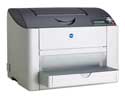
Magicolor 2450
Company: Konica Minolta

Price: $499

http://www.qms.com

I have been reviewing printers for years, and there is some special place in my tech-heart for color laser printers. I have used many different brands over the years, some of which I have reviewed here at MyMac.com, but this would be the first Konica Minolta review for me.

Honestly, it’s been a long time since I used any KM product. They simply don’t advertise Macintosh compatibility very well. So when I read a press release about some of their new printers, I thought it may be a good time to correct that and get one of their printers into the MyMac labs and have a go at it.

The first is the Magicolor 2450, a color laser printer that positions itself in the SOHO market. How well does it hold up under everyday use? Let’s take a look.

The 2450 is a full color printer. It advertises 5PPM color print speed, but like most printer advertised print speeds, I found this not to be realistic. In fact, printing a full-page color photo took much longer than many other printers in this category. The output in color quality was very good, at least for color document printing. When it came to printing photos on glossy paper, I found it somewhat lacking, at least compared to some of the newer laser printers now on the market.

More troubling was the fact that, no matter what I did, I could not print a color photo from iPhoto 6 to the Magicolor 2450. After multiple attempts, nothing but a grey scale picture would emerge. I even printed to an HP color inkjet to make sure the problem was not with iPhoto. The picture printed fine on the HP, but not on the 2450. Opening the same pictures in Adobe Photoshop or Apple’s own Preview application, and then printing to the 2450, resulted in a nice color print. But color printing from within iPhoto never worked.

Document printing is where the 2450 really shone. It prints crisp text pages fast enough to please most offices, especially when directly connected via USB to the computer. However, when connecting the printer to my network (zero configuration needed) printing took much longer than I expected. Printing the same ten-page document via network printing to my Lexmark E322 was twice as fast both in print speed and the time it took the printer to “rip” the print job. In fact, the same ten-page document sent over a similar network to a seven year old HP LaserJet 5P was also faster than the Magicolor 2450. Once the 2450 actually received the entire print job, it seemed to take much longer than expected to output the printed-paper.

Noise is also a factor to take into consideration when purchasing a printer. Every laser printer I have ever used made noise, but few come close to the output volume the Magicolor 2450 does. In short, it’s too loud. Clanks and whirls seem amplified over similarly priced Laser printers in this price range, including the above mentioned Lexmark unit.

I really wanted to like this printer. And for pure document printing, when time is not an issue, I did. It does a good job printing. Color photo printing is very good as well, just very slow.

Specifications:
Print
Color: up to 5 ppm
B&W: up to 20 ppm

Resolution
9600 x 600 dpi-class Photo ART

Interface Support
Hi-speed USB 2.0,
Ethernet (10/100BaseTX),
Parallel IEEE 1284

Memory
128 MB SDRAM
Upgradeable to 640 MB

Paper Handling
Up to legal (8.5" x 14")
Adjustable 200-sheet multipurpose tray
Manual duplex printing (Automatic – optional)
Optional automatic duplexing
Optional 500-sheet cassette

Warranty
One-Year Exchange

MyMac.com Rating: 3.5 out of 5, mostly for price and print quality.


Luxeline Snakeskin Case for iPod Nano – Review

On September 25, 2006, in Uncategorized, by Donny Yankellow


Luxeline Snakeskin Case for iPod Nano- Glamour
Company: Case-Mate

www.case-mate.net
Price: US $49.99

The Luxeline Snakeskin Case for the iPod Nano by Case-Mate is not for everyone. If you like snakeskin or reptiles, this might be the case for you. The case I got for review is called Glamour and is mostly a white snakeskin leather with gray scales in spots.

Looks aside, the case is one of the more protective cases I have tried for any iPod. The outside is snakeskin leather, and Case-Mate states that no two are exactly alike. The inside has a textured rubber-like surface that protects your Nano from scratching when inserting the iPod or removing it. It also keeps the iPod from sliding out of the case. The case itself is a hard case and is fairly thick for an iPod case. It definitely feels like it will do a good job protecting the iPod Nano.

I tested the case with a first generation Nano, and it fit perfectly. It was easy to put into the case, and just as easy to remove. Ports are easily accessed through the opening in the bottom of the case. The case is not compatible with the new iPod Nanos, but I have been told that the company is working on new cases for that line.

The packaging for the case is some of the best I have ever seen. As an artist and graphic designer, I was really impressed. It comes in a black, heavyweight box which is closed by a magnetic latch. The latch has a metallic snakeskin texture, and it opens two doors on the box. Inside the box the case is tucked away in a fabric pouch, surrounded by walls of a black velour type of fabric. The packaging alone would get five stars, if this was a review for that.

The Case-Mate Glamour does fall short in a couple areas. (1) There is no screen protector or scroll-wheel protection. Almost all cases these days come with some sort of protection for these parts of the iPod, even if it is just an overlay. (2)There is no belt clip. A belt clip is another must for an iPod case, in my opinion. (3) The snakeskin texture of the case feels very fragile. It feels like it will tear off if the case is rubbed the wrong way. (4) Finally, the case itself really smells bad. I guess it is from the leather, and I have a sensitive nose, but the odor coming from the case is awful.

At $49.99 the iPod Nano Snakeskin Leather Case – Glamour is a bit pricey and not something I can recommend for everyone. It is definitely not for the person that is going be active/exercising while using the iPod Nano. However, if snakeskin is your thing it might be for you. It is also available in black (Shimmer) and available for the full sized iPods.

MyMac.com rating 3.5 out of 5

Pros
Sturdy protective case for the iPod Nano (or full sized iPod)
Great packaging
First generation Nano fits perfectly into the case and is easily removed

Cons
No belt clip
No click wheel or screen protection
The texture feels fragile
The case really smells bad
A little pricey


More 100th podcast pictures

On September 24, 2006, in Uncategorized, by MyMac PodCast

More pictures from the 100th Podcast at the Grand Rapids Apple Store.


Pictures from the 100th podcast at Apple

On September 24, 2006, in Uncategorized, by MyMac PodCast

Tim and Guy had a fantastic day at the Apple Store, and thanks to Rick Stringer, we have some pictures from our 100th podcast! Thanks so much, Rick!

The actual 100th podcast will be online Monday morning, after edited and polished up some. Thanks for all those who came out to the show, as well as those companies who sponsored the event with some great prizes for our audience. It was a raging success, and we can’t wait to make a return to the Apple Store in the future.


More pictures will be posted later today.


MyMac Podcast 99

On September 21, 2006, in Uncategorized, by MyMac PodCast


Get the show here

Who should buy a MacPro, and who should not? That is the question this weeks thanks to listener Ivan. Tim and Chad also talk about the latest Mac news, why the iTunes Music Store needs a serious competitor, and much more.
Leave audio feedback by calling 801-938-5559

This podcast is sponsored by SmallDog.com, and Inno-Tech.com.

Get the show from these links:
iTunes Link
Podcast-only RSS Feed

 

Image Tricks – Review

On September 20, 2006, in Uncategorized, by Donny Yankellow


Image Tricks
Company: BeLight Software


www.belightsoft.com

Price: Free or $14.95 Pro Version

Do you want the ability to add cool effects to your photographs, but don’t have the money to spend on a program like Photoshop or even Photoshop Elements? If so, Image Tricks might be the program you’re looking for.

Image Tricks is a very simple to use program that can apply forty eight filters and effects to your images (and that is in the free version!). These effects range from standard filters, like adjusting color and focus, to more fun and strange filters for distorting and changing your image. Many of these filters are the same filters you would fine in Photoshop (Gaussian Blur, Crystalize). Others, like Starshine, are unique to Image Tricks.

To apply a filter you choose the effect you want, click it, and it is applied instantly. Each filter has a set of controls to set how much of each you want applied to your image. To keep the changes you click the Apply button. It doesn’t get any easier. The image below has several filters applied to it.

Image Tricks would be a great program if it stopped right there. But BeLight has gone even further. There is also an image generator, which produces designs and patterns that you can use in your artwork. The free version comes with twelve image generators. Need some 3-D blobs? Use the Atoms generator. Clicking render will randomize the design created. Once again, all of the generators have controls to change the way they look, and it is as easy as clicking the generator you want and making the adjustments in the settings.

Want more? How about thirty different masks that you can apply to your image. Give it a heart frame, or fame your photo in an Apple logo.

Or how about zoom, rotate, and scale features? All here. You can also copy an image from another source and paste that into a window for editing.

Samples from many of the included filters and generators can be found at: http://www.belightsoft.com/products/imagetricks/samples.php.

Image Tricks also has what BeLight calls iPhoto integration. Calling this feature iPhoto integration is a stretch, and the weakest part of the program. There is an iPhoto button in the Image Tricks window, but clicking it does not display your iPhoto library in another window the way iWeb would. Instead, iPhoto opens and you can drag an image onto the Image Tricks icon for applying filters. Not true integration in my book.

Would you believe there is more? Image tricks allows you to import a file from over 20 different formats. If your Mac did not come with Photo Booth, there is no need to wait for Leopard. You can import photos into Image Tricks and make your own Photo Booth. It will also export files into TIFF, JPEG, PDF, PNG and GIF formats. Plus, it is a universal binary!

Did I mention that these features are all included in the free version? (I’m starting to feel like I’m writing an infomercial)

For $14.95 you can upgrade to the Pro version. This gives you five more filters and eight more image generators, and two years of free upgrades. Not much to entice most people to make the purchase, but the free version is worth $15 or more by itself.

Whether you get the free version or the Pro version, Image Tricks is definitely something worth downloading. Kids of all ages will have fun with Image Tricks.

MyMac.com Rating: 4.5 out of 5

Pros:
•Tons of filters and effects for your photographs for free!
•Simple to use
•Imports and exports in numerous formats
•Universal Binary

Cons:
•iPhoto integration is not true iPhoto integration
•$14.95 for the Pro version does not add enough features to make it worthwhile when the free version has so much


Razer Pro | Solutions
http://www.razerpro.com

pro | tone m100 in-ear headphones
$40
http://www.razerpro.com//index.php?option=com_content&task=view&id=36&Itemid=47

pro | tone m250 clip-on over-ear headphones
$50
http://www.razerpro.com//index.php?option=com_content&task=view&id=37&Itemid=48

Both models are available in either black or white.
MyMac.com suggests you order black, for security and physical wear, but the choice is yours.

These new earphones from Razer Pro | Solutions are replacement ‘phones if you don’t like the ones that are packed with your iPod or other portable music player, or if you lose them, or if you need another set for whatever reason. They are not premium audiophile headphones, which we reviewed previously here, here, and here.

It took me longer to extract each set from the plastic and cardboard packaging than to form an initial opinion on their sound and comfort. It was:


m100 — "Hey, these are comfy and sound really good."


m250 — "Peculiar over-ear design. Not sure if I’m getting the best sound or fit."

Audio response is similar from both products, emphasizing a bright, frontal sound that accentuates the in-your-face aspect of today’s popular music and action games. Bass is surprisingly powerful, but you’ll have to obtain a closer fit with m250′s than I did.

Comfort is tops, especially for in-ear ‘phones. Razer’s engineering team concentrated on audio clarity and ear contentment, and succeeded in both areas. Ear tips on m100 are soft, round blobs, which are my personal favorites. Cushioned pads on m250 touch your ears, held in place with spring-clips that rest behind the ear — not easy to describe, but simple to put into place.
No user’s manual is provided for either model, but none is needed, except for a missing diagram of optimal positioning of m250′s clip/pads. Ample soft cases contain earphones and extra tips, for the m100 (three sizes are included). Pricing in the $40-50 range is excellent value, especially for m100, with its powerful bass and brilliant presence throughout the audio spectrum.

Sound quality is not deep, rich, and sumptuous, if that’s your concern for classical music, jazz, or some popular tunes. Pro | Solutions’ upfront approach to audio impact will not appeal to the geezer crowd who yearns for the lost era of Kingston Trio or Glenn Miller, not to mention Leonard Bernstein or John Coltrane. If you are young or youthful, m100 will send music piercing into your psyche, and m250 (with appropriate snug over-ear fit) will leave you mostly satisfied.

In-ear headphones are not for everyone. Roughly one-fourth of all iPodders, from anecdotal observation, much prefer some variation of over-ear contraption, which is where m250 fills a niche. Unless I achieve closer contact with m250′s comfortable over-ear pads, I’m not able to rate them in the same league as all the other models reviewed previously. Our provisional rating is 3 out of 5, to be updated when appropriate.

Razer Pro’s affordable, hot-sounding m100′s are indeed "tiny, but mighty," with "interchangeable ear plugs in 3 sizes for comfortable fit," and are "lightweight for listeners on the move," all as promised in the company’s PR. MyMac.com awards them 4 out of 5 for their audio presence, comfort, and price, if your listening tastes match their sonic design.


I love my new MacBook. It’s fast, it’s easy to use, it’s feature-packed, it’s now loaded with Photoshop Elements 4, it’s white, ands it’s cute. If I was single I’d be a babe magnet with my new MacBook. But I’m just an old fart with a great new toy.

Sometimes we have to be careful what we ask for. I bought my MacBook so, as a photographer, I’d be more mobile and effective in the field. Flexibility on the hoof. I haven’t been traveling much lately but I eagerly await that time, which is coming soon enough.

I can now compute without going downstairs to my studio. I’m writing this right now in the comfort of my living room / kitchen while my lonely PC and all of its equipment awaits me, momentarily sidelined. My Windows studio is where I do most of my image editing. I’ve got a 21" monitor, card reader, printer, lights, Wacom Intuos 2 Tablet, Adobe Photoshop CS2, and enough photo paper to last me into the next millennium.

My hope was that I would be able to manipulate my images using my MacBook in much the same way I use my PC, and I’d be mobile. Slowly my consciousness is awakening. Reality is setting in. Folly becomes apparent as my experiences unfold.

I will soon be traveling with my new MacBook. In January I’ll be flying on Southwest Airlines to San Francisco and the 2007 MacWold Expo. I will become one of those travelers of whom I often made fun. I mean the guys at the airport and on my flight who can’t seem to keep their noses out of their computers.

I used to think that even if I had a laptop I’d still sit back and appreciatge "the joy of traveling," taking notice of all the new faces and places, wondering about the lives traveling with me. Then there’s always looking out the window and marveling at mankind’s ability to fly this huge machine, which lasts a good ten minutes into the flight.

But my rugged individualism will take a nosedive as I become part of the computing masses. I guess wearing my pants up around my chest can’t be far off. I’ll have my face in my MacBook and hold my head up high (I have a very long nose) as I ignore my seat neighbor in favor of getting lots of work done in flight time. This is where reality sets in.

MacBook has some wonderful features. One of them is iPhoto. With this application I can manipulate images by colors, sharpness, depth, size, and brightness, among other features. And now I’ve added Photoshop Elements 4 for Mac which deepens and widens my photo imaging capabilities. That’s all well and good, but it’s the fine tuning of images which creates art and, hopefully, great photographs.

I actually had the thought of doing just that while en route. This would necessitate all the Wintel hardware I have in my home studio: printer, photo paper, card reader (possible), Wacom Intuos 2 Tablet, and good lighting. Plus I’d have to purchase another seat for the space I’d need to set up all this stuff. What was I thinking? That I would buy a MacBook and all my Photography On The Run problems would be solved? No! Problems NOT solved. There’s no way I can carry tablets and printers and papers and the other stuff I need to be totally equipped.

It’s not all bad. As a matter of fact none of it is bad. I can still do lots of preliminary image adjusting before I get to the detail work. That alone saves me oodles of time. And I have a safe place to store all of my images. The learning curve is long, and I must be patient (not my strong suit) as I wend my way through the world of digital photography using this new tool.

How hard is it to do the preliminaries, save them to disk, make a copy, and throw them on the PC when I get home? It’s not hard. It’s different. And I look forward to learning how to use this wonderful MacBook more efficiently, as it expands my abilities, and makes life even more enjoyable.


Do you have a computer with a dead ethernet jack? If so, you can always go to a tech and pay a good amount of money to have it repaired. If it is a tower, and you are handy with computers, you can always replace the ethernet card. However, if you have a laptop or a computer like the latest iMacs, replacing the ethernet card is easier said than done. There is another solution out there that will cost under $30, and you don’t have to take your computer apart.

The solution? A USB to ethernet adapter and an open source driver called Pegasus.

I use to have a G3 iBook at work with a broken ethernet port (from a kid tripping over the cord and the iBook taking a dive). After weeks of searching for a solution, I stumbled on this one. I don’t remember where I found this, but I’m glad I did.

A USB to ethernet adapter is not easy to find. It is even harder to find one that is Mac compatible. From all of my Google and Apple Discussion searches, the Belkin USB to Ethernet adapter was the way to go.

http://catalog.belkin.com/IWCatProductPage.process?Product_Id=104991

You can find it for under $30 at Amazon.com and other websites.

The technical specifications for the Belkin will not mention being Mac compatible. However, with the open source driver called Pegasus, it will be Mac compatible. The driver can be downloaded free from this site: http://sourceforge.net/projects/pegasususbmacx/.

Once downloaded and installed, restart the computer, plug in the adapter and you will be good to go.

The iBook I used the adapter on was running 10.3.9. I don’t know if it will work on earlier or later operating systems, or Intel Macs. However, if you have no other solution than spending a lot of money for a repair, for under $30 it is worth trying. You can always return the adapter and uninstall the driver.

That’s it!

Not a long Macspiration this week, but hopefully one to help you out.


MyMacMini Podcast 8

On September 18, 2006, in Uncategorized, by MyMac PodCast


Download the podcast here

Vacation and the 100th podcast is on Tim’s mind, while David Cohen talks about being a Mac guy, and Nemo reviews the Signature Sleeve from Case-Mate and the 5 in 1 ExpressCard Media Reader from Macally.

Leave audio feedback by calling 801-938-5559

Get the show from these links:
iTunes Link
Podcast-only RSS Feed

Links from the show
Signature Sleeve
5 in 1 ExpressCard Media Reader
La Encantada Apple Store
Grand Rapids Apple Store
CleanDR Screen Cleaner


Kibbles and Bytes 483

On September 16, 2006, in Uncategorized, by SmallDog

A very busy week this week!   I’ll get to all the news coming out of Apple a bit later in this issue but first I want to tell you all about Project Burlap.  For weeks, all we have been able to say is "Woof" but now the true story can be told.   Small Dog Electronics is opening our flagship retail store in S. Burlington, Vermont next month.  This will be a 3700 square foot store at the busiest intersection in Vermont.   We are located in the same shopping center as Eastern Mountain Sports and Barnes and Noble.  We are right across the street from the biggest and busiest mall in the state and we are walking distance from the University of Vermont.  Right off of Interstate 89 we have what we feel is an ideal location.    Hannah Parfitt has been working hard to make this store a reality and she will be joined by our current Waitsfield store manager, Rob Berkey and Apple Certified Tech, Scott Obara as the core staff for this store.   Mark Jones who has been our bookkeeper for many years is moving to take over the Waitsfield store which will remain open.

Hapy and I have, for years, felt that the Burlington, Chittenden County market was the right place for our next retail venture but it required just the right combination of a great location and more importantly at great staff to make it a reality.  This store will have extended hours and be open 7 days a week.  We are hiring personnel and making fixtures, creating a sound room for iPod speakers, laying flooring and planning for our grand opening.   Not only is it a lot of work but it is also a lot of fun!  You can expect the same world class Small Dog customer service and a great selection of Apple Macs and iPods as well as accessories and peripherals.   We will have a complete Apple Authorized service center for our customers and will feature Small Dog’s private labeled products, too. We’ll also be offering Stephen Huneck’s famous dog-related artwork at the store.

Two members of our Board of Advisors deserve some special recognition for helping in this project,  Steve Magowan, an attorney from South Burlington told us about the vacant property and John Osgood, our neighbor here at Small Dog negotiated the lease on our behalf.   I’d also like to thank Mike Hogan and Apple for their encouragement and support.  I think we will have a great staff up in Burlington, without even advertising we have dozens of qualified candidates.  I was up in Burlington last night at the Vermont Businesses for Social Responsibility board of directors meeting and I stopped in a Starbucks for a "hammerhead"  (that’s one of many names for a cup of brewed coffee with a double shot of espresso in it) and the clerk noticed my Small Dog sweatshirt.   He went over the newspaper rack and showed my our ad in Seven Days that announced our new store and asked if we are hiring.   He has a technical background and was anxious to get back into that rather than brewing coffee.   This is the kind of reaction we are having all over town.

Ed will be talking about the specifics of the announcements this week from Apple but I want to give you some of my perspective on the news from Apple.  As you may know, Apple has announced new iPods across the line, shuffle, nano and full size iPods.  They announced a major upgrade to iTunes and have brought movies to the iTunes store. Steve Jobs also showed what might be the most exciting development, the iTV (codename) which is a wireless interface between your Mac and your TV.  While this product will not ship until the beginning of the next calendar year,  it is the "media center" that many of us have been looking for – the missing link in the digital home.   Imagine sitting on your couch and being able to stream movies, video, music, pictures or any combination of the above to your digital home entertainment system!   The 24-inch iMac introduced last week was a great step – but this device has a universal appeal that will be yet another market that Apple can define and dominate.

The new iPod nanos are very cool.  Hapy told me that he’s trading in his full size iPod for an 8GB nano because it now holds plenty of music.  I’ve still got about 20GB of free space on my 60GB unit so I have more purchases at the iTunes store to do before I’ll be ready to upgrade.  On the other hand, movies!   The new shuffle is simply amazing.   It is the smallest MP3 player available and it has a scroll-wheel!  I definitely want one!  I’m going to import some helmet speakers and start offering a complete motorcycle (or snowmobile) music system featuring the shuffle and Small Dog’s helmet speakers.

These are powerful products to take Apple into the end of the year and the holiday season.  Powerful products for our new store in S. Burlington, too!  It is no wonder that analyst increased their estimates for Apple and that their common stock is again on the rise!

+———————————————————+

New iPod Specs! By Ed @ Smalldog.com

5G iPods Feature:

- 60% brighter screen. – 3.5 hours of video playback. – Gapless audio playback (finally!) – Redesigned earphones. – New quick scrolling feature using letters – very cool! – New games – Bejewled, Cubis 2, Mahjong, Mini golf, Pac Man, Tetris, Texas Hold Em, Vortex and Zuma. – Games will work on all 5G iPods, will cost $4.99 each from the iTunes Store

White and black are available: 30GB – $249 80GB – $349

Second-generation iPod nano Feature:

Looks like an thin iPod mini with beautiful Aluminum shell

- Green, silver, black, blue, pink available – 24 hour battery life – New charger, armband, lanyard headphones

- 2GB – $149 (Silver Only) – 4GB – $199 (Silver, pink, green, blue) – 8GB – $249 (Black)

iPod shuffle:

World’s smallest MP3 player Half the size of the previous generation Shuffle 1/2 ounce

- Metal body with white click wheel – 12-hour battery

- Requires included dock to sync

- Available  in October

+———————————————————+

iTunes 7 Dissected By Ed @ Smalldog.com

Along with the new iPods, Apple released iTunes 7. This is a major update to the venerable application. In this article, I’m writing about new or improved features in iTunes 7 to look out for.

I downloaded iTunes 7 as soon as it was posted on Apple.com. Within 15 minutes I had installed the program, and had purchased a movie and an iPod game (Pac Mac.) The game was strictly for research, of course.

So far, I’ve no problems with iTunes 7 – indeed, I’ve had some pleasant surprises, like when the new Download Manager  found some stray tracks on the iTunes Store that had not been downloaded, and automatically started to download them for me. However, I’ve have read that some people are experiencing glitches with the program, and apparently some professional Podcasts (e.g, Popular Mechanics) have been dropped or otherwise scrambled. I’m sure Apple will work out the bugs ASAP. Before you install iTunes 7, it’s a good idea to back up your iTunes library, in case it somehow gets scrambled during the install. This happened to Wil Wheaton. You can read about how it was resolved here:

http://wilwheaton.typepad.com/wwdnbackup/2006/09/apple_gave_me_b.html

So, here are a few things to notice in iTunes 7:

- Performance

On my computer, iTunes 7 runs considerably  faster and smoother than iTunes 6.5. Of note, video finally plays back in a useable manner, even at fullscreen resolution. The new Cover Browser animation is extremely smooth.

- iTunes Interface – iTunes 7 sports a slightly updated interface. Regarding the "look" of the application, some people feel it is a hint of things to come with Leopard. It’s a sort of smoothed out and less glassy version of Aqua. Colors are much more subdued. Some people hate the new look, but I like it. It feels clean and professional.

There’s also a new shinny blue icon. You can read about the iTunes icon history, and see old iTunes icons here:

http://macteens.com/gallery/displayimage.php?pos=-3582

On iTunes left pane, you’ll notice that the Library is now divided into Music, Movies, TV Shows, Podcasts, and Radio. The Store heading is divided into iTunes Store and Purchased. When you purchase a song, a new Download header pops up under Purchased. The new Download window is great – it’s possible to start listening to music or watch video as it downloads. Also, you can observe download progress and pause a download in-progress for later.

The Podcasts listing now displays a number showing how many Podcasts are waiting to be listened to. I have 37 sitting there, waiting for attention.

There are new options for viewing items in your library. I especially like the new List View – it shows the album cover next to a list of songs and artists on the album, all in a long list. This will make it easier to choose songs for mixes.

Also of note is the new Cover Brower. This is the digital equivalent of flipping through a sleeve of CDs or a stack of LPs. It’s an elegant and fun way to choose music. I really like this feature. It will look great on a big TV, if you have your Mac set up as a digital home media center.

- iTunes Store-  For most people, the addition of full-length movies to the iTunes Store (it’s now simply the iTunes Store, no longer the iTunes Music Store) was the big news of the day. Right now, there are only 75 mediocre movies in the iTunes Store, but Steve Jobs promised that more would be added in the weeks and months ahead. I can imagine buying movies when traveling, or during huge snowstorms when I don’t want to go out. Also, if the 30 minute download time is released, it would be possible to purchase a movie, start the download, cook dinner, and then begin watching the movie when dinner is ready. I guess I’ll do that when there are better movies.

I did purchase "The Brothers Grimm" for $9.99. The file is 1.3 GB, and took 68 minutes to download. Apple wants this to take more like 30 minutes as the Store develops. The movie is 16 x 9, and looks and sounds great on my 22" Cinema Display. It close to, but not quite DVD quality. It would look excellent on a Macbook or MacBook Pro, or an iMac.

Movies downloaded from the iTunes Store have chapter markers, so you can skip ahead as on a DVD. The lousy movie controller in iTunes

 - Backup Your Music – This is now easier than ever. Go to File > Back Up to Disk, and you will see options to back up your entire library, back up only iTunes Store purchases, back up only items added or changed since last backup. If your collection is larger than a single DVD or CD, iTunes will create a series of discs for you.

- iPod Preferences – iTunes 7 has a nifty new interface for the iPod. The only way to see this is to connect your iPod. You can now manage music, movies, TV shows, Podcasts, Photos, Contact and Games individually. In the Summery panel, you can see how much free space you have on the iPod, and how much space is dedicated to Audio, Video, and Other.

Personally, other than Contacts & Calendars, I’ll manually manage everything that goes on and off the iPod. Options for automatically syncing media with the iPod have been substantially upgraded. It’s now easier to manage what media automatically syncs to the iPod.

- Reverse Sync –  Now you can move music purchased from the iTunes music store off of the iPod and onto an iTunes-authorized computer. There are other programs that allow you to do this, but this is the first time Apple has overtly allowed it. Again, this currently only works with music purchased from the iTunes Store.

- iTunes will now download all the album covers for music not purchased in the iTunes Store. This makes Cover Browser work better, and it also adds to the feel of iTunes. Other programs will also do this for you.

+———————————————————+

iTunes 7 Quick Tip By Ed @ Smalldog.com

iTunes 7 allows you to make and manage multiple iTunes libraries, just like iPhoto 5 and 6! You can now easily keep an iTunes library installed on your computer’s hard drive and a separate iTunes library installed on an external drive.

To create a new iTunes 7 library, click on the groovy new electric blue iTunes icon, and then quickly mash down on the Option key. You will be prompted to choose an iTunes library, or to create a new one. If you create a new library and you want to switch back to the old iTunes library, simply hold down the Option key again when launching iTunes.

Other programs have allowed you to do this, but this is a very easy solution to a common problem.

+———————————————————+

Back-up Those Digital Photos! By Ed @ Smalldog.com

We’ve said it many times before, and we’ll say it many times again: it’s very important to back up your computer’s hard drive. The hard drive is the mechanical device that stores all the data in your computer. Because it’s a mechanical device, it can – and eventually will – fail.

The most important files on your computer’s hard drive are the ones that simply can’t be replaced. For most people, digital photos are at the top of this list. I have some digital photos that are very important to me,  including photos of loved ones who have died. It would be a tragedy if I somehow lost these.

The easiest way to back-up your photos is to back-up the entire contents of your computer’s hard dive. High-capacity, high-quality external hard drives are getting less expensive by the month. You can see our selection of hard drives here:

http://www.smalldog.com/category/x/x/storage/storage/wag113/wag10013/ mymac

You can use the software bundled with most of these drives for automated daily, weekly or monthly backups, or you can download two of my favorite shareware programs, Carbon Copy Cloner or SuperDuper to handle the task. See these two programs here:

Carbon Copy Cloner:

http://www.bombich.com/software/ccc.html

SuperDuper:

http://www.shirt-pocket.com/SuperDuper/SuperDuperDescription.html

You can also simply copy your iPhoto Library folder to an external hard drive (or a scratch disk) to get a fully working backup. Simply drag the folder "iPhoto Library," which is typically stored in your Pictures folder, over to the external drive. This method is not sophisticated, but at least you get your entire library backed up – including albums, keywords, comments, organization, slideshows, and thumbnails.

You can burn your entire iPhoto library to a CD or DVD, depending on the size of your file. If your iPhoto library is less than 4 GB, you can burn the entire iPhoto library to a CD or DVD; in iPhoto 6, go to Share > Burn. You’ll be promoted to feed your Mac a blank CD or DVD. There are a few catches with this.

First, to make sure iPhoto copies your entire library, highlight the "Library" header in the upper left pane of iPhoto, and be certain no individual photos are selected or highlighted in the library. Otherwise, you will only copy and burn the highlighted image – not your entire iPhoto library, as we are trying to do here.

Second, if your iPhoto library is larger than 4 GB, it will not fit on a single DVD, and iPhoto 6 is not smart enough to span multiple CDs or DVDs. You can divide your library into chunks of 4 GB or less, and then burn your library in batches. Or, you can use Roxio Toast to burn your library, as Toast can span single data sources over multiple CDs or DVDs.

Another way to back up your photos is to export every single photo in your library into a folder on your desktop, which can then be burned to a CD or DVD. The advantage of doing this is that all files will be exported in a full-resolution format, as JPEG or RAW files that can be opened on almost any Mac or PC. Only the images are exported; keywords, thumbnails, ratings, etc will not be exported. Date and time information will not be exported, as that data is embedded in the actual images. In iPhoto 6, to do this, go to File > Export. Make sure "Size" is set to "Full-size images." Then create a new folder at the location of your choice, name it something memorable (such as iphoto_library_2006_01_09, etc.)

This folder should be burned to CD or DVD, or copied to an external drive.

I think it’s a great idea to make multiple copies of your digital photos – keep a back-up copy on an external hard-drive, and regularly burn a copy of your photos to a CD or DVD. Some people even keep a copy of their iPhoto library off site, away from their computer and back-up hard drive.

The last method to back-up your photos is old-fashioned: print them. Select your favorite photos and have them printed at good photo lab, or at a local drug store or Costco, or buy a good photo printer and print them yourself, on good quality paper. You don’t have to print all of your photos, just the very important ones. Out of 6000 photos in my iPhoto library, only a couple hundred are truly important to me. These are the ones I will have printed!

+———————————————————+

Parallels Now Supports the Mac Pro!

By Ed @ Smalldog.com

Ok, ok, so this is cut and pasted directly out of their press release, which can be read in it’s entirety here:

http://www.parallels.com/en/news/id,9598

Now you can run Windows on your Mac Pro, without having to reboot the computer. Update Release Candidate also adds Experimental Support for Windows Vista Beta

Parallels announced today that it is making available the Update Release Candidate (RC) for Parallels Desktop for Mac, the first solution that enables users to run Windows and other operating systems at the same time as OS X on any Intel-powered Mac, without re- booting.

The update RC, which is free for all Parallels Desktop users, adds support the recently released quad-processor Mac Pro towers outfitted with up to 3.5GB of RAM. With the addition of support for Mac Pro towers, Parallels Desktop for Mac is now compatible with all Intel- powered Apple computers, which in addition to the Mac Pro includes the MacBook, MacBook Pro, iMac, and Mac Mini.

The update RC also offers full compatibility with the developer builds of Mac OS X 10.5, code-named “Leopard.” Leopard, which was previewed in Steve Jobs’ keynote address at the 2006 Apple Worldwide Developer Forum, is expected to be ship in Spring 2007.

“By adding support for Mac Pro towers and OS X ‘Leopard’, we’ve shown once again that Parallels Desktop is not only a great productivity tool for any Intel-Mac user, but also for Mac software developers who need to work with Apple’s next-generation OS.” said Benjamin Rudolph, Marketing Manager, Parallels. “Now, anyone using a Mac Pro, Mac Mini, MacBook, MacBook Pro or iMac can run any version of Windows alongside any Intel-compatible version of OS X, including 10.4 ‘Tiger’ or the upcoming 10.5 ‘Leopard’.”

In addition, the Parallels Desktop for Mac update release candidate includes experimental guest OS support for the beta builds of Windows Vista, the next-generation of Microsoft’s Windows operating system. Vista is due to be generally available in 2007.

You can read more about Parallels or buy it here:

Parallels installation on any intel Mac with Windows XP Home

http://www.smalldog.com/product/40927/mymac

Parallels installation on any intel Mac with Windows XP Pro

http://www.smalldog.com/product/40926/mymac

+———————————————————+

New SDE Board Member By Don @ Smalldog.com

I’m pleased to announce that we have added another member to our Board of Advisors group.  Jesse Stein has been actively selling and marketing to the Apple consumer for over 20 years . During his 15 year career at Apple Computer he held sales and support positions for Apple’s enterprise, education and reseller clients in North East Region, Key North East Market Center and Executive Briefing Center positions, Product Line Manager for Hardware in Apple’s WW Corporate Briefing Center and was the Product Manager for the Power Macintosh Line, bringing the Power Mac G4 733 (first Machine to ship with iTunes, iDVD, and the DVD Superdrive) to market.

He moved his family back to the North east taking a Marketing role at IBM, where he was Product Manager for the IBM PowerPC 970 (aka G5) chip and is currently the IBM’s representative and Marketing Program Manager for Power.org, a multi-company standards body focused on Power Architecture Technology.

+———————————————————+

Specials!

Here are the specials for this week, valid through September 22 or while on-hand supplies last. Be sure to use the wag URL to get this special pricing.

+—————-+

EXCLUSIVE – Save on the Apple Hi-Fi!

To order: http://www.smalldog.com/wag16918/mymac

+—————-+

LaCie 300gb Extreme Triple Interface Firewire 800/400/USB – $169, limited time only!

To order: http://www.smalldog.com/wag16858/mymac

+—————-+

MacBook 1.83, Canon iP1700 Printer, Belkin Surge Protector, Cable for printer, Ogio Case – $1199!

To order: http://www.smalldog.com/wag16817/mymac

+—————-+

Mac Pro Intel 2.66 2 GB (512MB ECC RAM x 4)/250GB HD/SD/7300GT, 3- year Applecare Plan – $2869!

http://www.smalldog.com/wag16917/mymac

+—————-+

MacBook 13" 2.0GHz 512/60/SD/AP/BT white, Epson Printer, USB Cable, Surge Protector – $1389

http://www.smalldog.com/wag16916/mymac

+—————-+

Rebate on Epson Stylus CX4200 All-in-One

http://www.smalldog.com/wag16804/mymac

+—————-+

$50 Rebate – Miglia TVMini HD

http://www.smalldog.com/wag16859/mymac

+—————-+

Griffin Desktop Stand for Airport Express Base Station – $12.00

http://www.smalldog.com/wag16912/mymac

+—————-+

PowerMac G5 DC/2.3GHz 512/250/Super/GeF6600, Apple 23in Cinema Display (r) – $2799! (web only)

http://www.smalldog.com/wag16921/mymac

+—————-+

MacBook 13in 1.83GHz 512/60/combo/AP/BT white PLUS 3-year Applecare plan – $1279! (web only) Please Note: Web Only Exclusive – not available in our retail stores!

http://www.smalldog.com/wag16920/mymac

+———————————————————+

I’m off for a change of pace today.  I’ll be attending the meeting of the Board of Trustees of Goddard College.   It looks like a sunny weekend here in Vermont so I’m sure Grace and I will get out on the bikes, too to catch the early foliage.   We will update you frequently on the progress of our new store and of course, you are all invited to our grand opening and the pre-opening "private" openings that will be held before we really throw open the sashes!

Have a great weekend and thanks for reading Kibbles & Bytes!

Your Kibbles & Bytes Team,

Don, Ed & Holly


Working On The Mac In The Late 1980s

On September 15, 2006, in Uncategorized, by Roger Born


Characters and people I knew and worked with in prehistoric Mac times.

ANNE – Was a wonderful interior designer, working out of her house in Southern California in the late 1980s. She used a Mac II, brand new, out-of-the-box for five grand. I helped her purchase and install RAM back then, because the more RAM you could install, the faster that 25 MHz computer would run applications.

Her house was furnished in late 70s Hippy fashion, which looked dated a decade later, but it was an interesting place to hang out. Anne was not the most beautiful girl, but she was a very decent sort and very business-like to work with. This lady was almost always in a bathrobe when I would come over, smelling like she just came out of the shower, her hair looking slightly damp and not yet blow dried. There was nothing overt in this. She probably liked to take a lot of showers. So I would just have her sit away from the Mac II while I had the top off and was fooling around its insides.

We Mac people had our culture back then – an informed, power-using clique, and Anne was a newbie, buying her way in. She had to be taught everything, including navigating the Desktop, working in PhotoShop, Corel Draw, and Quark. But she was a fast learner, and very intelligent, so she picked up stuff quickly, and soon was showing me shortcuts and processes, while turning out wonderful room interior proposals for her clients.

Printers back then were almost as expensive as the Macs were, and you would have to buy Font packages to have them installed on the memories of these large, heavy laser printers. I think you could print a page every couple of minutes. Of course, more RAM for these guys was also required to do heavy graphics on paper. Inkjets were almost as big and expensive, but a lot more buggy, since they weren’t made by Apple.

Anne had a son, almost grown. A blond kid that I suspected could neither read, write, or talk. He was a surfer-dude, thin, tanned and blond, always heading out to the beach close by, to ride his waves. The TV in their house was always on the weather channel, to get surf conditions. He had no interest in the Mac at all, but he loved his mom’s art. For Anne, I did some surfboard graphics, which she gave him for his birthday, and which he used as a design to airbrush onto a new board.

I was also the software Pusher in those days, carrying around a small shoebox of 3″ ” floppies. These held a myriad number of software programs for the Macintosh, mostly fonts, applets, control panel apps, screensavers (remember Satori?), as well as stand-alone, one-of-a-kind apps that made the Mac so much fun to work on. I also had programs like Aldus FreeHand, which fit on two floppies, PageMaker, on three floppies, and Microsoft Word 5.0, which took five floppies, mostly for the fonts.

These last were only demos of the programs themselves, complete in every way, and before the need for installation serial numbers, but if you bought the applications ($4-500), you also got a printed manual and the box. I pushed these things to my small group of users, hoping to save them from the horrors of Quark and Corel Draw. Of course, they all bought their own copies so they would have the boxes to proudly display above their Mac computers on their big oak computer desks.

I also used these applications myself, since they installed so quickly, so it was handy to have them when I worked the long hours on my friend’s computers, and sometimes needing to print out something on their expensive printers, out of PageMaker or FreeHand, uh, for my own clients, who wanted their illustrations and/or corporate manuals.

As you probably figured, I did not have my own Mac. Who could afford five grand for a computer back then, when you were just a job-shopper working the job-of-the-month? So the free services I provided for my Mac friends allowed me use of their Macs to do my own business on the side. Kinkos was handy back then too, since they all had Macs and Apple laser printers, so a guy could get his stuff outputted for his clients.

Anne later married a real estate executive and moved to Malibu, raising the three new kids she gave him. Now I hear she paints watercolor landscapes.

FRANK – an early educational computer vendor for many school districts. Frank was an engineer, who tired of the trade and wanted to be an entrepreneur, so he rented a small warehouse-storefront and bought and sold Macintoshes. Mostly he had the Mac Plus, since educators loved that for their teachers and administrators. But he also had the first Newton and Mac Portable, as well as a couple of Mac IIs.

Frank also had access to Apple Credit, wherein someone could actually purchase a Mac Plus for two grand, on low monthly payments. I helped my parents in Kentucky to buy a Mac Plus back then, and floated enough credit to buy my own Mac II with an Apple 12” color monitor. The extra RAM was borrowed from Frank’s store, since he had so much of it. I paid him for things like this by creating his company mascot, sort of a Mac Plus with hands and feet, and a happy face on the screen. It was cool to put this art and his company name with a locator map on coffee mugs and fliers and mailings, connecting Frank with another Mac power-user who had the special equipment for putting artwork on mugs and another guy who had a new color inkjet printer.

I wasn’t the only one of the hangers-on around Frank’s store. There were the Lopez brothers, young kids, barely teenagers, who spent time every day on the Mac IIs in the display area in the front of the store. They drew awesome, photo realistic art in FreeHand. You could watch their art, like a beautiful 18 wheeler tanker truck, as it slowly drew each layer on the screen, until the finished work was complete.

Frank and I helped these kids get piecework with a company doing California Drivers License manuals. That guy was a maker of books and publications, old school, and used to paste-up and drafting board work, but he bought their printed art, just the same. These kids were too young to work, and perhaps didn’t even have a green card to be working, if they could. But with the Mac, their art had life, and they had good income.

Sadly, Frank was put out of business one day, when Apple decided to do their own Educational channel. He lost his right to sell Macs to educators, and went back to engineering, closing his store, and selling his stock for pennies-on-the-dollar. He now works for Microsoft, or so I hear.

ED – Here was a guy, when I found him, who was doing entire publications for companies, on a Wang, typing out lines of code on a green monitor, keeping the layout and font styles in his head. He did awesome, professional work, but it pained me to see him doing it like he did. So I introduced him to the Mac, and it didn’t take him long to see the value of WYSIWYG. He bought one of the first Mac IIfx, with two, large Ikigami color monitors, all the RAM in the world, and every font in existence. Twenty-Five grand, I think he spent for all of it, but being a real newbie, I stuck around to teach him about things on the Mac.

We became fast friends after that, and still are. In the beginning, he could make Fontographer tap dance, and soon was creating his own fonts. He spurned PageMaker and even Quark, preferring to do advanced page layouts in Microsoft Word. He was quite successful in that too. Since I had my own Mac, I did all his line art for his manuals.

He made his living doing publications and technical manuals for local corporations in Southern California, so he considered himself to be just a page layout guy and font expert. But one day, I introduced him to Photoshop, just so he could clean up photos for his manuals. Who knew I would unleash a monster upon the world?

Ed found that he could paint in Photoshop. Not only paint, but do awesome computer graphics and abstract art. He ended up doing art and animation backgrounds for Peter Gabriel concerts, and now has fine art hanging in galleries – all created from blank documents in Photoshop.

Of course, he had to buy and own nearly every color printer ever made to that point. But most of these had output that were sadly lacking to his perfect eye. Eventually, he went to professional Giclee large drum inkjet printers, output on canvas and mylar, to get the museum quality he wanted for his fine art.

You know, to this day, he still uses and maintains his Mac IIfx! He works in Mac OS 8.5, using Fontographer and Suitcase, as well as the host of older Mac publishing and graphics apps. He is happy in this, and why not? It all works. So why learn something new and spend all that money for new hardware and software with a steep learning curve? That would never work for me, but it works for Ed.

The Eighties were totally different back then for people buying and using the Macintosh. It was not quite the wild, wild, West, but almost. Macs back then were very expensive, but powerful graphics tools. Today, we fly at warp speed on Macs which no one could even dream of, and we carry around cheap Apple pocket devices that are more powerful than those five grand desktop beasts that were as much of a status symbol to own, as they were awesomely fun and productive to use.


MyMac Podcast 98

On September 14, 2006, in Uncategorized, by MyMac PodCast


Download the show here

The big new products from Apple are discussed, including the new iTV, iPods, iPod Nanos and Shuffles, iTunes 7, and so much more. John Martellaro joins us for a segment as well. Plus, with no Mini podcast this week, Nemo and Robert stop in for a visit, and Guy Serle’s 50th, and last, DashBoard Minute.

Leave audio feedback by calling 801-938-5559

This podcast is sponsored by SmallDog.com, and Inno-Tech.com.

Get the show from these links:
iTunes Link
Podcast-only RSS Feed

Links from the show
Chax
MailTemplate
You Control: Desktops
Data rescue
Google.com

 

What is iTV?

On September 14, 2006, in Uncategorized, by David K Every


A lot of people are very excited about it. I must admit, the features sound quite convenient. But there are a lot of things it could/could-not be.

For one, I don’t think it is a "computer", though it obviously has some processing power. And I don’t think it is a DVR. I think it is basically an Airport Express on steroids. It basically gets its data across either a wired or wireless network, it receives the infrared commands (which it relays to your computer), and your computer does all the work. So it is a remote station for your computer, not a media station. That means your computer must be on, in order to service the iTV. This helps Apple dramatically lower the cost and parts count, and eliminates redundancy. They don’t need as much computing power, memory, hard-drive, etc., in the iTV. They can get away with all solid-state storage (possible), it is just a video playback buffer and remote video connection. Think of all the licensing stuff it avoids by NOT having iTV as an actual computer running iTunes (and its own copies of media on it), but that it is just a remote player for them! It would have the downside of if you’re having problems with your computer, then you’d be having problems with watching movies. If the network was spotty, then the media would be spotty.

Of course I could be wrong. Apple could have stuffed a hard-drive, lots of memory, and whole operating system in there. It could be a stand alone device that doesn’t require any computer at all, and is basically a turn-key multi-media workstation. But if they did that, I’d have a lot of questions; why no iPod dock or USB (to allow an iPod dock)? If you already have computing power of that order, then why not OSX and allow games + DVR functionality, and so on? Some could argue that the next iPod will have wireless or ethernet, thus not need a dock, but I find that unlikely; Apple wouldn’t want to eliminate the millions of iPods they already have, if they could easily make them work with this device directly. Thus it is an indirect device. No, I think Apple looked hard at what it didn’t need to be, and removed all that, until it came down to the lowest cost device it could be — which is just a remote connection for your computer, and let your computer do what it is good for. This way you can upgrade your computer separately from the iTV.

Or it could be a hybrid device that can store ONE movie/song, or a fragment of, and requires the computer for everything else. It could have part of a whole solution, but still be dependent on computer for others. Some features being stand alone, others being dependent. Even if it is hybrid device, I suspect it leans towards being a dependent peripheral than a stand-alone device.

So the most likely is it is actually a very simple device. And if I’m right, then the real magic isn’t in the hardware, but in the software. Sure, the hardware is cool and "spiffy". Nice package, nice design, looks good, works good. Obviously it has to have some computing power. But the big deal will be in how well it integrates with your computer. What has to be running on your computer for it to work? A few background tasks and services? Or do you need to be running full iTunes to be able to service this device? Does it connect directly to the internet, or more likely, use your computers connection to the internet? (If the latter the device itself is very easy to setup — you set it and your computer to talk to each other, and assuming your computers is working, then your device is). That’s actually a lot of software to allow iTunes to be both servicing multimedia content, and being the traffic cop to a device that is displaying it, and maybe even having some upgrade capabilities for iTV.

The upside, if I’m right, is that Apple will be able to get the costs down and margins up. But there are caveats. If I only have a laptop, I don’t want it to have to be on, to be servicing my iTV. But the answer is "tough" — I have to either give part of my computing power to iTV, or buy a computer to do that for iTV. Of course, I don’t have JUST a laptop, and can easily leave my mini running — and people can buy a mini, and stick it on-top to be the service device. But I think the device is a similar form factor to a mini for a reason; Apple hopes to sell mini’s as a host device for an iTV and eventually as a hub for doing lots of things around the house. Then it has everything; you can have a turn-key solution, that has almost everything you want in an entertainment solution, with the caveat that Apple needs to add PVR software and a Tuner solution to a MacMini, and the gain (for them) that they sell a lot more mini’s as a whole home hub.

Another big question is why pre-announce? My first suspicion is that when Apple says, "802.11" they mean "802.11n or 802.11x" — one of the variants that isn’t fully formed. 802.11g probably BARELY has the bandwidth alone, but the newer protocols would guarantee it, and explain why Apple is waiting — because the full standard isn’t finalized and the chipsets aren’t in full production yet. As well as the amount of software they have to complete.

But my point is that in many ways people don”t even know what iTV is yet. They know where it goes, and a small fraction of what it can do for them. And that is a lot of the important stuff. But how it works, what its limitation are, and other stuff, all will tell me how much impact this device can have. How easy will it be for others to copy it or undercut its price? How far will Apple go in software and features.

I think Apple is being very smart in trying in multiple solutions together, and eventually owning our entertainment experience — and by making this a device, that is locked into their other software solutions, it is increasing the value of all of them. "You want the simple experience of this device; sure, but it works with iTunes and iPods". Apple has learned from Microsoft’s "tying" technologies together, and going to flog them with it. I can already tell that this is a cool device, and Apple is changing home media. If I can have the same songs and movies that are on my computer(s), playable on my TV’s, or on my iPod when I travel, this is way cool. That I can only have this level of integration with Apple’s solutions, just smacks the others out of the market, and guarantees Apple’s position in the market for a long time.


Looking for something?

Use the form below to search the site:

Still not finding what you're looking for? Drop a comment on a post or contact us so we can take care of it!