eMedia Learn to Play Keyboard Pack USB Version

On September 30, 2005, in Uncategorized, by John Nemerovski


eMedia Learn to Play Keyboard Pack USB Version
Company: eMedia Music

Price: $150

http://www.emediamusic.com

Our original review of the instructional software can be found here:

We were going to wait until Volume Two of eMedia Learn to Play Keyboard to evaluate the physical MIDI (musical instrument digital interface) keyboard that is included. The company just released a USB version of their keyboard. This improvement is so exciting that we’re giving readers of MyMac.com the opportunity to learn about the next phase in audio input technology. Our first response is Bravo!

Potential purchasers of the original package, including conventional MIDI keyboard, could easily be discouraged by the MIDI terminology and interface. Those barriers have vanished with the arrival of eMedia’s new USB keyboard.

The carton contains very little: software, brief written Owner’s Manual, USB cable, and instructional MIDI keyboard. Ignore the three black non-USB rear ports (one each for power adapter, MIDI interface, and pedal, that can be purchased separately if desired) and focus on the white USB port.

Insert the CD entitled “eMedia Piano and Keyboard Method With USB Keyboard Drivers” into your computer, and follow the on-screen instructions to install the software in OS X, OS 9, or Windows. No serial numbers, no digital rights management, no secret handshake – simply install and begin!

Then attach the USB cable to computer and eMedia keyboard, switch it on, and play along with your instructional software. Any questions? Call or email eMedia for quick, conclusive answers. That’s what I did, and I’m enjoying using this keyboard. It comes with a Pitch Bend wheel and a Modulation wheel that is beyond the scope of this review, since they aren’t relevant to the tutorial software, but are useful for other MIDI musical functions.

The stylish keyboard has 49 touch-sensitive keys in four full C-to-C octaves. Its size is roughly 33” x 8” x 3” and its weight is 7.5 lbs. Additional MIDI specs are available from eMedia. Sound is very good, and finger action is just fine for beginning piano students.

__________

Because the CD was pre-release, Zac Jensen, Assistant Music Editor and Quality Assurance at eMedia provided the following software installation instructions, in case you have any difficulties at home or school:

We’ve gone to great lengths to make the set-up of Piano and Keyboard Method with MidiStudio2 Drivers as simple as possible, John.

When you insert the disk into your Mac, the disk icon will appear. Double-click the disk icon and there will be two items in the folder: the eMedia Piano Method icon, with the instructions “Drag to Applications folder” on its left, and a second icon for the keyboard drivers with the instructions “Run to install keyboard driver” just underneath.

It doesn’t matter which you do first, but let’s start with the keyboard drivers, as that seems a bit more intuitive.

As the instructions state, double-click the keyboard driver package and the MidiStudio2 Driver Installation Wizard appears, prompting you to choose the directory to which you’d like to install the drivers. Select the disk, and the drivers install themselves automatically in less than a minute, letting you know when they’ve successfully finished.

Next, drag the eMedia Piano Method 1 icon to the Applications folder on your disk, and the files will be copied to that directory. The program is ready to go!

Now, when the program starts you should hear the intro song, Scott Joplin’s “Entertainer,” and be able to strike a key on your MIDI keyboard and hear sound from the speakers. On some Macs, however, there may be several MIDI devices on the system and the program may not have defaulted to the correct device, rendering your keyboard unable to produce any audible sound, which is what happened on Nemo’s system.

This can be remedied very easily: simply go to Options/Midi Settings, and in the Midi Devices box at the bottom of the screen, double-click each device listed until you come to the device that enables you to hear a sound when you strike a key on your MIDI keyboard.

I hope these instructions help and that you enjoy the software! We’re busily working on Piano Method 2 at the moment, which we’re hoping to release within the next two months or so, and I think you’ll be pleased with the content and some interesting changes that we’ve added.

Thanks, Zac.

When all goes well, there is less elapsed time installing and beginning to use eMedia Learn to Play Keyboard Pack USB Version than opening up its carton and unpacking it. Our MyMac.com rating stays the same for the instructional software, and eMedia’s new USB/MIDI keyboard is rated at 4.5 out of 5.


MyMac Podcast 46

On September 29, 2005, in Uncategorized, by MyMac PodCast

This week, podcast hosts Tim and Chad talk about iPod nano quality control problems, Warner Music and their new PR battle against Apple Computer, the Doom 3 Demo, and much more.

We want your Mac stories! Funny, sad, technical, you name it. Listen to the podcast for more information.

Get the show
(RSS) Subscribe to our RSS feed via iPodder or other RSS newsreaders.
(iTunes) Subscribe to our podcast via the iTunes Music Store and have each episode downloaded every week automatically
(MP3) Download the MP3 file directly here, or listen in your web browser.
(Vote) For our Podcast on Podcast Alley

Sponsor – SmallDog.com

Hosts – Tim Robertson and Chad Perry

Links from the show
Apple link to Spotlight Index problem
FreeMacWare.com
Doom Demo

Send all feedback and MP3 files to MyMacPodcast@gmail.com
Interested in Podcasting yourself? Email Tim Robertson direct.


iPod Nano – Hardware Review

On September 28, 2005, in Uncategorized, by Guy Serle


iPod nano
Company: Apple Computer, Inc.

Price: $249
http://www.apple.com/ipodnano/

No day at the beach

The iPod nano. The name just oozes music technology. OK, so it doesn’t exactly inspire the image of a couple walking hand-in-hand along a sun-drenched beach with their iPod nano supplying music through the headset (each person has one headphone plug, isn’t that cute?) as the sun (with a stupid cartoon-like grin) slowly melts away. What it did give me however is severe techno lust.

I resisted buying an iPod for a long time. I just didn’t see the point of needing a digital music player. Therefore to prevent my lack of restraint when it comes to electronic gadget purchases, I avoided even picking one up like the plague. I managed almost two years before finally succumbing. It was that darn iPod shuffle that did me in. I went to a retail store to just look at one (yeah right), and after examining it, decided that I just had to have an iPod mini.

Huh? I realize that it’s the equivalent of going to the store to buy some bread and coming home with a steak sandwich (work with me here), but after looking at the shuffle, I realized that it just didn’t have enough storage and the lack of a display meant I couldn’t pick exactly what song or podcast I would listen to next. So I bought a mini and life was good. At least it was until the nano came out.


Curiosity kills my credit report

I went to the local Apple Store (Clarendon, Virginia) to look at the nano after it was announced. They didn’t have any and I was told that only the BIG Apple Stores had received a shipment prior to the product announcement. So after manufacturing a reason to go again the next week, they were in stock..sorta. No black ones (the one that seems the most popular) and only 4 GB white ones were available. I played with it for about 2 minutes before the aforementioned techno lust kicked in. Some $249.00 plus tax later, I was the proud owner of a white iPod nano.


I would be remiss if I didn’t tell you about what came with the iPod nano besides the device itself. Inside the sleek black box, there’s a CD with some updates for iTunes 4.9 (if you already have version 5, you probably don’t need to use it). There of course are the headphones, and a USB cable with an Apple iPod connection port. No AC power adapter, no dock, and no FireWire cable (more on this later). The device charges itself via connecting to a computer with the USB cable. Hopefully whatever kind of computer you have has USB ports that can supply a charge or your iPod experience is going to last about 10 to 14 hours. So, USB 2 ports are an almost must have to use this iPod. I suppose you could use USB 1 ports, but only if you have a LOT of spare time on your hands.


Yes, yes very well, but what does it look and feel like?

Let’s get some of the technical specifications out of the way. The nano is 3.5 inches high, 1.6 inches wide, and an amazing 0.27 inches deep. This is one little bugger! It weighs in at 1.5 ounces, yes, that’s what I said. If I had to find a criticism about the physical nature of this device, it would be that it almost weighs too little. It feels almost insignificant in the palm of your hand.

Another oddity is the lack of FireWire support for the iPod nano. I had heard and read about this, but didn’t really believe it until I connected my mini’s FireWire connection cable and plugged it into my iBook. It chastised me onscreen for even trying. I realize that most iPods of any type today are sold to Windows users, and therefore they must all be USB compatible, but how hard would it have been to include FireWire support? I don’t want to read too much into it, but could this be the beginning of the end for FireWire?


The 1.5-inch color display is another thing I take issue with. Yes, it is color and it manages to get every color in your album or podcast logo displayed, but at the cost of clarity. Looking at the MyMac.com podcast logo on the nano I see an almost indistinguishable blob. While that might say more about my eyesight than I care to acknowledge, the screen itself might be too small for some logos or album covers. The text displayed for artist and song title is clear and readable.

The click wheel built into the nano is smaller than either the full-sized iPod or the iPod mini that it replaced. My iPod mini’s click wheel felt pretty good, with little give. The iPod nano’s click wheel feels fragile, but has so far stood up to my fumble-fingers (at 6’6”, you can guess that I have pretty big hands).

Battery life thus far has been exceptional. I took it on a six-hour bike ride that would have all but drained my mini, and the nano had juice to spare. Sound quality is pretty good; at least as good as the mini and since this is what’s going to replace it, that was important to me.

One thing that Apple did right was to use the same kind of dock connection port as all the other iPods for the nano. This means any accessories you currently own that use this port, should work as well for the nano. I connected it to my Belkin FM transmitter that I use in my car on a recent long trip to Ohio, and it worked flawlessly. The Belkin device wasn’t made for it, so the nano didn’t fit exactly right, but it worked. What’s more, since the nano weighs so much less than my mini, the FM transmitter didn’t keep falling over during any kind of hard steering I did like it did with my mini.

Of course the nano has all the built-in features that its full-sized brethren does, like support for your calendars and contacts. Any new features that have appeared in iTunes 5 are supported by the nano as well. It even has the same games, but I can’t see trying to play solitaire or brick on a screen this small. One thing the nano has that the mini does not is support of iPhoto and the ability to carry your pictures around with you. Well, at least as many that will fit into its 4 GB of flash memory. Like the mini, the nano does not support external recording that its big brother does.

Other than carrying cases and sleeves, there aren’t too many accessories currently available for the nano, but I expect that will change soon. In the meantime, many of the accessories that the mini or full-sized iPod can use, the nano can as well.

While the nano has its flaws, overall it’s a great little device and a more than worthy successor to the iPod mini. If I could change anything, I would give it FireWire support, a slightly bigger display, and I would beef up the outer case, even at the cost of a little weight or bulk. Also, “Hey Apple, put a dock in there for furshlugginer’s sake”. The darn thing doesn’t cost that much. I give the nano MyMac.com Rating of 4 out of 5. I expect the next generation to be even better.


As I mentioned in my first article, a lot of the topics for these articles are going to be coming from help requests I receive from coworkers at my school. We take a lot of digital pictures at work, and I have found myself giving mini lessons on iPhoto recently. iPhoto is a great tool for simple editing of photos, emailing photos, and more. (For more iPhoto instructions, please see Nemo’s iPhoto Ten Point Tutorial #1)

Before you can do anything with a photo in iPhoto, you have to get the photos from your digital camera into your iPhoto library. Your library is like a catalog of all your photos. This couldn’t be any easier!

First, you need to connect your camera to your computer via the USB cable that came with the camera (refer to your camera’s manual). If you have a spare USB port I suggest leaving the camera cable connected to the computer all of the time. Once the cable is connected to the computer, connect the camera to the cable. The spot for this varies from camera to camera, so check your user’s manual if you are having problems. If your computer is not on at this point, make sure you turn it on.

Now turn on the camera. After a few seconds iPhoto will open. This is one of the best features of iPhoto, especially for beginners. If iPhoto does not open, check all your connections, and make sure your camera is Mac compatible.

Once iPhoto is open, it will load and tell you how many images are in your camera. In the lower right corner of the iPhoto window the “import” button will darken. Next to that button will be a check box giving you the option to delete the images off the camera after importing. I keep this option checked so that my memory card is clear when I go to take more pictures.


Click for larger image


If you were like my aunt, you would leave this option unchecked and buy a new memory card whenever the card is full (not something I recommend). Next click “Import.” If you have the delete option checked you will get a confirmation box asking if you really want to delete the pictures. I always say “Yes.” iPhoto will begin importing all of your pictures. If you are using iPhoto 5, any movie clips that might be on your camera will also be imported.

You will know the import is complete when your screen goes back to your library view. You can now disconnect the camera. This can be a little tricky. If you have a camera like my Kodak, you can disconnect the camera immediately without any further steps. However, some cameras, like my old Nikon, mount a drive on the Desktop. In this case you would need to go back to the Desktop and eject that drive by dragging it into the trash or by one of the other methods I described in my first article “ 3 THINGS A “SWITCHER” SHOULD KNOW.” If you fall into this category, the easiest way to get to the Desktop would be to wait until you are finished in iPhoto, and on quitting you will be returned to the Desktop where you can eject the camera.

Now that you have your photos in iPhoto, you can start having fun with your images. You can turn a photo into your desktop picture, make a slide show, give your photo an old fashioned sepia tone, and more. One of the great features in iPhoto is emailing photos, and this will be the topic covered next time.

But don’t have to wait for me to use iPhoto. Play around with the features. If you mess up a photo you can always go back to the original by going to the “Photo” menu and choosing “Revert to Original.” In earlier versions of iPhoto this can be found in the File menu.

As always, if you have any comments or question email me. I’d love to hear from you. You can also leave your comments in the space below.


***Note: The steps mentioned above will work with any version of iPhoto, but the screenshots and location of icons might differ. ***


Weekend Archive – GL2 Video Review

On September 24, 2005, in Uncategorized, by

Perhaps one of the greatest videos ever recorded, Chris Seibold and Todd Long look at the Canon GL2. But the review takes a disturbing turn, as Chris and Todd do what the vast majority of Americans do with expensive video cameras, go hunting for Big Foot! CLICK HERE to watch.


MyMac Podcast 45

On September 22, 2005, in Uncategorized, by MyMac PodCast


Download Podcast 45 from THIS link, or simply subscribe to our show via iTunes at THIS LINK.

News from MacMinute.com, a new Dashboard Minute and Not Mac News, and Chad returns from vacation!

Topics – The end of Macworld Expo Boston, price hike in iTunes Music Store, Fujitsu ScanSnap, Tim gets his hands on a iPod nano, and much more.

What’s this about a possible NEW MyMac.com podcast? Listen to the show to get all the details.

This show is sponsored by SmallDog.com and RamJet.com.

Websites Mentioned in The Dashboard Minute
SameGame
OverWhelmed
Widget Monkey

Please send all email to MyMacPodcast@gmail.com


Serious Editing in iPhoto 5

On September 21, 2005, in Uncategorized, by David Weeks


Serious Editing in iPhoto 5
J. Kevin Wolfe
Books That Don’t Go Bad
http://www.booksthatdontgobad.com
126 pages/5 megabytes
US $24.95

The conventional wisdom, according to graphics cognoscenti, is that iPhoto is for amateurs, snapshot takers, who don’t care about high quality images. Even if they did care, iPhoto hasn’t got the moxie to do decent photo editing.

J. Kevin Wolfe authored the ebook Serious Editing in iPhoto 5 to disprove the conventional wisdom. Serious Editing in iPhoto 5 will surprise those who think iPhoto is just an over hyped digital shoebox. In 126 pages, Wolfe demonstrates that you don’t need to run PhotoShop to do serious, high-quality editing work on your images.

Serious Editing in iPhoto 5 (SeEIP5, for short) is clearly NOT an electronic version of a paper book. As a PDF (Portable Document File) SeEIP5 takes full advantage of hyperlinks to let the reader jump from place to place, and then back again. With a clear list of topics right at the front, you can navigate with ease.

Wolfe’s writing style is matter-of-fact and unpretentious. You won’t be flogged with the high-tech graphics jargon so often found in a 5 lb. Photoshop manual. I found his manner clear and easy to understand, although I did run across a few typos and grammatical mistakes.

The table of contents is presented as a series of images and captions. With sub-groupings of Color Fixes, Exposure Fixes, Cleaning Fixes, and Effects, it’s easy to find out how do the desired edit.

SeEIP5′s editing techniques are effective, yet surprisingly easy. Most fixes require less than 6 steps. A professional photo editor using Photoshop may be able to garner a bit more quality with a 15 step process, but Wolfe’s procedures get you a lot of bang for the buck, errr, mouse-click.

More importantly, Wolfe covers why iPhoto’s buttons and sliders do what they do. You get an basic understanding of the basics of editing, not just instructions on what buttons to click

Here’s a sample of an editing procedure to fix "banding" that worked well when I tried it:

1) Open your photo in Edit.
2) Click on the Adjust button.
3) Drag the Black slider below the histogram right until the bands are gone. This changes the darkest colors to black.
4) To compensate for the darkening, drag the Exposure slider right to your liking. Press Crtl key to compare it to the Before picture.
5) Click Done to save your work.

If banding occurs in lighter areas of the image, you might try adding Contrast, reducing Saturation and reducing Exposure.

These simple steps will fix most images quickly, most of the time. Wolfe’s steps are easy to understand, and to perform.

The great majority of his fixes and enhancements are equally short and sweet.

While there are plenty of quality paper books that discuss editing with iPhoto, this is the first quality publication (paper or ebook) effort I’ve come across that focuses solely on iPhoto editing. The editing examples are both effective, and easy to follow, even for iPhoto beginners to intermediate users.

My only caveat is that the book is a shade pricey at $24.95. While it’s clear that Wolfe has invested many, many hours, the costs for ebook production are quite low when compared to paper book production. However, given that paper alternatives will set you back at least $30, SeEIP5 holds its own. You do get free updates to SeEIP5, so you’ll always be able to keep current.

SeEIP5 can be purchased at Wolfe’s website Major credit cards and PayPal, are both accepted.

MyMac rating: 4.5 out of 5


Sneak Peek – Photoshop CS2 for Dummies

On September 20, 2005, in Uncategorized, by MyMac Administrator


Vanishing Point!

When combining images to create a scene, you might find a need to add texture or a pattern along what is supposed to be a three-dimensional object. You might, for example, add a product box to a photo of a kitchen and need to add a logo to the front of the box. Or maybe you will create a room, perhaps in a castle high on a hill, and you’ll need to add a realistic stone texture to the walls. Use the new Photoshop CS2 Vanishing Point feature to “map” a pattern to angled surfaces, such as walls, floors, buildings, and boxes.

Vanishing Point, using information that you provide, automatically determines the correct angle, scale, and perspective. (Vanishing Point is rather complex, so for simple jobs, you might want to stick with the Paste and Edit–>Transform commands.)

To use Vanishing Point, you follow a specific sequence of steps:

1. Copy your pattern.
Open whatever pattern file (or texture or color or logo or whatever) you’re going to add to the walls or sides in your image, make a selection, and then choose Edit–>Copy. You can now close the pattern file.

2. Make a selection in your working image.

Identify where you want the pattern to be applied. If you’re working with walls, for example, make a selection that includes the walls but doesn’t include windows and doors.

3. Open Vanishing Point (Filter–>Vanishing Point).
The Vanishing Point window opens, displaying your image.

4. Create planes on your image in the Vanishing Point window.

a. Select the Create Plane tool (the second tool from the top on the left edge of the window).
b. Click on your image where you want to place the three corners of your plane, and then move the cursor to the fourth corner.

You see the plane extending along the last two sides.

c. When the cursor is in position, click to create the plane.
If the plane is yellow or red rather than blue, it’s not aligned properly. Drag the corners of the plane to realign them, using the Edit Plane tool (the top tool on the left). Drag the side anchor points outward to expand the plane’s mesh to cover the whole wall or side.
d. Create perpendicular planes by holding down the Ctrl key and dragging the side anchor point at the point where the two planes should meet.
If the second plane’s angle is off a little, drag one of the corner anchor points to adjust it. In Figure 10-10, you see two perpendicular planes.


Figure 10-10: Use the Create Planes tool to identify surfaces.

5. Paste your pattern.

a. Press Comand+V/Ctrl+V to paste your pattern into Vanishing Point.

Your pattern is pasted into the upper-left corner of the Vanishing Point window.

b. Select the Marquee tool (third from the top) and drag the pattern into your plane.

The pattern automatically adopts the orientation of the plane. If necessary, press T on your keyboard, and then rotate and scale the pattern.

6. Replicate the pattern.
Unless your pattern is an exact fit, you need to replicate it to fill the plane. With the Marquee tool selected, hold down the Option/Alt key. Then click and drag in your pattern to replicate it. Repeat as necessary to fill the plane. As you see in Figure 10-11, you can replicate a relatively small pattern to fill a large area.


Figure 10-11: Option/Alt-drag with the Marquee tool to copy your pasted selection.

If the lighting in your original image varies, set the Healing pop-up menu (at the top of the window, only with the Marquee tool active) to Luminance. That helps maintain the original lighting on the new pattern or texture.

7. Click OK to exit Vanishing Point and apply the pattern or texture to your image.

After exiting Vanishing Point, you might need to do some touch-up work on your image with the Clone Stamp tool (depending on how precise you were when dragging). You might also, depending on the original image, need to add a layer and paint some shadows or highlights to reproduce the original lighting in the scene.

Here are some tips for working with Vanishing Point:

Create accurate planes; then drag. Click in four corners of any identifiable area of your plane — perhaps a window — and drag the side anchor points outward (or inward) to identify the whole plane.

Use the X key to zoom. Pressing and holding the X key on your keyboard makes the preview area zoom to show the area where you’re working. Release the X key to zoom back out.

Press T to transform. After pasting your pattern, you can press T on your keyboard and then scale and rotate your pasted pattern.

Use the Shift key to drag in alignment. Hold down the Shift key while Option/Alt-dragging to replicate your pattern. That keeps the new part aligned to the old.

Duplicate elements in the image. Make a selection with the Marquee tool and Command +Option-drag/Ctrl+Alt-drag to the area where you want to place the copy.

Paste over objects in Vanishing Point. Create your plane. Use the Marquee tool to select an area that you want to replace, and then hold down the Command /Ctrl key and drag to an area that you want to paste into the marquee selection.

Clone in Vanishing Point. Define your plane, select the Stamp tool, and Option/Alt-click at the source point. Release the Option/Alt key and move the cursor to the point where you want to start cloning. When the preview is properly aligned, click and drag to clone.

Paint in perspective. With a plane identified, the Brush tool in Vanishing Point shrinks or grows in accordance with your perspective plane.

Work on an empty layer. You can add an empty layer in the Layers palette before entering Vanishing Point. Your result is added to the new layer, which lets you work with blending modes and opacity to merge your pattern into the original.


Like it so far? Check out the entire book at the link below!

About the author
PETE BAUER (South Bend, IN) is a Photoshop World Dream Team Instructor, the author of five books on Adobe Photoshop and Adobe Illustrator, and a contributing author to a number of other books. An Adobe Certified Expert (ACE), he is a regular contributor to Photoshop User and Mac Design magazines and writes a weekly column for the computer graphics portal PlanetPhotoshop.com. As the Help Desk Director for the National Association of Photoshop Professionals (NAPP), Pete personally answers more than 25,000 E-mail questions regarding Photoshop and computer graphics. As Help Desk Director, he has contributed to and assisted on such projects as feature film special effects, major book and magazine publications, award-winning Web sites, and fine-art exhibitions. He has taught computer graphics at the university level and serves as a computer graphics efficiency consultant for a select corporate clientele.


After writing my last (and first) article called “3 Things a Switcher Should Know,” I had a list of seven more things which were originally going to be part of that article. So when I sat down to start this one, I decided to go with 3 of the most important things off that list (as I see it). So here they are:

The Dock

In Windows you have the start menu. In OSX you have the Dock. When you start your computer for the first time the Dock will appear on the bottom of the screen with a collection of icons on it. These icons can launch programs, websites, files, or allow access to folders (if you want). You can add items to the dock, and remove them. To remove an item from the Dock click the icon in the Dock and drag that item off the Dock and let go. The icon will disappear in a “poof of smoke.” To put something in the Dock, drag the icon of the application or folder into the Dock until space is made for it automatically. Let go and it should be in the Dock. Folders, files, and websites go to the right; and applications go to the left. Want to store a website link? Drag the address from your browser.

There are many ways to customize the Dock. This will all be discussed in a future article dedicated to the Dock. If you can’t wait for that article, visit the Dock system preference in the Apple Menu and play around with the settings. You can find other ways to customize the computer in system preferences. So if you feel comfortable enough, explore and see what you can find in the system preferences.

Keyboard Shortcuts

Another major difference is how to use keyboard shortcuts. In windows you use the control key + another key. On a Mac you use the Apple Key (also called the command key) instead of the control key. Most of the shortcut letters are the same on both platforms. If there is a shortcut for an action, the key combination will be found in the pull down menus at the top of the screen and to the right of the action.

Controlling Windows (not the Microsoft OS)

Closing windows on the desktop or in a program is a lot different between Windows and the Mac. On the Mac there are 3 colored buttons that control how a window acts. The red button closes a window when clicked. The yellow button collapses a window to the dock. When you want it back, go to the dock and click the icon for window and back it comes. The green window will expand the window to its largest size, or smaller size.

Keep in mind clicking the red button on a window in a program (ie. a word processor) does not necessarily quit the program. It usually only closes the window or document you are working on.

Bonus tip: Force Quitting a Program

In Windows when a program crashes you can attempt to use “ctrl-alt-dlt” to quit the program.

In OSX, if a program stops responding and you get the “spinning beachball” you can force quit the program. To force quit you can do one of two things. First, click the program’s icon in the Dock and hold. A menu will pop up, and if the program has stopped working you will see “Application not responding” on the top of the menu. At the bottom it will say “Force Quit.” Click “Force Quit.” Usually, that will be enough and the program will quit. If the program is running fine “Force Quit” will be replaced with “Quit” in that menu.

If that does not work, go to the Apple in the top left corner and click on it to lower the Apple Menu. Click on “Force Quit” from that menu. A window will open showing the applications running on the computer. If a program has stopped working, you will see the same not responding message next to the name of the application. Click the name, and then choose “Force Quit.” The program should quit after that. It is extremely rare (I don’t remember the following ever happening to me) that you will need to restart the computer to continue working.

These are just a few of the things you will learn using your Mac. If you feel comfortable enough to explore and experiment, try different things on your computer. Don’t over do it. For example, I would stay out of the System Folder, and don’t delete anything you aren’t sure about. But try different applications, and look at the different menu options or preference options they may have. I learned most of what I know by trying different things. There is always the restore disks if you really mess things up.

To learn more about different aspects of your Mac keep reading these articles. I’ll be covering much more in the weeks to come geared towards any Mac user, not just “Switchers.” Until next time, email me any comments and/or suggestions for articles; and have fun with your Mac!


Nemo’s Ten Point Tutorial #1

On September 19, 2005, in Uncategorized, by John Nemerovski


When you have a bunch of photos suitable for a nice slide show, iPhoto can easily group the images and then export them into a handy QuickTime presentation that will play on most Apple and Windows computers having the latest free QuickTime application. Here’s the link to obtain the software, if necessary.

Let’s get started!

1. OPEN iPHOTO and click on the plus (+) sign, lower left, to create a new Untitled Album, then type in a name for it, such as “First QuickTime Show,” and click CREATE.

2. CLICK ON “LIBRARY” at the top of the Source panel, upper left, then select and drag your desired photos into the new “First QuickTime Show” you just created, in your Source panel. Hint: start with only 8 – 12 slides, until you become more experienced.

3. CLICK ON THE ALBUM ICON for that new show to see all your chosen images, then CLICK / DRAG them into your desired slideshow sequence, as appropriate. Then choose EDIT / SELECT ALL from your iPhoto Menu at upper left of your screen.

4. CLICK ON THE LITTLE TRIANGLE symbol next to that plus sign, bottom left, not the “SlideShow” icon.

5. CLICK ON “MUSIC” tab at the top of the new little window that just opened, and UNCHECK “Play music during slideshow.”

6. CLICK ON “Settings” tab, also at the top of the little window, and UNCHECK every box on the left side. Then choose “4 seconds” in the “Play each slide for” drop down area, and choose “Dissolve” in the Transition area. Now CLICK “Play,” lower right in the little window, and observe your slides in timed, dissolved sequence. Exciting!

7. Choose SHARE / EXPORT, from iPhoto Menu at top of y our screen, and then click on the QuickTime tab in the new little “Export Photos” window. Type in 640 for Width and 480 for Height, and in “Display image for,” type in 4 seconds. Uncheck “Add currently selected music” if necessary, and click EXPORT.

8. Give your QuickTime show a name, then select “Desktop” from the pull down menu area, and CLICK OK. You’ll see the speedy progress of your exporting.

9. CLOSE ALL WINDOWS, then click once on your Desktop, and observe your newly named “MOV” show. DOUBLE-CLICK on the icon for this QuickTime movie file to play it, remembering to CLICK on the triangular “Play” symbol, center bottom. Groovy!

10. ATTACH this QuickTime “MOV” slide show to an email message, and amaze your friends and family with your talent and brilliance. Hint: Be aware of varying upload, transfer, and download speeds, depending upon network bandwidth for you and your recipients.

I’ll be back soon with another Ten Point Tutorial.

Nemo


Weekend Archive – I was wrong, wrong, wrong

On September 17, 2005, in Uncategorized, by Tim Robertson

Well, when you are wrong, you’re wrong. And boy-howdy, was I wrong almost four years ago when Apple released the iMac, and I predicted that “So the iPod will be an early success. No doubt about it. But after the initial wow factor of the Mac faithful wears off, sales will plummet, the price will be cut in half, different color choices will be made available, and it will become compatible with PC’s. And it still won’t sell as many units as Apple had hoped it would.”

Read the rest of my wrong opinon here.


Take Control of Customizing Office – eBook Review

On September 16, 2005, in Uncategorized, by David Weeks


Take Control of Customizing Office September 2005 Version 1.01
Kirk McElhearn

TidBITS Electronic Publishing

http://www.takecontrolbooks.com/

ISBN: 0-9759503-8-X
US $10.00

Kirk McElhearn, one of the original Take Control ebook authors, has scored another hit with the recent publication of Take Control of Customizing Office.

Unlike his more general-purpose books (iPod & iTunes Garage), Take Control of Customizing Office (TCCO for short), is a tightly focused explanation of one of Microsoft Office’s most powerful, yet most obscure features; how to customize your work environment.

If you use Word merely for tapping out thank-you notes, or making to-do lists with Excel, save your ten-spot; TCCO is not going to be of much interest. But if you’re a serious Office user, one who craves the knowledge to make Office look and feel the way you, not Bill Gates, want it to, then you need to buy this ebook.

Microsoft Word allows you to customize virtually the entire user interface. The problem is that it’s well-nigh impossible to figure out on your own. I’ve been mucking around with Word since Word 1.0, and consider myself a fairly capable intensive user. But after one quick read through TCCO, I could tell I didn’t know much about the different ways to customize menus, templates, toolbars, palettes, and keyboard commands. You could spend hours slogging through the on-line Help files, and never come across many of the useful techniques McElhearn presents.

Section by section, TCCO covers customizing toolbars and menus, using keyboard shortcuts, saving typing time, and working with templates. While Word gets the lion’s share of attention, Excel, PowerPoint, and Entourage get plenty of good coverage. Appendix B Cool Customization Ideas, is almost worth the $10 price itself. It’s full of great suggestions for shortcuts from experienced Office customizers.

Being an ebook, TCCO takes full advantage of the PDF format, it’s full of hyperlinks, so you can jump back and forth between related sections with a mouse click. At 78 total pages, it not too large to print, but most users will want to keep it handy for quick electronic reference. Weighing in at 1.2 megabytes, you’ll hardly know it’s on your hard drive. One advantage of publishing in the ebook format is that it’s easy to update the text. Version 1.01, with additional material and corrections arrived about 10 days after version 1.0 hit the streets. All Take Control updates are free, so there’s no reason not to get the newest version.

TCCO is not a quick read, as many customizations involve numerous detailed steps. The text is well-written, and screen shots are plentiful, but most users will need to follow along carefully while at their own computer.

If there ever was a reason to back up your files, this is it! After spending several hours getting all my templates, macros, keyboard, shortcuts, and palettes just right, I couldn’t bear the thought of losing them in a crash. McElhearn does tell you where the various files are located, so you can back them up or synchronize them to a laptop.


Conclusion

This is the best coverage I’ve seen on this narrow subject, period. Take the time, (you’ll need plenty) to work your way through it, and you’ll have tuned up Office so it looks and runs just the way you want.


Highly recommended

MyMac rating 5 out of 5


MyMac Podcast 44

On September 15, 2005, in Uncategorized, by MyMac PodCast


You can download the MP3 file at THIS LINK, or simply subscribe to our iTunes Podcast listing HERE.

As Chad is on vacation this week, host Tim Robertson spends an hour with Chris Seibold, as well as a great talk with John Farr!

Due to software problems, the audio quality of this show is not up to our usual standards. Also apologies to PlayList magazines’ Chris Breen, who graciously took the time to participate in a planned feature on the new ROKR phone, but due to technical problems with the recording software, the conversation was lost.

This podcast is sponsored by SmallDog.com and RamJet.com.

Websites mentioned on the podcast
Dennis Sellers’ Macsimum News
MacMinute.com
Macintouch.com
Macworld.com
MacAddict.com

John Farr
JHFarr.com

Not Mac News link:
Weeeeeeeeeee!

The Dashboard Minute
Widget Update
Conference Call

We love feedback! Send your email or audio feedback (MP3) to MyMacPodcast@gmail.com.


Three Things a Switcher Should Know

On September 13, 2005, in Uncategorized, by Donny Yankellow

When I heard MyMac.com Publisher’s Tim Robertson announce on the weekly podcast that he was looking for someone to write a “How to” column for MyMac.com I thought, “I can do that.” At work and at home I am the person everyone calls when they have a problem or need help with their Macs. I figured I could put something together that made sense. So, a few emails and a phone call later, here I am starting my first article.

When I was trying to figure out what to write about for these articles, I decided to go with what I help people do on their Macs every day, and just turn those experiences into articles. Within the last month several people at the school where I teach have become “Switchers” and are using Macs for the first time. When I set up their computers I gave them a quick crash course on the Mac. A perfect topic for my first article.

RIGHT-CLICKING
Unless you have the new Mighty Mouse or a third party mouse, the first thing you notice when using a Mac is that there is only one button and no way to right-click. No problem. To right click, just hold the control (ctrl) key and click. You will get a menu similar to right-clicking on a Windows machine. The menu options may vary depending on the program. Of course, as I mentioned above, you can always buy a third party mouse for that extra button.

USING CD’s and DVD’s

Using CD’s and DVD’s is a little different on the Mac than a PC. First, if you have a tray loading Mac and a Mac keyboard, use the eject key (the last key in the top right corner of the keyboard) to open and close the tray. If you have a slot loading Mac (the CD or DVD goes into a slotted opening) you only have to worry about getting the disc out of the computer.

Unlike Windows, you can’t just open the drive tray and remove a CD or DVD. You have to eject the disc first. The easiest option is pressing the eject key on the keyboard as mentioned above (for trays or slot loaders). If you don’t like that option, you can click the icon for the disc on the main screen (called your Desktop) and do one of the following: drag that item to the trash which is located in the dock (the dock is the row of icons at the bottom of the screen when you boot the computer for the first time (I will cover more about the dock in a future article)), or press the Apple key + E, or go to the file menu and click Eject. (The Apple key is also known as the Command Key.) If you use the trashcan method, the trash can icon will become an eject symbol when you drag the disc or drive over it.


click for full-size graphic

click for full-size graphic


Shutting down the computer

To shutdown your computer, go to the apple in the top left of your screen and click. A menu called the Apple Menu will appear. Go down the menu and click shutdown. A little window will pop-up. Click the blue button labeled Shutdown. If you would rather restart the computer, click Restart in the Apple Menu. The same window will open, but instead of Shutdown, you click the Restart button.

So there you go, my first article. You may think another topic belongs on this list. I started with a list of ten items that I eventually narrowed down to these three. The other seven will be covered in future articles. If you have any comments about this article, or a suggestion for what I should cover in the future, email me and I will try and cover them in future articles.


TuneBox – Speaker Review

On September 12, 2005, in Uncategorized, by Chad Perry


TuneBox
Company: Griffin Technology

Price: $39.99
http://www.griffintechnology.com

First off, I’m impressed with the speed at which Griffin has been pumping out products to support the iPod. Several of their recent offerings have already been reviewed on this website or given away for contests on the weekly MyMac.com podcast. So, of course, I wasn’t surprised to see the press release for the TuneBox, a portable speaker/charger for the iPod shuffle.

When I first saw the TuneBox, I was reminded of the little speakers that attached to my old Sony Walkman I used to have in my college dorm. Those little box speakers were never going to blow the windows out, but I could at least listen to and share my music with my friends without putting out a wad of cash for a boombox or stereo system I couldn’t afford. The TuneBox fills this same niche.

Presentation
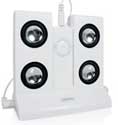
The TuneBox base unit measures roughly 4” high x 2.5” deep x 4.5” wide and has an opening between the mini twin tower speakers that is just wide enough to hold your shuffle. There’s a USB connection in the base to charge the shuffle while you listen. A 3.5mm stereo jack cable and slim AC adapter also ship with the unit. The color, of course, is white, and when looked at head on, it resembles a white horseshoe with four silver and black eyes.

Performance
The TuneBox delivers the kind of sound you’d expect from something its size. I spent the first 15 to 20 minutes with the TuneBox on the table, listening at a distance of about 4 feet. The sound was slightly muffled at this range, but turning down the volume easily compensated for this.

I also took the unit out to my back patio and cranked it as loud as the little 1” speakers could handle. At a distance of about 75 feet away the music was still clearly discernable, and within about a 25-30 foot diameter the TuneBox would be more than adequate for an outdoor party (at a slightly lower volume, of course).

As I write this, I have the TuneBox placed on the opposite side of the room and am listening at a distance of about 10 feet. I find the sound quality best at this distance.

Design
Although small and easy to use, the TuneBox does have a few drawbacks. The first drawback with the TuneBox was the weight (or lack thereof). Because the unit is so light, the user needs to rest their hand on top of one of the speakers or the iPod Shuffle to stabilize it while manipulating the shuffle controls.

Second, the portability of the TuneBox is limited by the users proximity to a 120V outlet. Providing the option for a battery backup would have added to the value and convenience of the unit, and may also add some heft to help address my first issue, above.

Finally, it would be nice if the TuneBox could double as a dock for your shuffle. You can charge your shuffle with the TuneBox, but you can’t change your shuffle song library.

Closing
Regardless of how you choose to use the TuneBox, the sound performance should meet the needs of anyone who wants a (relatively) portable solution to broadcast their iPod Shuffle playlist. Keep in mind, if your looking for something to pump out the base and shake the windows, or play your shuffle while out on your next camping trip, the TuneBox may not offer the solution you’re seeking.

With the few exceptions noted above, I felt that the Griffin TuneBox delivers excellent sound for its $39.99 value.

MyMac.com rating: 3.5 out of 5.0.


Hacking Mac OS X Tiger: Serious Hacks, Mods and Customizations
Scott Knaster

Wiley Publishing
378 pages
ISBN 0-7645-8345-X
US$ 24.99 CA$ 31.99

Scott Knaster knows what he’s talking about. Seriously. He’s been writing about programming the Mac for years, including the classic How To Write Macintosh Software. Hacking Mac OS X Tiger: Serious Hacks, Mods and Customizations is his latest effort.

Unfortunately, I found Hacking Mac OS X Tiger to be a bit schizophrenic. While full of neat tips and tricks, it also has lots of detailed Mac programming material. The book tries too hard to appeal to widely divergent groups of readers. In doing so, it will almost certainly disappoint both the regular Mac users looking for hints and tricks, as well as programmers looking to learn about hard-core Mac hacking.

The first part of the book, Tips, is a wide-ranging collection of hints and tips. Unfortunately, many are already well known, although some are a bit more obscure and titillating. After reading six or seven Tiger tips book, I’m not impressed when I get another tip of how to quit the Finder, or how to close windows in slow motion. Even so, Knaster does find some less-common gems; changing the wording on the “Unexpectedly quit” dialog box, or how to duplicate Widgets.

The further you delve into Hacking Mac OS X, the geekier the material becomes. Knaster scores bonus points for his good introduction to X11, an application that allows you to run windows-GUI Unix applications. While not comprehensive (an in-depth treatment of X11 would need a book of its own), Knaster provides enough detail for the adventurous reader to jump into the X11 pool at the shallow end. Scott leaves you with a tease of how to run X11 applications on another Mac, with only the window display running on your local machine. Some Terminal code is included to kick off this tip, but I’ll bet most users will be overwhelmed trying to get this X11 feature to work, as doing so requires a fair amount of networking and Unix savvy. Even so, the text provides plenty of references to detailed X11 documentation.

Part II, Mods, cranks the geekiness up a notch. You’ll be learning about application bundles and .plist preference files. Scott walks you through how to use Property List Editor to modify .plist files.

Oddly, the next section of Mods jumps back to user-level information about Automator. Since Apple provides Tiger users with little information about how to best use Automator, Knaster’s tips are welcome. But this would be more logically placed in the user hints and tips section earlier on the book.

After Automator, programmer material comes back to the front with a discussion of Xcode, Apple’s collection of programming tools. The material barely scratches the surface, but if you have any interest in learning what Xcode can do, this is a place to start.

Part III, Hacks, is the most complex part of the book. Users with no programming experience can skip it, as this part is all about how to actually program the various neat example hacks. Some of the examples include creating a Word Of The Day application, running a video as your Desktop (my favorite, even though I’m not a programmer), and how to write a Spotlight importer.

Pages of source code are provided, which makes this part more than a bit dull to read. It’s good that Wiley Publishing has a web site
for downloading source code examples. Unfortunately, the only spot where I found any mention of the web site URL was the bottom of the outside back cover, a less-than-conspicuous location. If Knaster mentioned the URL in the text, I never noticed it.

Conclusion

Hacking Mac OS X Tiger : Serious Hacks, Mods and Customizations, is a fine effort, but it tries to be too much for too many. While it has some good user-level tips and hints, and provides some great examples of true programming hacks, the book’s focus is diluted. Given that there are numerous titles that do a better job of presenting end-user (non-programmer) hints and tips, Knaster would do better to focus on the programmer-level material. As is, he may be boring programmer types with the pages of easy and well-known tips before getting to the hard-core hacks.

I’d recommend this book for novice to intermediate Macintosh programmers who want to see how expert Mac programmers implement neat hacks. Be aware that you’ll have to skip through the first part to get to the hack examples. Mac users who want user-level hints and tips may be better served to buy a book that doesn’t dedicate half the text to material that requires programming experience.


MyMac rating: 3 out of 5


Mac User Supporting Katrina Victims

On September 9, 2005, in Uncategorized, by Tim Robertson


Like many people, I had spent the previous few days glued to the television and news websites, watching the horror that was inflicted upon the Gulf Coast states of the United States. What struck me was just how bad this was going to end for many people. People, who had worked all their adult lives to own a home, fill it with memories, only to see everything lost in just a few moments in time. What was worst, frankly, was seeing the poor and destitute all but left to fend for themselves days after Hurricane Katrina ravaged their cities and homes.

The helplessness I felt was shared by millions of others. I knew there was little I could do outside donating the few dollars I could spare to charity and relief efforts. Somehow, it just did not feel like enough. I wanted to give more than I could afford, but how?

Inspiration came early on the morning of Friday, September 2. Why not contact a bunch of Mac related companies, ask for donations of either hardware or software, and sell them on MyMac.com with all the money going to the relief effort? It sounded simple enough, so I set about early Friday morning contacting companies, getting the website ready, doing a bunch of HTML, and asking other MyMac.com’ers to lend a hand when/if they could.

The response was more than I bargained for. One of the first companies I contacted was Bumbakpaks, a company I had never dealt with before. I did not know them; they did not know me outside an upcoming review of one of their products by our own Owen Rubin. But once contacted, like almost every company I contacted that day, they readily agreed to donate. For Bumbakpak, it was five of their $75 laptop bags, which we sold for $50 a piece, and they sold out almost immediately. (They later donated five more) MacTech Magazine also jumped in with five subscriptions. Thought Out, the iPod stand company, joined in. Then FireWire Depot. Then… the list went on and on.

MyMac.com gets a lot of traffic, a lot of people reading (or listening via our weekly podcast) our content. I was pretty confident that with our traffic, we would do quite well selling the items the companies had donated. Thankfully, those companies without actual products to sell stepped in and posted both news links to our efforts, as well as posting the Mac Users Helping Katrina Victims graphic (top of this page) that Todd Long had created for us on their website. Without their help, we could not have sold as many items as we did, nor raise the money in this time of need.

A few people emailed and asked why I was doing this. In fact, a few websites even went so far as to post opinion articles to the effect that I was simply trying to drive more traffic to our site. Or that perhaps there was some scam that the money we raised would not, in fact, go to the charities we listed. While I do have a thick skin after a decade of doing this, some of this stung me. All I had set out to do was raise money and help those helping the victims of the disaster. While it is true there are unscrupulous people who do prey upon the charity of others in times such as this, I knew our motives were pure, and all I really wanted to do was help. It really is as simple as that.

All the items we sold were done so via PayPal. I had wanted to use eBay, but after posting a half-dozen items on their site, eBay promptly canceled each one, citing that I had to use a third-party to conduct charity sales such as this. The problem was, in my mind, too much control over where the money we raised was spent, how long until they actually dispersed our funds, and asking for a credit card number. The heavy-handed way eBay deals with people was also a concern, so I decided to use PayPal, electronically transfer the money to a savings account, and split the money into two cashier checks for both the Salvation Army and the Red Cross to donate myself, in person.

We ended our auction on Friday, the 9th of September, one week after we began. When we started, I told my wife Julie that I would be pleased if we could raise as much as $500. Anything over that would be better, but not expected. So imagine my surprise when, after totaling up all the sales, we had made $2,047.87 before PayPal fees. I had publicly stated that every dollar spent would go to relief, so I personally paid for each transaction fee, and then rounded up the dollar amount to $2,050 so that we could give both our chosen charity organizations $1.025.00 which Julie and I did on Friday, September 16th.

Below is a list of every company who donated either items to sell, or sites I know that linked to our relief effort. I simply cannot thank these companies and individuals enough, and all the credit for our raising this money should go to them, not to me. Also below are thumbnail links to the documentation of our receipts for the money we gave. Clicking each will bring up a full-size scanned image as proof of where the money went. I feel it is important to publicly account for every penny we raised, which is why the receipts are listed here.

Finally, it should be said that much more needs to be done to help the people affected in this terrible disaster. Hard working people, just like you, lost everything. They still need help. I am posting a link to donate directly to the American Red Cross and the Salvation Army. Regardless of your political, religious, or other opinions or beliefs, know that these two organizations are the true first responders, and they need all the help we can give.

Contributors and thanks to:

Companies:

Bumbakpak

MacTech Magazine


Thought Out

Runtime Revolution Ltd.
MYOB US, Inc.

FireWire Depot


Motion VFX


Roxio


BeLight Software

NotePage, Inc.

Neometric Software

Inventive, Inc.

CDFinder


Apimac


LoadPod


Byrd Soft


Rogue Amoeba Software


Aquafadas Software


Zelek Software

Individuals:
David Every, who jumped in and made my HTML actually look decent.
Todd Long, who created our graphic in hours on the busiest day of his workweek.
Chris Seibold, who did much behind the scenes, as well as defending my honor when I had neither the time nor energy to do so.

Stan Flack and MacMinute.com, for generating more traffic our way and keeping our banner online.
Dennis Sellers and Macsimum News, who kept this front and center over a long holiday weekend.
Ross Clark for being so generous.

Ed Sherry for being so generous.
Sean Lee for staying in contact so much and for showing all the enthusiasm in the world for this effort.
Mike Talmadge for his great products and help.

Guy Serle, for his special Dashboard Minute, and not remembering buying something.
Norbert Doerner for his patience and enthusiasm.
Rod McCall for not only donating but also for helping to get the word out.

Paul Kafasis, for keeping on top of the MANY emails I sent his way and his professionalism and charitable heart.
Bill Palmer, for being a better man than some give credit, donating ad space to help in this effort, and being so very encouraging.
Liam Young, the man with the great ideas.

Jared Zelek, for donations and being such a good friend to us.
Neale Monks, for all the help he gave, including donating copies of his great eBook.
Dwayne McDuffie, for the offer to help. The Justice League is in the best of hands.

Neil Ticktin, for keeping me on my toes and staying on top of the email.
Beth Lock for putting us in touch with those willing to give.
Chad Perry, for agreeing to do a special podcast on his day off.

Kim Perry, for letting Chad do a special podcast on his day off.
Julie Robertson, my wife, for being so supportive, encouraging, and loving at a time when it was needed most.


Mac User Supporting Katrina Victims – Page 2

On September 8, 2005, in Uncategorized, by Tim Robertson


Like many people, I had spent the previous few days glued to the television and news websites, watching the horror that was inflicted upon the Gulf Coast states of the United States. What struck me was just how bad this was going to end for many people. People, who had worked all their adult lives to own a home, fill it with memories, only to see everything lost in just a few moments in time. What was worst, frankly, was seeing the poor and destitute all but left to fend for themselves days after Hurricane Katrina ravaged their cities and homes.

The helplessness I felt was shared by millions of others. I knew there was little I could do outside donating the few dollars I could spare to charity and relief efforts. Somehow, it just did not feel like enough. I wanted to give more than I could afford, but how?

Inspiration came early on the morning of Friday, September 2. Why not contact a bunch of Mac related companies, ask for donations of either hardware or software, and sell them on MyMac.com with all the money going to the relief effort? It sounded simple enough, so I set about early Friday morning contacting companies, getting the website ready, doing a bunch of HTML, and asking other MyMac.com’ers to lend a hand when/if they could.

The response was more than I bargained for. One of the first companies I contacted was Bumbakpaks, a company I had never dealt with before. I did not know them; they did not know me outside an upcoming review of one of their products by our own Owen Rubin. But once contacted, like almost every company I contacted that day, they readily agreed to donate. For Bumbakpak, it was five of their $75 laptop bags, which we sold for $50 a piece, and they sold out almost immediately. (They later donated five more) MacTech Magazine also jumped in with five subscriptions. Thought Out, the iPod stand company, joined in. Then FireWire Depot. Then… the list went on and on.

MyMac.com gets a lot of traffic, a lot of people reading (or listening via our weekly podcast) our content. I was pretty confident that with our traffic, we would do quite well selling the items the companies had donated. Thankfully, those companies without actual products to sell stepped in and posted both news links to our efforts, as well as posting the Mac Users Helping Katrina Victims graphic (top of this page) that Todd Long had created for us on their website. Without their help, we could not have sold as many items as we did, nor raise the money in this time of need.

A few people emailed and asked why I was doing this. In fact, a few websites even went so far as to post opinion articles to the effect that I was simply trying to drive more traffic to our site. Or that perhaps there was some scam that the money we raised would not, in fact, go to the charities we listed. While I do have a thick skin after a decade of doing this, some of this stung me. All I had set out to do was raise money and help those helping the victims of the disaster. While it is true there are unscrupulous people who do prey upon the charity of others in times such as this, I knew our motives were pure, and all I really wanted to do was help. It really is as simple as that.

All the items we sold were done so via PayPal. I had wanted to use eBay, but after posting a half-dozen items on their site, eBay promptly canceled each one, citing that I had to use a third-party to conduct charity sales such as this. The problem was, in my mind, too much control over where the money we raised was spent, how long until they actually dispersed our funds, and asking for a credit card number. The heavy-handed way eBay deals with people was also a concern, so I decided to use PayPal, electronically transfer the money to a savings account, and split the money into two cashier checks for both the Salvation Army and the Red Cross to donate myself, in person.

We ended our auction on Friday, the 9th of September, one week after we began. When we started, I told my wife Julie that I would be pleased if we could raise as much as $500. Anything over that would be better, but not expected. So imagine my surprise when, after totaling up all the sales, we had made $2,047.87 before PayPal fees. I had publicly stated that every dollar spent would go to relief, so I personally paid for each transaction fee, and then rounded up the dollar amount to $2,050 so that we could give both our chosen charity organizations $1.025.00 which Julie and I did on Friday, September 16th.

Below is a list of every company who donated either items to sell, or sites I know that linked to our relief effort. I simply cannot thank these companies and individuals enough, and all the credit for our raising this money should go to them, not to me. Also below are thumbnail links to the documentation of our receipts for the money we gave. Clicking each will bring up a full-size scanned image as proof of where the money went. I feel it is important to publicly account for every penny we raised, which is why the receipts are listed here.

Finally, it should be said that much more needs to be done to help the people affected in this terrible disaster. Hard working people, just like you, lost everything. They still need help. I am posting a link to donate directly to the American Red Cross and the Salvation Army. Regardless of your political, religious, or other opinions or beliefs, know that these two organizations are the true first responders, and they need all the help we can give.

Contributors and thanks to:

Companies:

Bumbakpak

MacTech Magazine


Thought Out

Runtime Revolution Ltd.
MYOB US, Inc.

FireWire Depot


Motion VFX


Roxio


BeLight Software

NotePage, Inc.

Neometric Software

Inventive, Inc.

CDFinder


Apimac


LoadPod


Byrd Soft


Rogue Amoeba Software


Aquafadas Software


Zelek Software

Individuals:
David Every, who jumped in and made my HTML actually look decent.
Todd Long, who created our graphic in hours on the busiest day of his workweek.
Chris Seibold, who did much behind the scenes, as well as defending my honor when I had neither the time nor energy to do so.

Stan Flack and MacMinute.com, for generating more traffic our way and keeping our banner online.
Dennis Sellers and Macsimum News, who kept this front and center over a long holiday weekend.
Ross Clark for being so generous.

Ed Sherry for being so generous.
Sean Lee for staying in contact so much and for showing all the enthusiasm in the world for this effort.
Mike Talmadge for his great products and help.

Guy Serle, for his special Dashboard Minute, and not remembering buying something.
Norbert Doerner for his patience and enthusiasm.
Rod McCall for not only donating but also for helping to get the word out.

Paul Kafasis, for keeping on top of the MANY emails I sent his way and his professionalism and charitable heart.
Bill Palmer, for being a better man than some give credit, donating ad space to help in this effort, and being so very encouraging.
Liam Young, the man with the great ideas.

Jared Zelek, for donations and being such a good friend to us.
Neale Monks, for all the help he gave, including donating copies of his great eBook.
Dwayne McDuffie, for the offer to help. The Justice League is in the best of hands.

Neil Ticktin, for keeping me on my toes and staying on top of the email.
Beth Lock for putting us in touch with those willing to give.
Chad Perry, for agreeing to do a special podcast on his day off.

Kim Perry, for letting Chad do a special podcast on his day off.
Julie Robertson, my wife, for being so supportive, encouraging, and loving at a time when it was needed most.


MyMac Podcast 43

On September 8, 2005, in Uncategorized, by MyMac PodCast


Download the MP3 from THIS link, or simply tune into our iTMS listing in the podcast directory HERE.

This week, Tim and Chad go over the latest Apple news from our friends at MacMinute.com, including the new iPod nano, iTunes Motorola Music Phone ROKR, and our impressions of both.

The Dashboard Minute Returns, this week with outtakes!

The winner of our Roxio Toast 7 contest is announced!

ElementK Journals faux Invoices strikes again. An update!

This podcast Sponsored by SmallDog.com and RamJet.com.
We love feedback! Let us know what you think at MyMacPodcast@Gmail.com


MyMac Podcast 42 Hurricane Katrina Help

On September 3, 2005, in Uncategorized, by MyMac PodCast


Like many people, I had spent the previous few days glued to the television and news websites, watching the horror that was inflicted upon the Gulf Coast states of the United States. What struck me was just how bad this was going to end for many people. People, who had worked all their adult lives to own a home, fill it with memories, only to see everything lost in just a few moments in time. What was worst, frankly, was seeing the poor and destitute all but left to fend for themselves days after Hurricane Katrina ravaged their cities and homes.

The helplessness I felt was shared by millions of others. I knew there was little I could do outside donating the few dollars I could spare to charity and relief efforts. Somehow, it just did not feel like enough. I wanted to give more than I could afford, but how?

Inspiration came early on the morning of Friday, September 2. Why not contact a bunch of Mac related companies, ask for donations of either hardware or software, and sell them on MyMac.com with all the money going to the relief effort? It sounded simple enough, so I set about early Friday morning contacting companies, getting the website ready, doing a bunch of HTML, and asking other MyMac.com’ers to lend a hand when/if they could.

The response was more than I bargained for. One of the first companies I contacted was Bumbakpaks, a company I had never dealt with before. I did not know them; they did not know me outside an upcoming review of one of their products by our own Owen Rubin. But once contacted, like almost every company I contacted that day, they readily agreed to donate. For Bumbakpak, it was five of their $75 laptop bags, which we sold for $50 a piece, and they sold out almost immediately. (They later donated five more) MacTech Magazine also jumped in with five subscriptions. Thought Out, the iPod stand company, joined in. Then FireWire Depot. Then… the list went on and on.

MyMac.com gets a lot of traffic, a lot of people reading (or listening via our weekly podcast) our content. I was pretty confident that with our traffic, we would do quite well selling the items the companies had donated. Thankfully, those companies without actual products to sell stepped in and posted both news links to our efforts, as well as posting the Mac Users Helping Katrina Victims graphic (top of this page) that Todd Long had created for us on their website. Without their help, we could not have sold as many items as we did, nor raise the money in this time of need.

A few people emailed and asked why I was doing this. In fact, a few websites even went so far as to post opinion articles to the effect that I was simply trying to drive more traffic to our site. Or that perhaps there was some scam that the money we raised would not, in fact, go to the charities we listed. While I do have a thick skin after a decade of doing this, some of this stung me. All I had set out to do was raise money and help those helping the victims of the disaster. While it is true there are unscrupulous people who do prey upon the charity of others in times such as this, I knew our motives were pure, and all I really wanted to do was help. It really is as simple as that.

All the items we sold were done so via PayPal. I had wanted to use eBay, but after posting a half-dozen items on their site, eBay promptly canceled each one, citing that I had to use a third-party to conduct charity sales such as this. The problem was, in my mind, too much control over where the money we raised was spent, how long until they actually dispersed our funds, and asking for a credit card number. The heavy-handed way eBay deals with people was also a concern, so I decided to use PayPal, electronically transfer the money to a savings account, and split the money into two cashier checks for both the Salvation Army and the Red Cross to donate myself, in person.

We ended our auction on Friday, the 9th of September, one week after we began. When we started, I told my wife Julie that I would be pleased if we could raise as much as $500. Anything over that would be better, but not expected. So imagine my surprise when, after totaling up all the sales, we had made $2,047.87 before PayPal fees. I had publicly stated that every dollar spent would go to relief, so I personally paid for each transaction fee, and then rounded up the dollar amount to $2,050 so that we could give both our chosen charity organizations $1.025.00 which Julie and I did on Friday, September 16th.

Below is a list of every company who donated either items to sell, or sites I know that linked to our relief effort. I simply cannot thank these companies and individuals enough, and all the credit for our raising this money should go to them, not to me. Also below are thumbnail links to the documentation of our receipts for the money we gave. Clicking each will bring up a full-size scanned image as proof of where the money went. I feel it is important to publicly account for every penny we raised, which is why the receipts are listed here.

Finally, it should be said that much more needs to be done to help the people affected in this terrible disaster. Hard working people, just like you, lost everything. They still need help. I am posting a link to donate directly to the American Red Cross and the Salvation Army. Regardless of your political, religious, or other opinions or beliefs, know that these two organizations are the true first responders, and they need all the help we can give.

Contributors and thanks to:

Companies:

Bumbakpak

MacTech Magazine


Thought Out

Runtime Revolution Ltd.
MYOB US, Inc.

FireWire Depot


Motion VFX


Roxio


BeLight Software

NotePage, Inc.

Neometric Software

Inventive, Inc.

CDFinder


Apimac


LoadPod


Byrd Soft


Rogue Amoeba Software


Aquafadas Software


Zelek Software

Individuals:
David Every, who jumped in and made my HTML actually look decent.
Todd Long, who created our graphic in hours on the busiest day of his workweek.
Chris Seibold, who did much behind the scenes, as well as defending my honor when I had neither the time nor energy to do so.

Stan Flack and MacMinute.com, for generating more traffic our way and keeping our banner online.
Dennis Sellers and Macsimum News, who kept this front and center over a long holiday weekend.
Ross Clark for being so generous.

Ed Sherry for being so generous.
Sean Lee for staying in contact so much and for showing all the enthusiasm in the world for this effort.
Mike Talmadge for his great products and help.

Guy Serle, for his special Dashboard Minute, and not remembering buying something.
Norbert Doerner for his patience and enthusiasm.
Rod McCall for not only donating but also for helping to get the word out.

Paul Kafasis, for keeping on top of the MANY emails I sent his way and his professionalism and charitable heart.
Bill Palmer, for being a better man than some give credit, donating ad space to help in this effort, and being so very encouraging.
Liam Young, the man with the great ideas.

Jared Zelek, for donations and being such a good friend to us.
Neale Monks, for all the help he gave, including donating copies of his great eBook.
Dwayne McDuffie, for the offer to help. The Justice League is in the best of hands.

Neil Ticktin, for keeping me on my toes and staying on top of the email.
Beth Lock for putting us in touch with those willing to give.
Chad Perry, for agreeing to do a special podcast on his day off.

Kim Perry, for letting Chad do a special podcast on his day off.
Julie Robertson, my wife, for being so supportive, encouraging, and loving at a time when it was needed most.


Looking for something?

Use the form below to search the site:

Still not finding what you're looking for? Drop a comment on a post or contact us so we can take care of it!